© 2010 Viking Preferred Service
20
Diagnostics
Service Diagnostics and Testing
1. Run all Tests
This test will cycle the entire upper and lower (double oven model) elements, fans, lights, door interlock
switches, and door lock motors. It will also test all the individual touch pads on the control panel. The
result of this test will allow you to check the entire oven, including all the components, display elements,
and keyboard test. With the unit in diagnostic mode (see accessing the diagnostic section, page 18), the
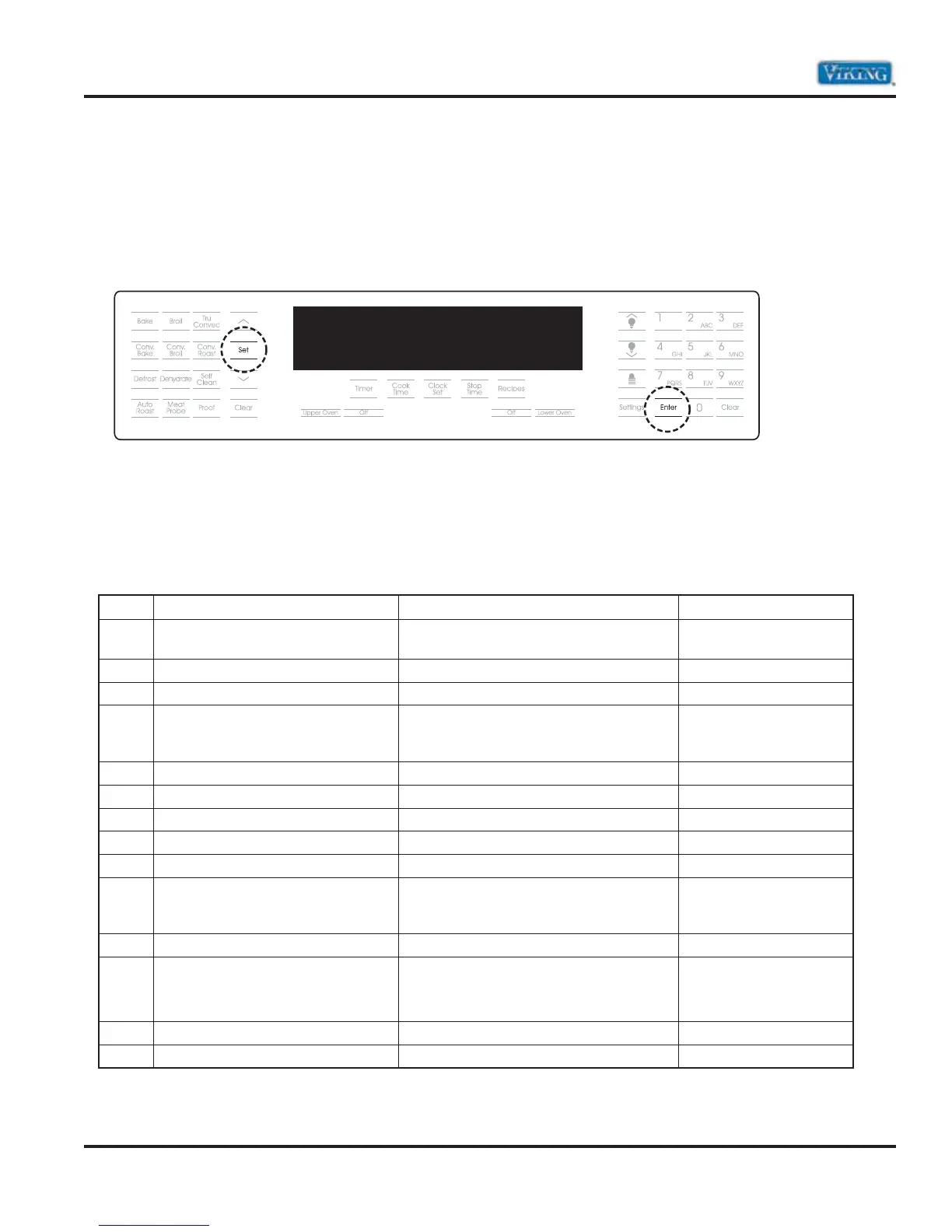
first screen you will see will be the one shown below:
Once at the RUN ALL TESTS screen, press the “SET” or “ENTER” pad to run this test. Once the test has
begun, use the “ENTER” pad, “UP ARROW” or “DOWN ARROW” pad to cycle through the tests. To end
the test, select the “CLEAR” pad.
Note: Have an amp meter connected the power to check if the elements are working.
Step Test Result To Change Test
1 Product Information Display will show model, serial, and
version number of the software
Enter, Up or Down arrow
2 Display all dots and segments All digits in the display will light up Enter, Up or Down arrow
3 Clear Screen All digits in the display will extinguish Enter, Up or Down arrow
4 Upper Inner Bake Element SKIP THIS TEST
(No amperage should be read on Step 4.
Not used on DSOE and DDOE models)
Enter, Up or Down arrow
5 Upper Outer Bake Element Run bake element*** Enter, Up or Down arrow
6 Upper Inner Broil Element Run inner broil element Enter, Up or Down arrow
7 Upper Outer Broil Element Run outer broil element Enter, Up or Down arrow
8 Upper Convection Element Run convection element Enter, Up or Down arrow
9 Upper Oven Temperature Display upper oven temp Enter, Up or Down arrow
10 Upper Meat Probe Displays meat probe temp with probe
inserted in socket (default is 0°F with no
probe inserted)
Enter, Up or Down arrow
11 Upper Cooling Fan – High speed Run cooling fan at high speed Enter, Up or Down arrow
12 Upper Cooling Fan – Low speed Run cooling fan at low speed*
* Oven uses a single speed motor (same
RPM’s as high speed)
Enter, Up or Down arrow
13 Upper Convection Fan – High speed Run convection fan at high speed Enter, Up or Down arrow
14 Upper Convection Fan – Low speed Run convection fan at low speed Enter, Up or Down arrow
***If no amperage is read, check STEP 4 (Inner Bake Element). If amperage is read, the plug on the relay
board is reversed.
TFUUJOHT
SVOBMMUFTUT



 To Next Page