© 2009 Viking Preferred Service
30
Diagnostics
Special Features (continued)
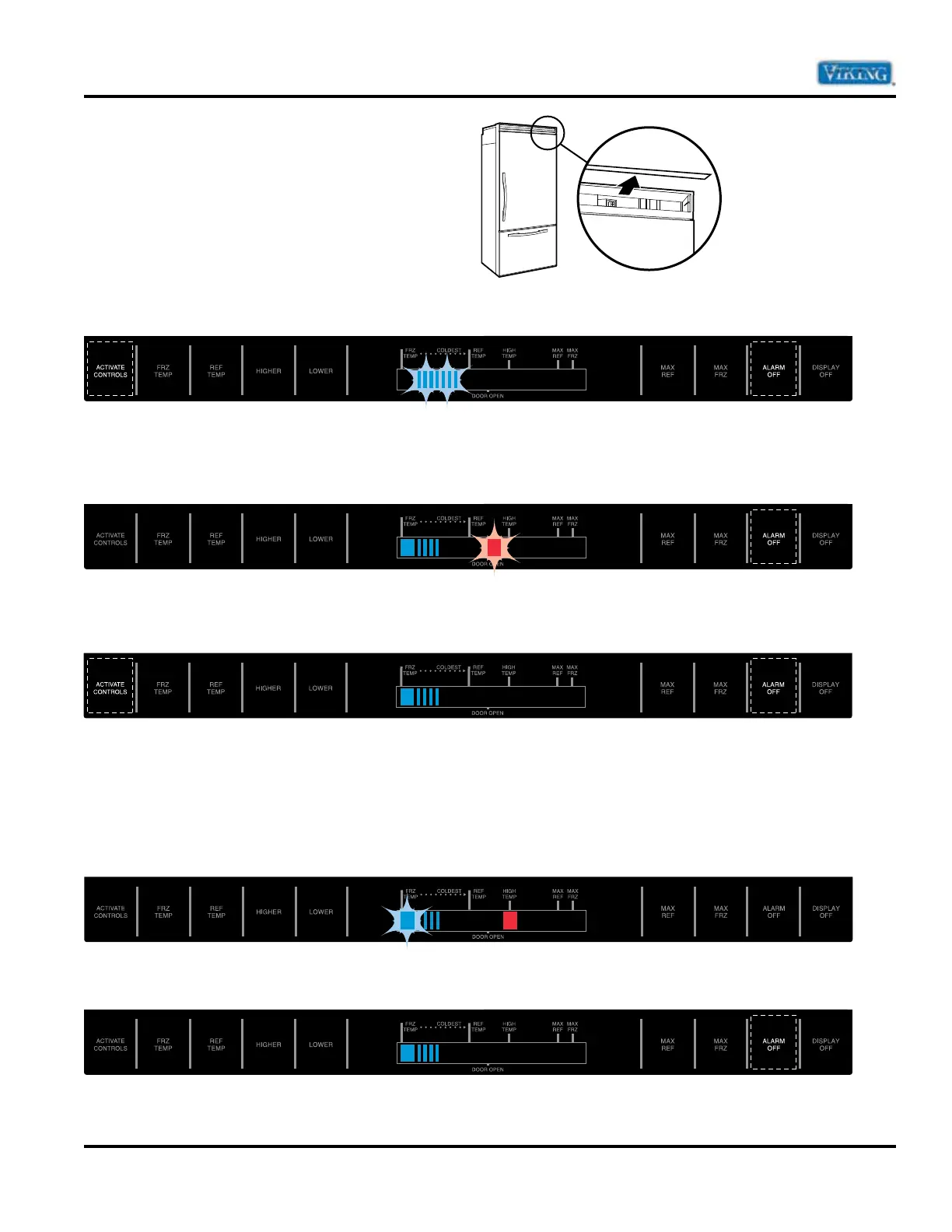
Power Disconnect Switch
Use power disconnect switch to disconnect power
without unplugging unit. Switch is located behind
air grille in top right corner.
Power Up Alarm
After Power is initially plugged in, after a power loss, or if power disconnect switch is turned “OFF”, all
temperature indicator lights will flash until “ALARM OFF” or “ACTIVATE CONTROLS” is pressed.
Door Open Alarm
Alarm tone sounds and indicator lights blink if door is open for more than 3 minutes. To turn off Door Open
Alarm, press “ALARM OFF” pad or close door.
To deactivate Door Open Alarm by pressing “ACTIVATE CONTROLS” pad and then press and hold “ALARM
OFF” pad for three seconds.
Door alarm delay can be adjusted in Program Mode B.
High Temperature Alarm
When the controller detects critical temperature in the unit for a duration of 2 hours, an alarm will sound.
A high temperature indicator light and a flashing freezer or refrigerator indicator light will accompany the
audible alarm. Alarm tone stops if temperature falls again.
Press “ALARM OFF” pad to turn alarm off.
21


 To Next Page