System Check
A Speed System Check
TM
control kit containing a control test cell and
a control chip is provided with the unit for this purpose. The control
chip is not a calibration chip, therefore it should not be saved in the
reader.
o System Check notifications
It is advisable to make a System Check before the first use of the device and
then once a month (default setting). To customize the periodicity of the
reminder, press the "System Check" button on the main screen and then on
"Notifications", select the desired periodicity and save by pressing "Save".
When a System Check needs to be done, a window appears and prompts the
user to take the System Check test. However, if the user defers the test, a
notification appears on the main screen and remains displayed until the
System Check is performed.
When not in use, store the two control items in their bag, away from light
and with a desiccant pack, and only take them out for the regular control
operation. A validity date is written on the pack. Be sure to always use a
valid control kit.
o Checking the reader
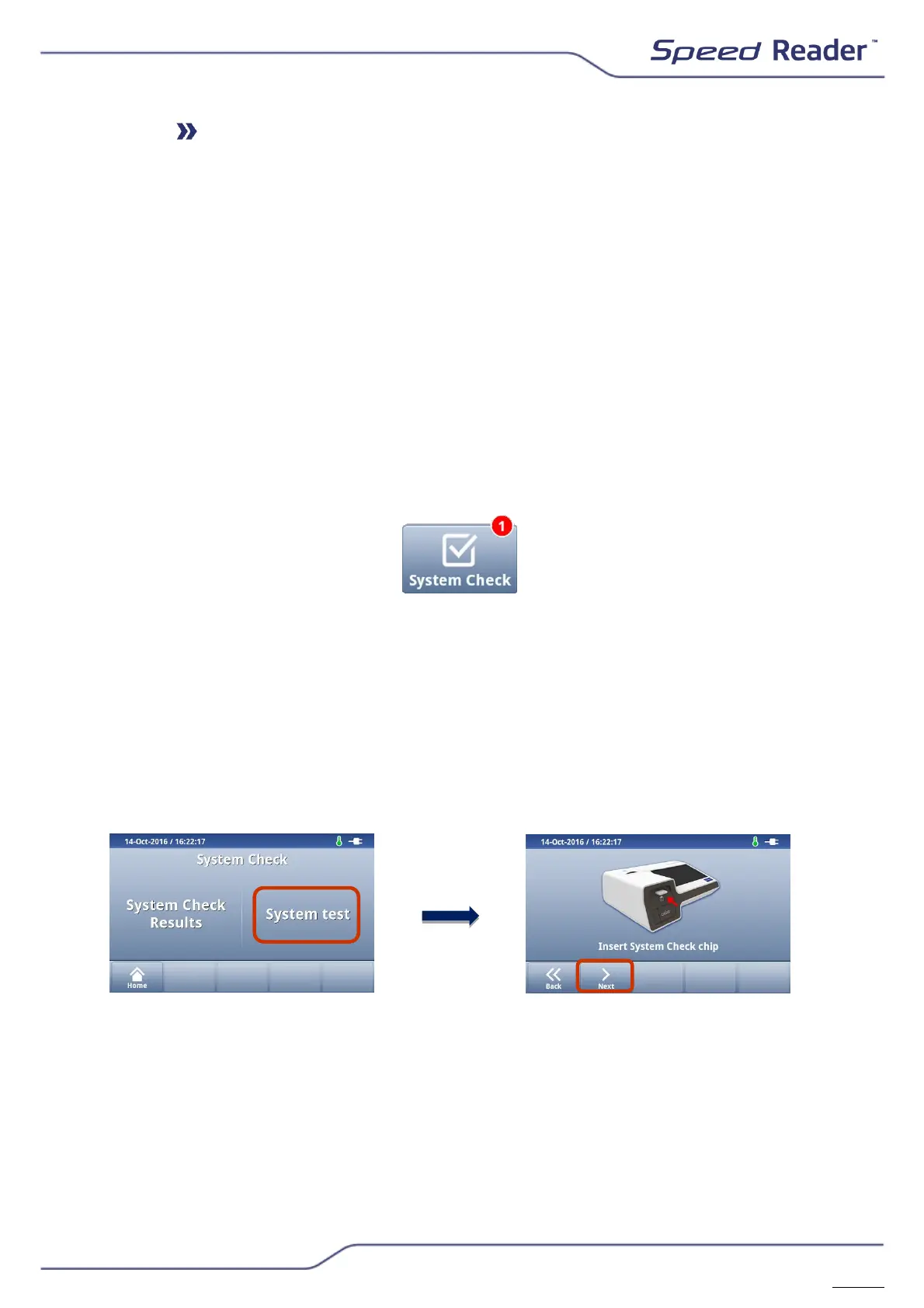
In the main menu, press “System Check”.
o To perform a System Check, select “System test”. Then insert the
check chip supplied with the reader in the chip reader located on the
front of the unit and press “Next”.
o Insert the check tape supplied with the reader as far as it will go and
press “Start”.
o After the check has been completed, “System OK!” appears on the
screen.


 To Next Page