Before the first use
Installing the reader
o Place the reader on a clean, flat surface that is free from moisture
o Connect the two cables that constitute the power cord
o Connect the power cord to the rear of the reader at the level of the
power supply socket and to a 100-240V earthed power supply.
The Speed Reader
TM
analyser can be used with
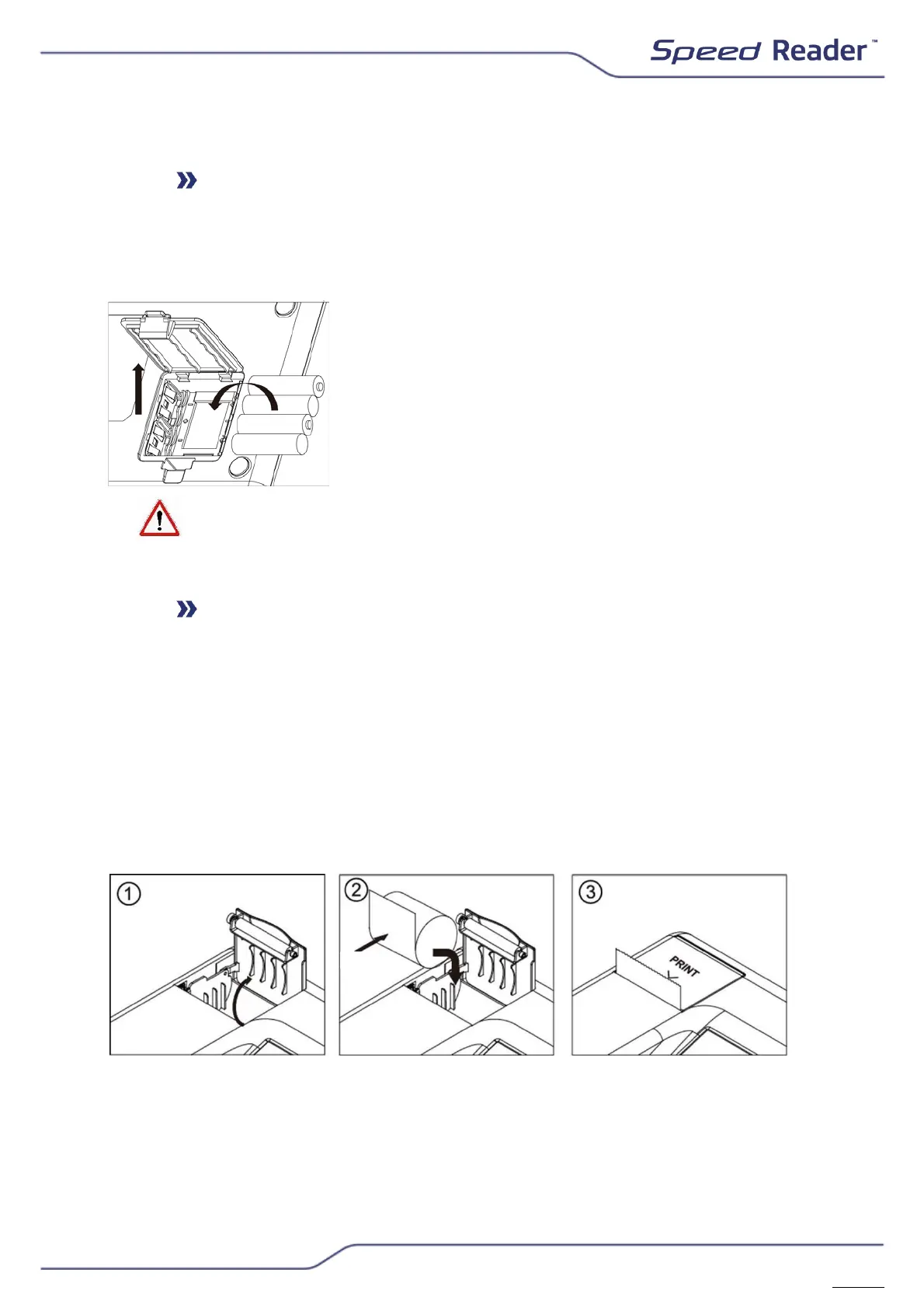
batteries. This feature enables the device not to
turn off in case of a power failure (power is limited
to 30 minutes or about 3 tests).
Only use non-rechargeable type AA/LR6 batteries. Never use Ni-Mh
rechargeable batteries or batteries of other types.
Loading the thermal printer
To change the paper roll, lift the printer cover, remove the old roll and
replace it with the new one. Close the cover. Ensure that the printing can be
performed properly by rolling out the beginning of the paper outside the
printer.
This printer only works with thermal paper.
The size of the thermal paper roll is:
57 mm x 40 mm x 12 mm
(Paper width X Maximum external diameter of the roll X Internal diameter of the coil)
Each time the Speed Reader
TM
analyser is booted, the printer rolls out a thin
band in order to verify the presence of paper


 To Next Page