102
Viscount Concerto III - Operating Manual
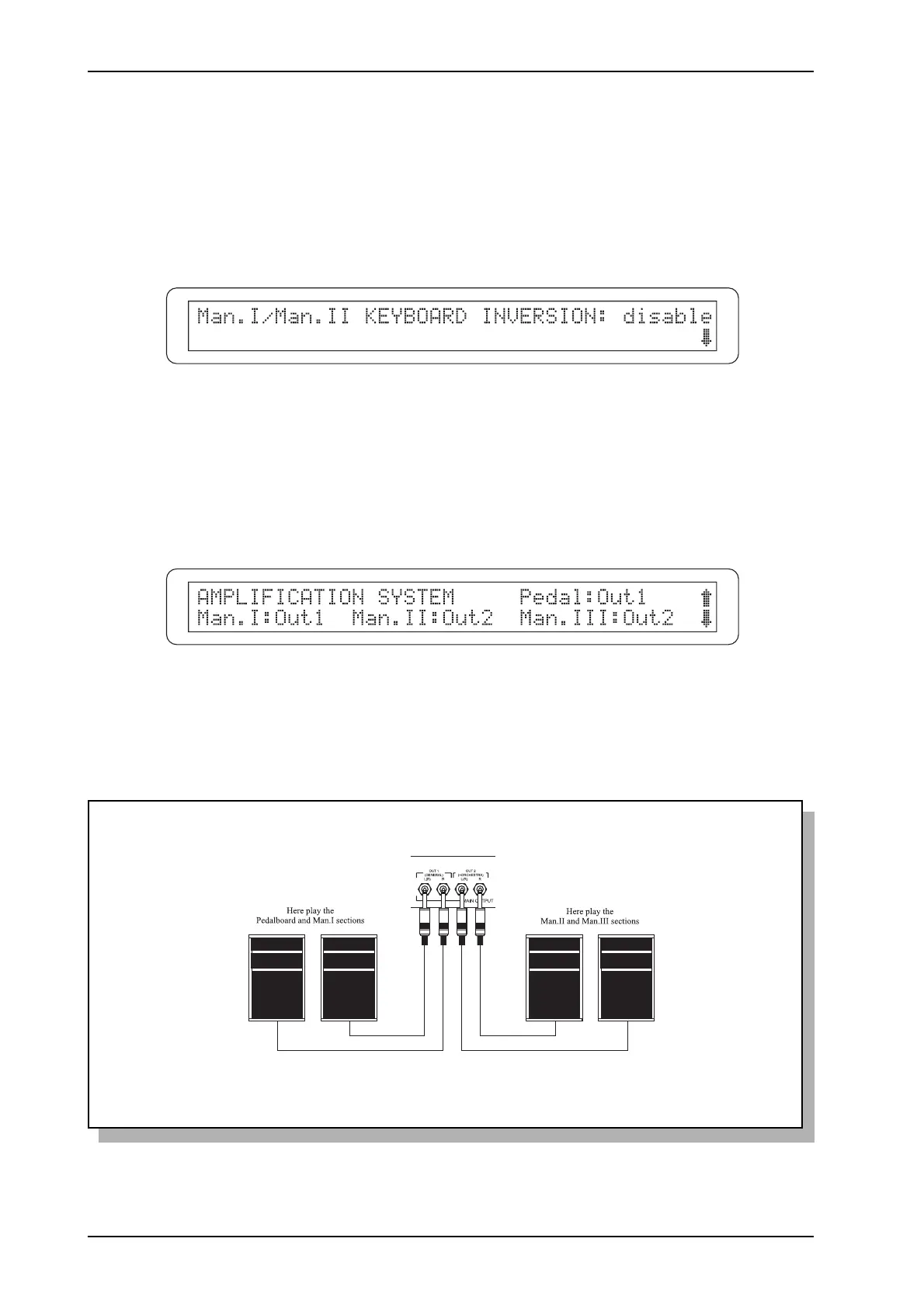
EXAMPLE OF AN AMPLIFICATION SYSTEM SETUP
This is how the audio channels would be subdivided with the setting shown in the video page
illustrated above.
6.4 MANUAL SETUP
Selecting the KEYBOARD SETTINGS option in the MIDI&UTILITY menu gives access to all
the settings relating to the manuals, including the reversal of manuals I and II, regulation of the
audio output channels and the note dynamic settings.
The first video page displayed relates to the KEYBOARD INVERSION function:
allowing the positions of Man.I and Man.II to be reversed. Select enable to activate the function or
disable to deactivate it. The status of this setting will also be displayed by the [I/II KEYB. INV.]
LED on the right of the display (when the LED is on, the function is active).
Now press [EXIT/NO] to return to the MIDI&UTILITY menu or [CURSOR (PG) DOWN] to
display the AMPLIFICATION SYSTEM function:
on which one of the outputs [OUT1] and [OUT2] on the rear panel can be assigned to each manual
and pedal board. You can use these settings to distribute the organ’s sections over two different
amplification/diffusion systems to best effect.












 To Next Page