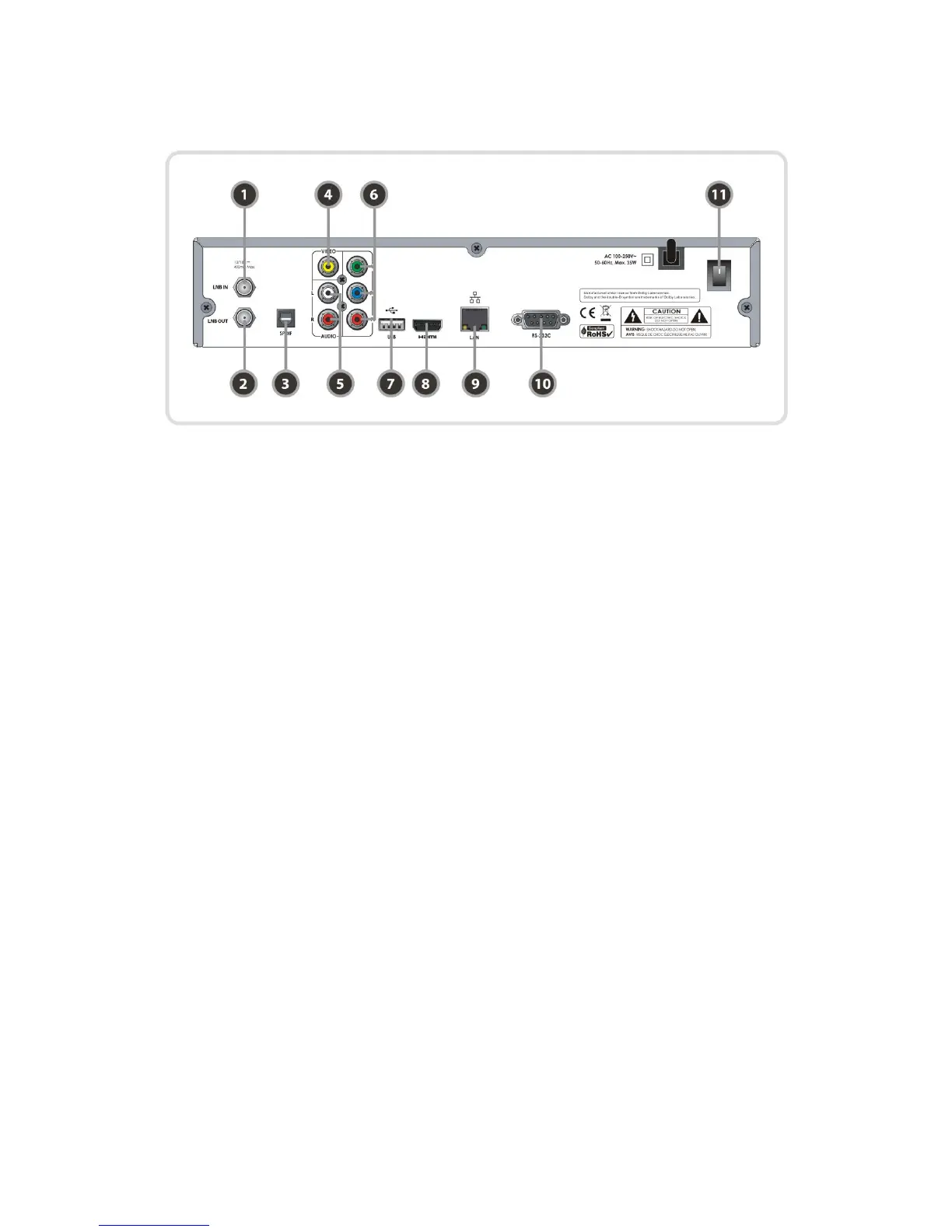
3. Rear Panel Configuration
1. LNB IN
Connects a satellite antenna LNB cable.
2. LNB OUT
Connects to another STB for loop-through.
3. SPDIF : Connects to the audio system using a S/PDIF cable. (digital audio)
4. VIDEO : Connects to the TV or VCR using a RCA cable. (Composite video output / Yellow)
5. AUDIO L/R : Connects to the TV or VCR using a RCA cable. (Stereo audio output / White, Red)
6. Component : Connects to the TV or VCR using a component cable. ( YPbPr)
7. USB : Use it when connecting to external USB storage device.
8. HDMI : Connects to the TV by using a HDMI cable for the best quality picture and audio.
9. Ethernet : Local area network port for direct computer connection.
10. RS-232C : Serial port for firmware update and data transfer.
11. A/C Switch : Power switch
11


 To Next Page