14
Check the Wand Batteries
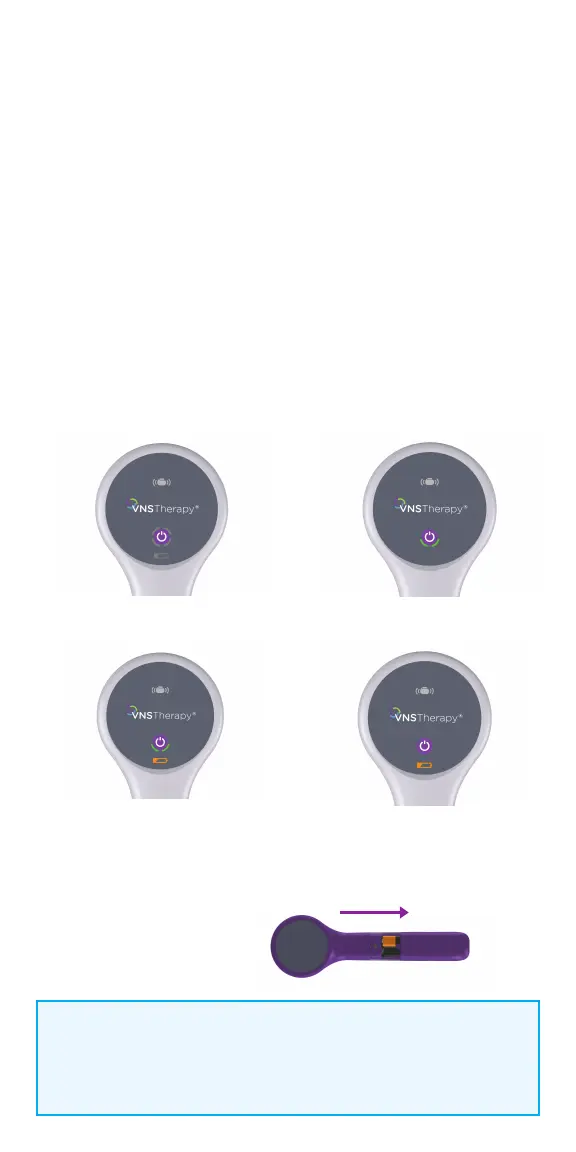
1. To turn wand ON: Press and release the POWER button
• If the battery is OK, green arcs around the power button will light up to
indicate that the wand has power
- Two green arcs indicate that the wand is available for connection
with the programmer
- Four green arcs indicate that the wand is connected to the
programmer
• If the battery is low, the Low Battery Indicator will light up.
If this happens, replace the batteries before using the device
• If only the Low Battery Indicator lights up (no green arcs),
no communication will be possible until you replace the batteries
2. To replace batteries: If batteries are low, remove the battery compartment
cover on the back of the wand and replace the batteries with two new AA
lithium ion or alkaline batteries
Turn Wand Power On
Low Battery Indicator
Wand Battery
Replacement
Battery OK Indicator
Low Battery Power/
No Communication
NOTE:
When illuminated, the flashing white icon at the top of the screen
indicates that there is communication with the generator.
Push and slide to open battery compartment



 To Next Page