17
Connect the Wand to the Programmer
The programmer and the wand can be connected wirelessly or with a backup
USB cable.
WIRELESS CONNECTION
To set up wireless connection:
1. Turn on the programmer
2. Turn on the wand. Look for two green lights on the wand, indicating that
power is on and the wand is ready to connect
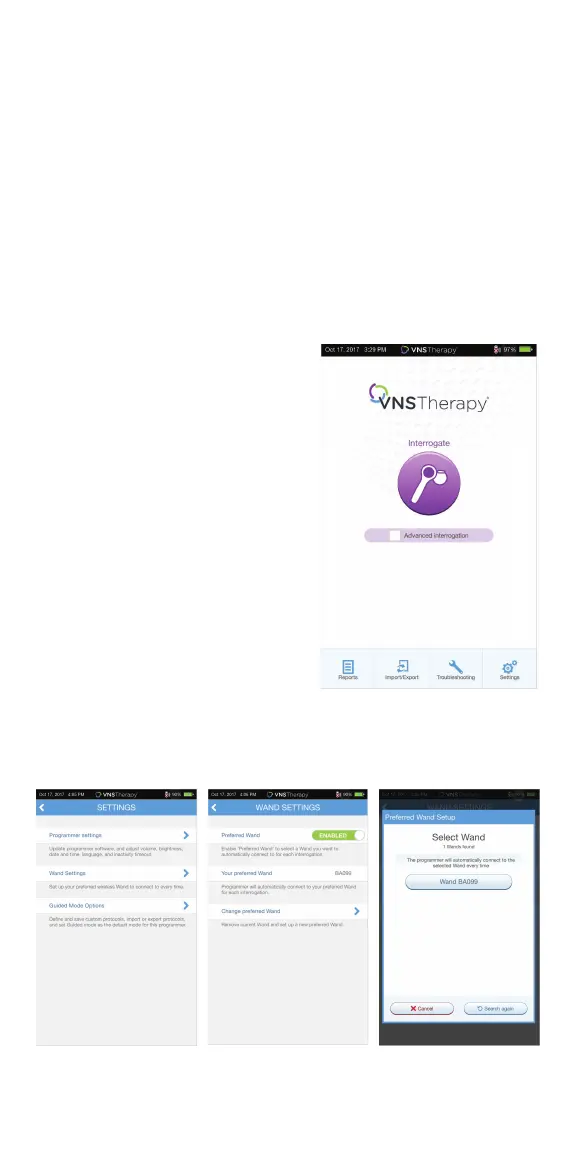
3. From the Main Screen on the programmer, tap on SETTINGS in the
Navigation Bar at the bottom of the screen
4. From the Settings Screen on the programmer, tap on WAND SETTINGS >
PREFERRED WAND
5. Tap on the preferred wand serial
number (found on the back of the
wand) to enable the preferred wand or
to change wands
6. Tap on BACK (upper left) to return to
the Main Screen
7. Look for two green arcs on the wand to
indicate the wand is available for
connection with the programmer. Once
availablity is established, four green arcs
on the wand to indicate that the
programmer and the wand are
connected. The green lights will stay on
for 10 minutes when the programmer
and wand are connected. When they are
not connected, the green lights will go
o after 2 minutes
Main Screen



 To Next Page