52
Turn Tachycardia Detection ON
Tachycardia Detection can be turned on from the Edit Parameters screen.
To turn Tachycardia Detection ON:
1. From the Summary Screen, tap on the EDIT PARAMETERS button,
OR tap on the PARAMETERS button in the Navigation Bar at the bottom
of the screen
2. On the Parameters Screen, select the Detection Tab and then tap on
ENABLE NOW to turn on Tachycardia Detection
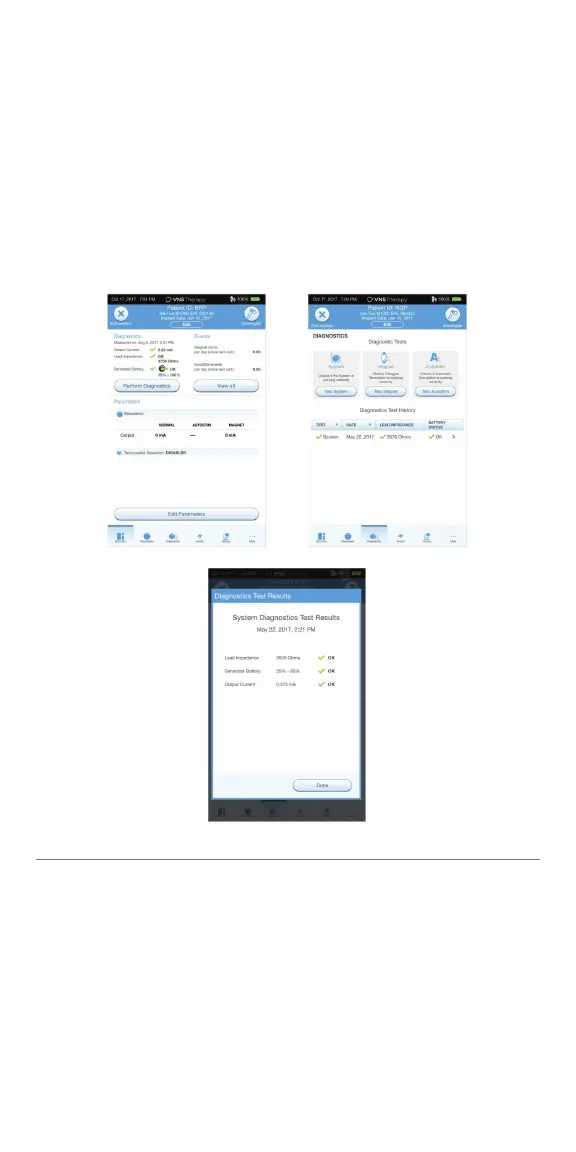
Perform System Diagnostic #1
System Diagnostic #1 tests the continuity of the lead and confi rms delivery of
the programmed output current to the vagus nerve.
To perform System Diagnostic #1:
1. From the Summary Screen, tap on the PERFORM DIAGNOSTICS button,
OR tap on the DIAGNOSTICS button in the Navigation Bar
2. On the Diagnostics screen, tap TEST SYSTEM to start the test and confi rm
that the system is working correctly
3. Review the Diagnostics Test results and tap DONE



 To Next Page