53
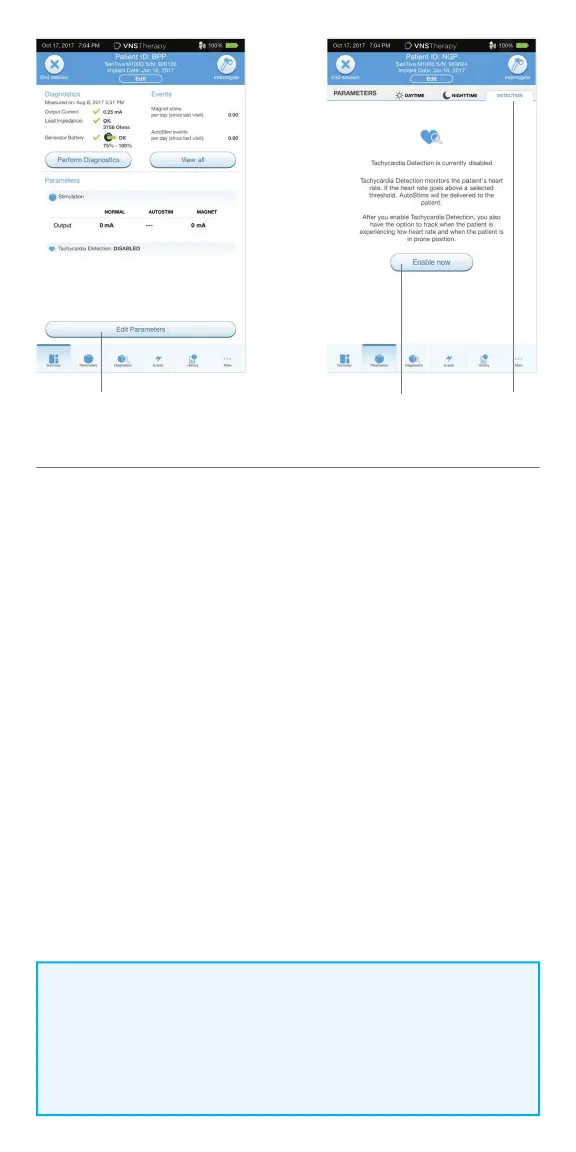
Verify Tachycardia Detection Setting
To verify the Tachycardia Detection setting:
1. From the Summary Screen, tap on the EDIT PARAMETERS button,
OR tap on the PARAMETERS button in the Navigation Bar at the bottom of
the screen
2. On the Edit Parameters screen, select the Detection Tab and confi rm that
Tachycardia Detection is enabled. Verify the Heartbeat Detection Setting by
tapping the VERIFY button. If Detection has not been enabled, click on the
ENABLE NOW button to enable Detection
3. On the Tachycardia Detection Setup screen, select a Heartbeat Detection
Setting between 1 and 5. Small ECG signals need high amplifi cation
(e.g. setting 5), while large ECG signals do not (e.g., setting 1)
4. Keep the wand over the generator and press START on the programmer
screen to begin the test. Wait at least 10 seconds for the reading to stabilize
5. Compare the heart rate measured by the system in beats per minute (BPM)
to the actual heart rate of the patient, and adjust the Heartbeat Detection
Setting until the system displays an accurate heart rate
6. Review changes, and then tap NEXT
NOTE:
Tachycardia Detection Setup (Step#3) is performed in the Operating
Room during initial setup. This will only be required to be performed in
the o ce if this step was not completed in the Operating Room or if an
adjustment is required post implantation.
Edit Parameters Detection TabEnable Now



 To Next Page