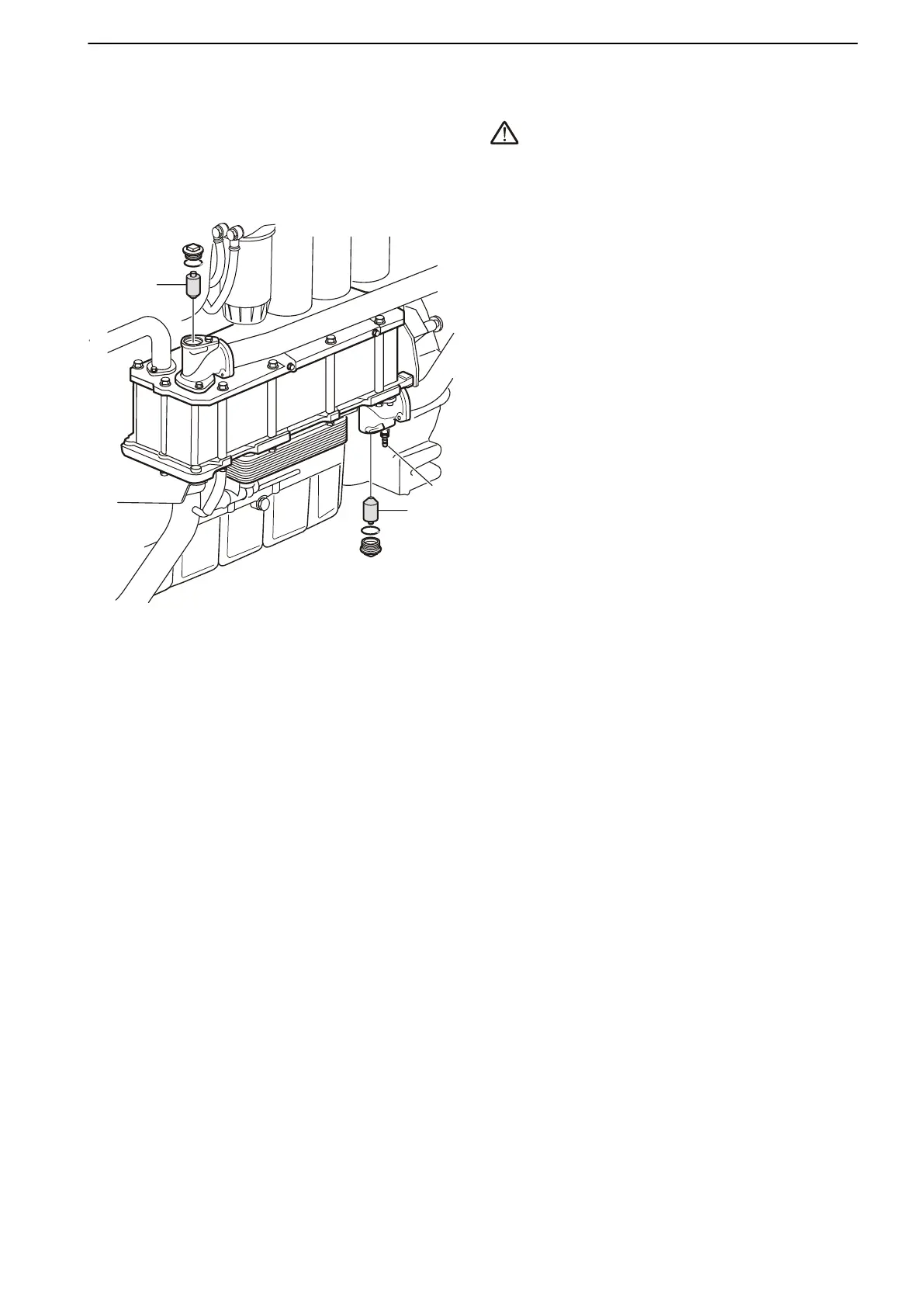
Zinc Anodes, Check and Change
WARNING!
Risk of water entry. Close the seawater cocks before
doing any work on the seawater system.
1 Close the seawater tap.
2
Open the heat exchanger drain tap (1) and drain off
the seawater.
3 Remove the zinc anodes (Z) (2 pcs.) from the heat
exchanger.
Check that the O-ring is in good condition, other-
wise change it.
4 Check the zinc anodes and change them if they
have been consumed below 1/3 of their original
size. If not, clean the zinc anodes with emery cloth
to remove the oxide layer before re-installing them.
IMPORTANT!
Use emery paper. Do not use a wire brush or
other steel tools when cleaning, as these may
damage the galvanic protection.
5 Install the zinc anodes. When installing, make sure
there is good metallic contact between the anode
and the casting.
6 Close the drain tap (1 ).
7 Open the sea cock before starting the engine.
8 Check that there are no leaks.
Maintenance
47705796 05-2014 © AB VOLVO PENTA 99





 To Next Page