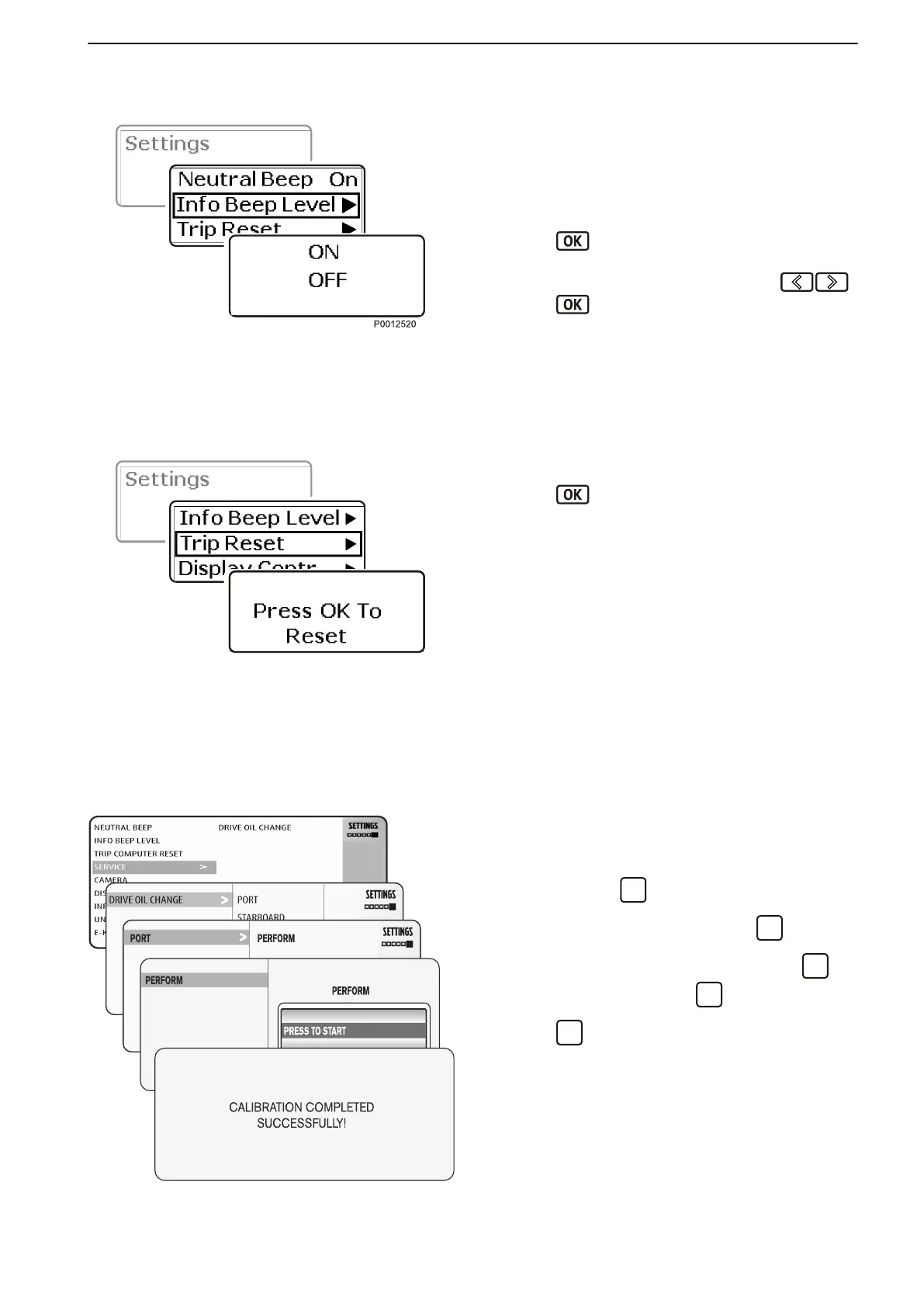
Information Beep
InfoBeep is an audible signal that sounds when there
is a message from the system.
1 Navigate to
Information Beep in the settings
menu.
2
Press
to switch the audible signal on or off.
If there is a tachometer (accessory) installed, the
volume can be adjusted with the aid of .
Press
to confirm the selection. The setting is
confirmed by an audible signal at the set level.
The screen will return automatically to the settings
menu.
Trip Reset
1
Navigate to Trip Reset
in the settings menu.
2
Press
twice to zero the trip information.
Service
IMPORTANT!
Every time oil is changed in the drive, the water-in-oil
sensor must be calibrated.
1 Start the engine and let it run at a speed below
1,000 rpm.
2
From the settings menu, go to EVC and navigate to
Service. Press
to open the settings menu.
3
Select Drive oil change and press
.
4
Select the drive for calibration and press .
Select Perform and press
.
5
Press
to confirm the selection and begin cali-
bration.
The message Calibration completed successfully
will be displayed to confirm that calibration is in prog-
ress.
Repeat the calibration procedure for each drive.
Restart the system to confirm calibration.
Information Beep
Trip Reset
Calibration and Settings
47705796 05-2014 © AB VOLVO PENTA 121





 To Next Page