Depth Alarm
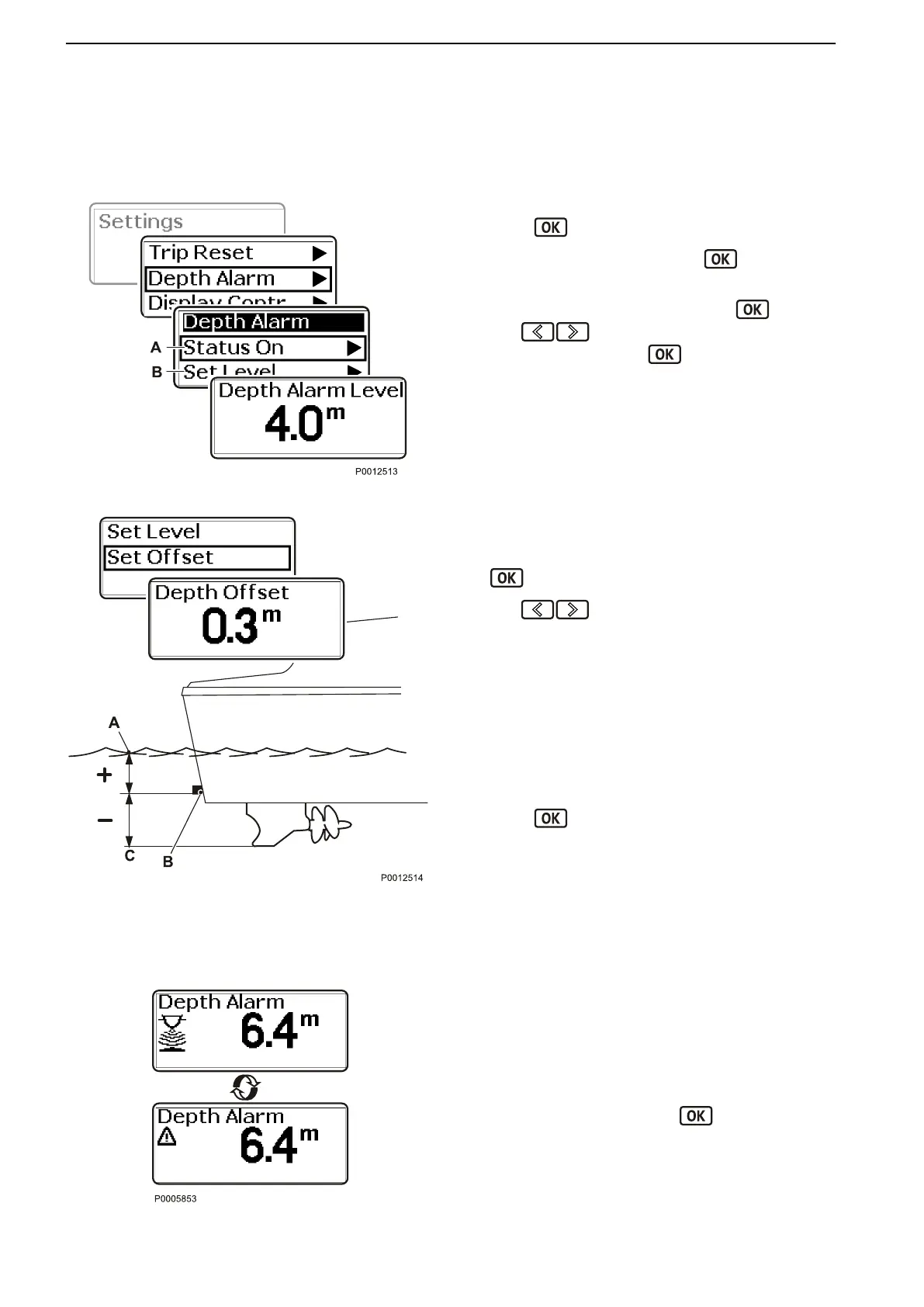
Setting the level for the depth alarm on Volvo Penta
echo sounders.
The setting need only be made at one helm station.
1
Navigate to Depth Alarm in the settings menu.
Press
to proceed to the submenu.
2
Depth Alarm Off/On (A). Press to switch the
alarm on or off.
3
Proceed to Set Level (B) and press .
Use
to set the limit where the alarm must
begin sounding. Press to confirm the setting.
The depth alarm is dependent on depth compen-
sation; refer to the next section.
Set Offset
1 Go
from
the settings menu to Set Offset and press
to reach the setting.
2
Use to set the depth compensation value
so that it corresponds to the boat's lowest point or
the waterline. The echo-sounder can be placed
anywhere between these two points.
Set the echo-sounder/waterline or echo-sounder/
lowest point distance to the depth to be displayed.
The distance between the echo-sounder (B) and
the water line (A) has a positive (+) value.
The distance between the echo-sounder (B) and
the boat's
lowest point (C) has a negative (–) num-
ber.
Press
to confirm the setting.
Depth Alarm
When the depth is less than the alarm setting a mes-
sage will be shown on the display, followed by an audi-
ble signal.
The message will be displayed every 30 seconds until
the depth exceeds the alarm level.
Confirm the alarm by pressing .
Depth Alarm Level
Set Offset
A Waterline
B
Echo-sounder
C
Lowest point
Depth Alarm
Calibration and Settings
122 47705796 05-2014 © AB VOLVO PENTA





 To Next Page