CAUTION!
The boat
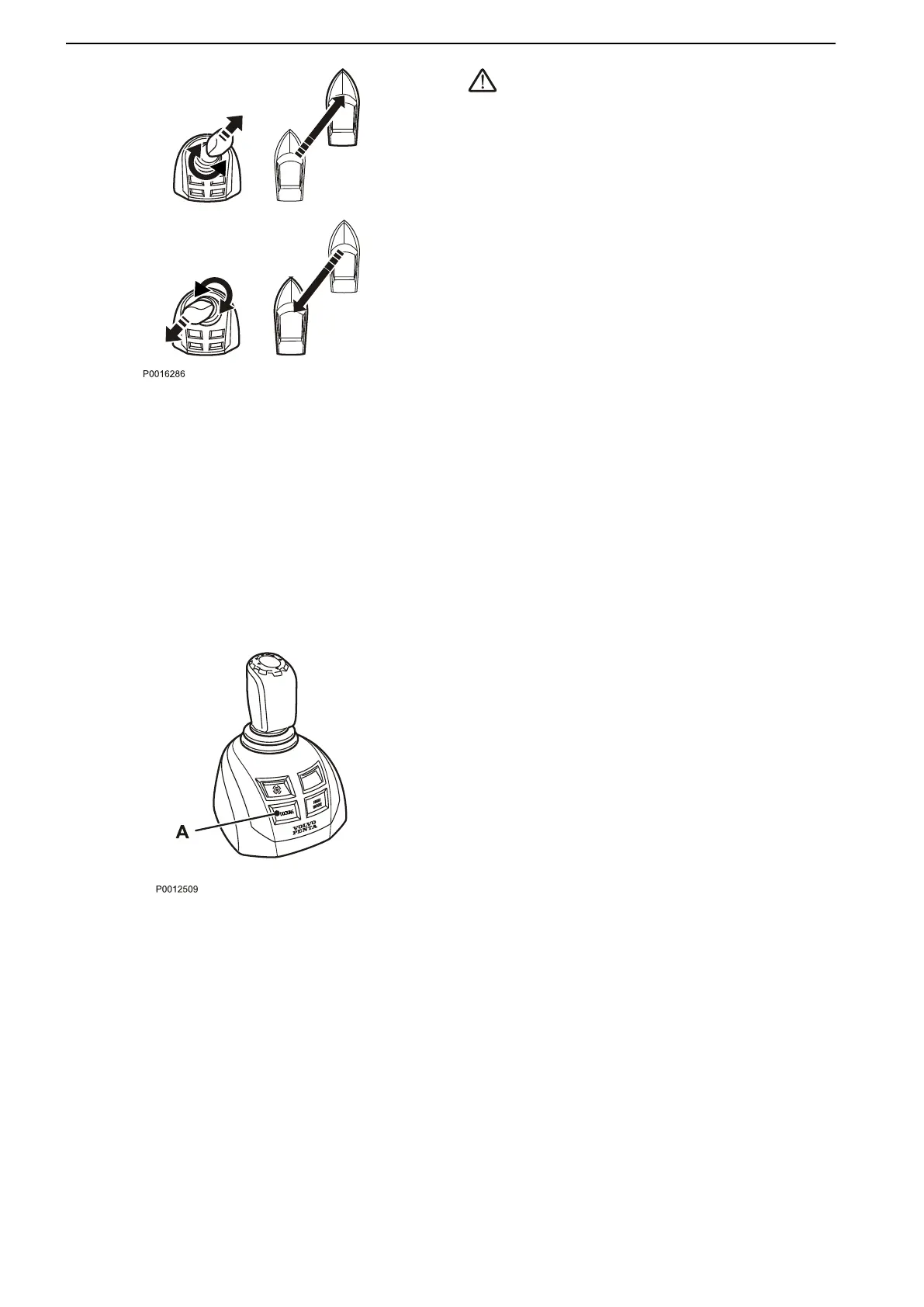
will continue to move in the selected direction
even when the joystick has been released.
To slow the boat or reverse its direction, move the joy-
stick in the opposite direction. In order to achieve a
diagonal movement, move the joystick diagonally and
use the joystick knob to adjust the boat’s direction
accordingly.
When the docking function is activated, engine revo-
lutions are limited and the boat can only be steered by
the joystick.
In order to activate the docking function, the following
must be fulfilled:
•
engines running
•
control levers in neutral
•
helm station active
•
joystick in center position
Activating the docking function
Activate docking mode by depressing the docking but-
ton (A) on the joystick.
An audible signal will confirm that docking mode is
activated and the docking button lamp will light up.
Exiting the docking function
To exit the function, press the joystick docking button
(A). An audible signal will sound twice to confirm that
docking mode is deactivated, and the docking light will
go out.
The docking function is also deactivated if the controls
are moved from the neutral position.
Optional
40 47705796 05-2014 © AB VOLVO PENTA





 To Next Page