24
25
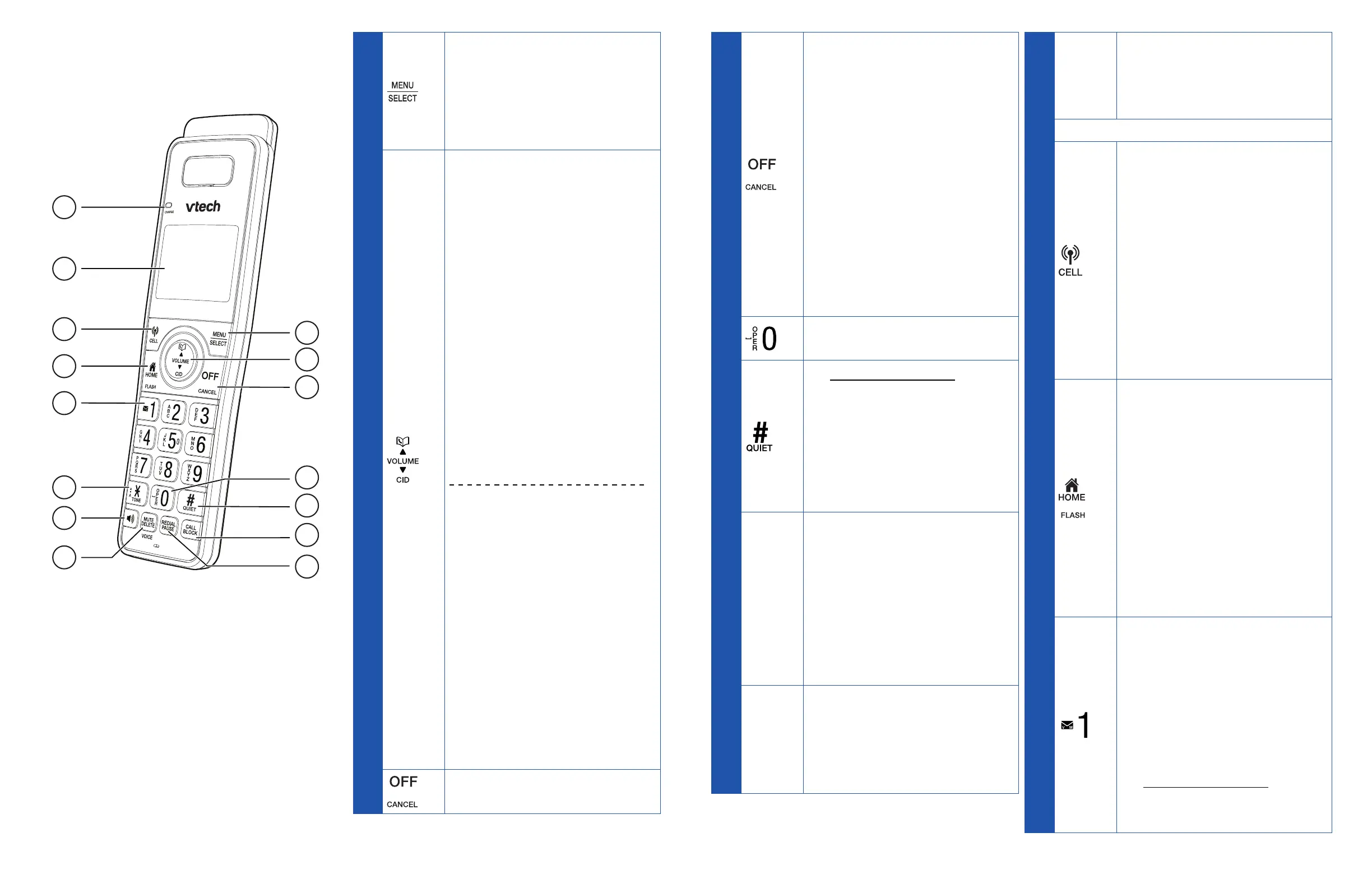
Overview
Handset
1
2
3
5
6
7
4
14
15
13
11
10
9
8
12
1
• Press to display the
menu.
• Once in the menu, press
to select an item or save
an entry or setting.
2
• Press to show
phonebook entries
when the telephone is
not in use.
• Press to scroll up while
in a menu.
• Press to increase the
listening volume when
on a call, or increase
the message playback
volume.
• While entering names
or numbers, press to
move the cursor to the
right.
• Press to review the
caller ID log when the
telephone is not in use.
• Press to scroll down
while in a menu.
• Press to decrease the
listening volume when
on a call, or decrease
the message playback
volume.
• While entering names or
numbers, press to move
the cursor to the left.
3
• Hang up a call.
3
• Hang up a call.
• Return to the previous
menu or idle mode
without making
changes.
• Delete digits while
predialing.
• Silence the handset
ringer temporarily while
the phone is ringing.
• Erase the missed call
indicator while the
handset is not in use.
4
• Enter space character
during text editing.
5
• Press and hold to set
and turn on the QUIET
mode, or turn it off.
• When reviewing a
caller ID log entry, press
repeatedly to view other
dialing options.
6
CALL
BLOCK
• Press to block the
incoming call when the
telephone is ringing.
• When on a call, press to
block the call.
• When the handset is not
in use, press to show the
call block menu.
7
REDIAL/
PAUSE
• Review the redial list.
• Insert a dialing pause
while dialing or entering
numbers into the
phonebook.
8
CHARGE
• On when the handset
is charging in the
telephone base or
handset charger.
9 LCD display
10
• Press to make or answer
a cell call.
• During a cell call, press
to answer an incoming
cell call when you hear a
call waiting alert.
• During message
playback, press to
call back the caller if
the caller’s number is
available.
11
• Make or answer a home
call.
• Answer an incoming
home call when you
receive a call waiting
alert.
• During message
playback, press to
call back the caller if
the caller’s number is
available.
12
• While reviewing a caller
ID log entry, press
repeatedly to add or
remove 1 in front of
the telephone number
before dialing or saving
it in the phonebook.
• Press and hold to set
or dial your voicemail
number.



 To Next Page