TEBS E
9
Start-up
171
If the calibration was unsuccessful, make sure that the height sensor is in-
stalled properly. Change the lever length if necessary. Then repeat the cali-
bration.
9.5 Documentation
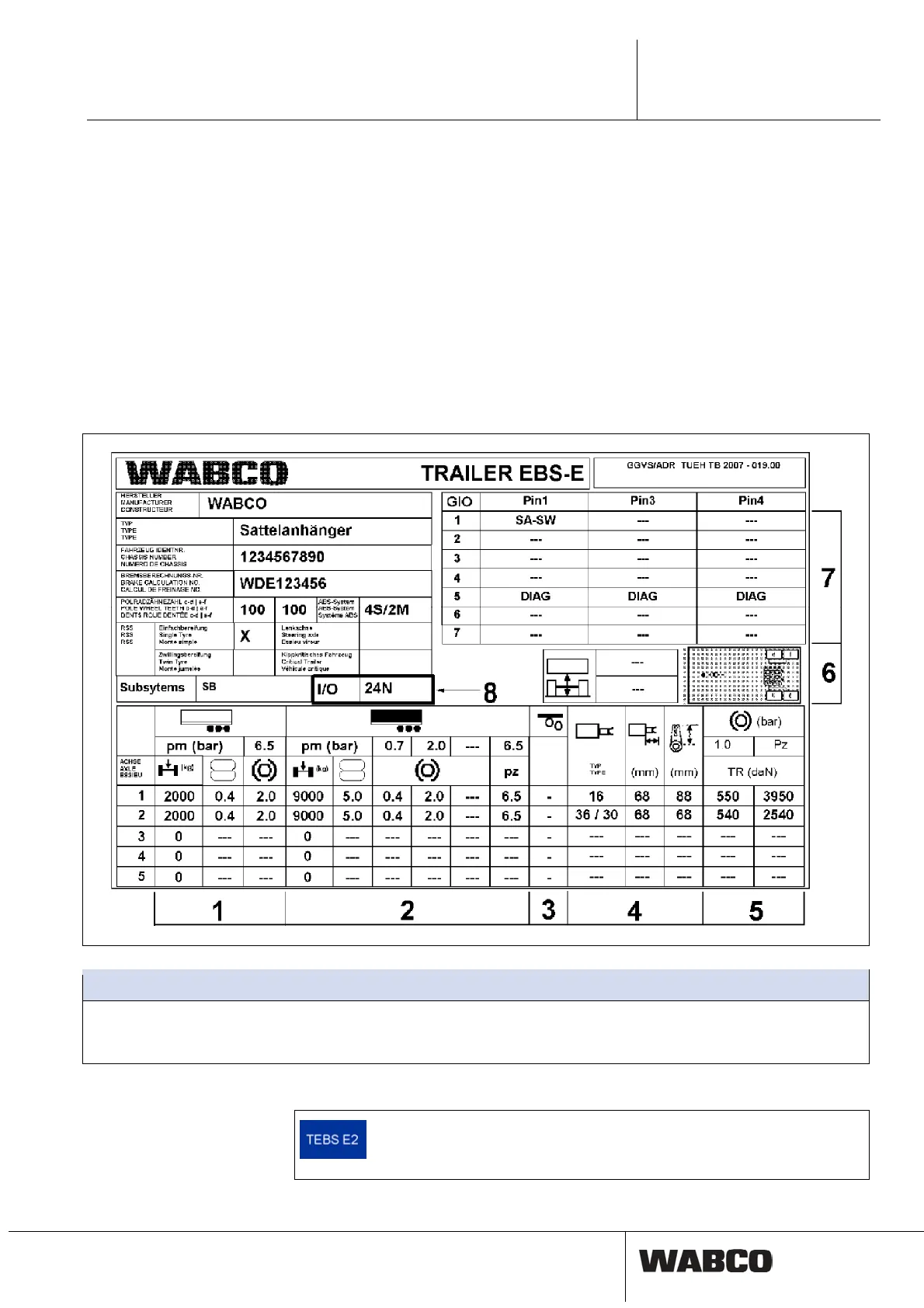
System label
After the TEBS E system has been installed, the TEBS E Diagnostic Software can
be used to create a TEBS E system label documenting the setup data.
This TEBS E system label must be affixed in a clearly visible place on the vehicle
(e. g. in the area where the LSV plate is located in conventional braked vehicles).
The blank foil for this type plate can be obtained via WABCO part number
899 200 922 4. The data must be printed out using a laser printer.
Legend
1
Unladen vehicle
2
Laden vehicle
3
1. Lifting axle
4
Data Brake cylinder
5
Reference values
6
Ride height
7
Selected pin assignment's to the GIO slot
8
IN/OUT connections
Printing of PDF files
A print-out of the start-up log and the diagnosis memory protocol can
be created as a PDF directly from the print menu with the TEBS E
Diagnostic Software (as of version TEBS E2).



 To Next Page