IP Camera W2(1080P)/W3(720P)
16
Save Picture to FTP: When an alarm is detected, the camera will send pictures to your FTP
server. Click on FTP Seng to setup FTP.
Save Record to FTP: When an alarm is detected, the camera will send a video to your FTP
server.
For FTP paramters, please refer to Page 40
Save Picture to SD/TF: unavailable(W2/W3 cannot support SD card)
Save Record to SD/TF: unavailable(W2/W3 cannot support SD card)
Trigger IO Output: Not available for W2/W3.
Preset Linkage: When an alarm is detected, the camera will focus on one of the 8 Preset
spots (see above).
Speaker Linkage: When an alarm is detected the speaker will act as a siren for the chosen
length (5-30sec).
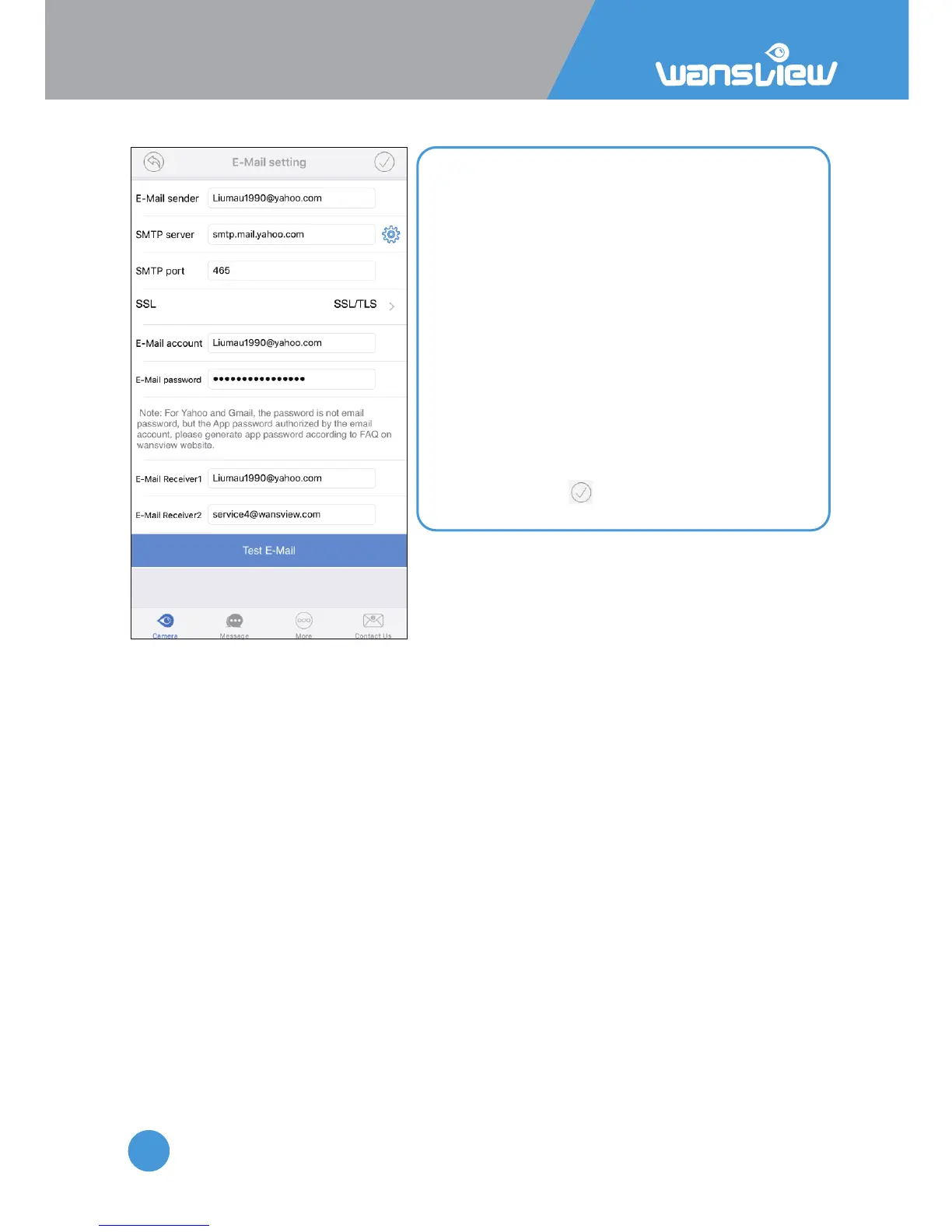
Sender: your email address
Smtp Server: such as smtp.mail.yahoo.com etc.
Smtp port: 465
SSL: SSL
User name: your email address, the same with
sender
Password: your email password, if you are using
Yahoo and Gmail, please generate an app
password, and using the app password. Check the
FAQ document on website to generate app
password.
Receiver: any email address
Aer you fill in the chart of the email seng
page, please Save and Test E-Mail.
For Email Seng, please follow the below parameters:



 To Next Page