IP Camera W2(1080P)/W3(720P)
36
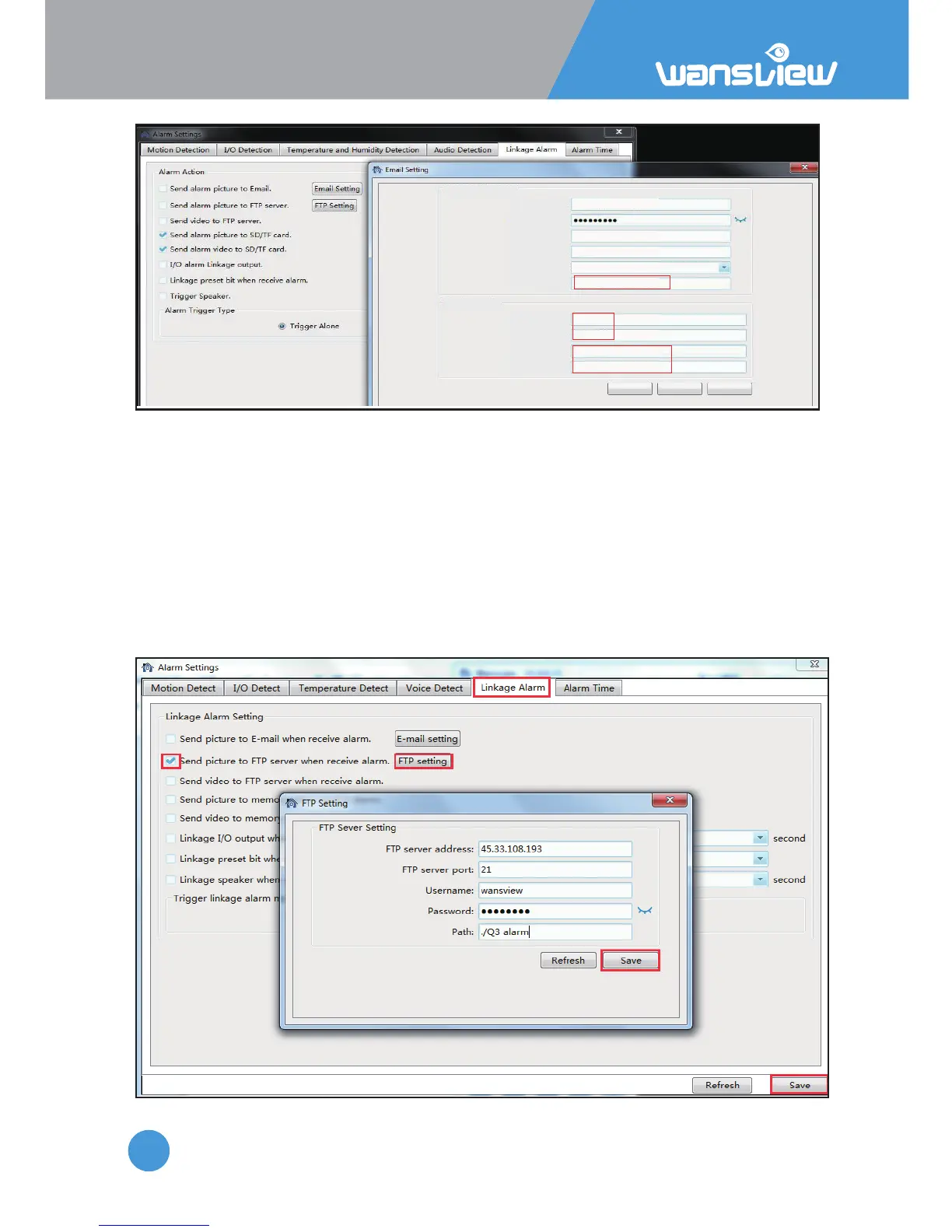
2)FTP Seng
Email address:
Email Sender setting
Receiver Setting
Email Password:
SMTP Server:
SMTP Port:
Security Type:
Sender:
E-mail subject:
E-mail content:
Receiver 1:
Receiver 2:
Test Refresh Save
service2@wansview.com
smtp.qiye.163.com
25
NONE
alarm
Q3 alarm
service@wansview.com
service2@wansview.com
service2@wansview.com
any information
any email
email, it should be the same
with "Email address"
2)FTP Seng
FTP Server Address: This field allows the user to designate an IP address or DDNS address
for the FTP server.
Server Port: This field allows the user to designate the port number for the FTP server.
User Name: Input FTP user name.
Password: Input FTP password.
Path: Specify a folder for storing video and pictures, for example: ./Q3 alarm
Note: If you want to save the alarm picture and video to FTP, you must build an FTP sever,
then create an FTP account with a password (not an anonymous account) on your FTP
server and FTP account must have create and delete file rights.



 To Next Page