IP Camera W2(1080P)/W3(720P)
52
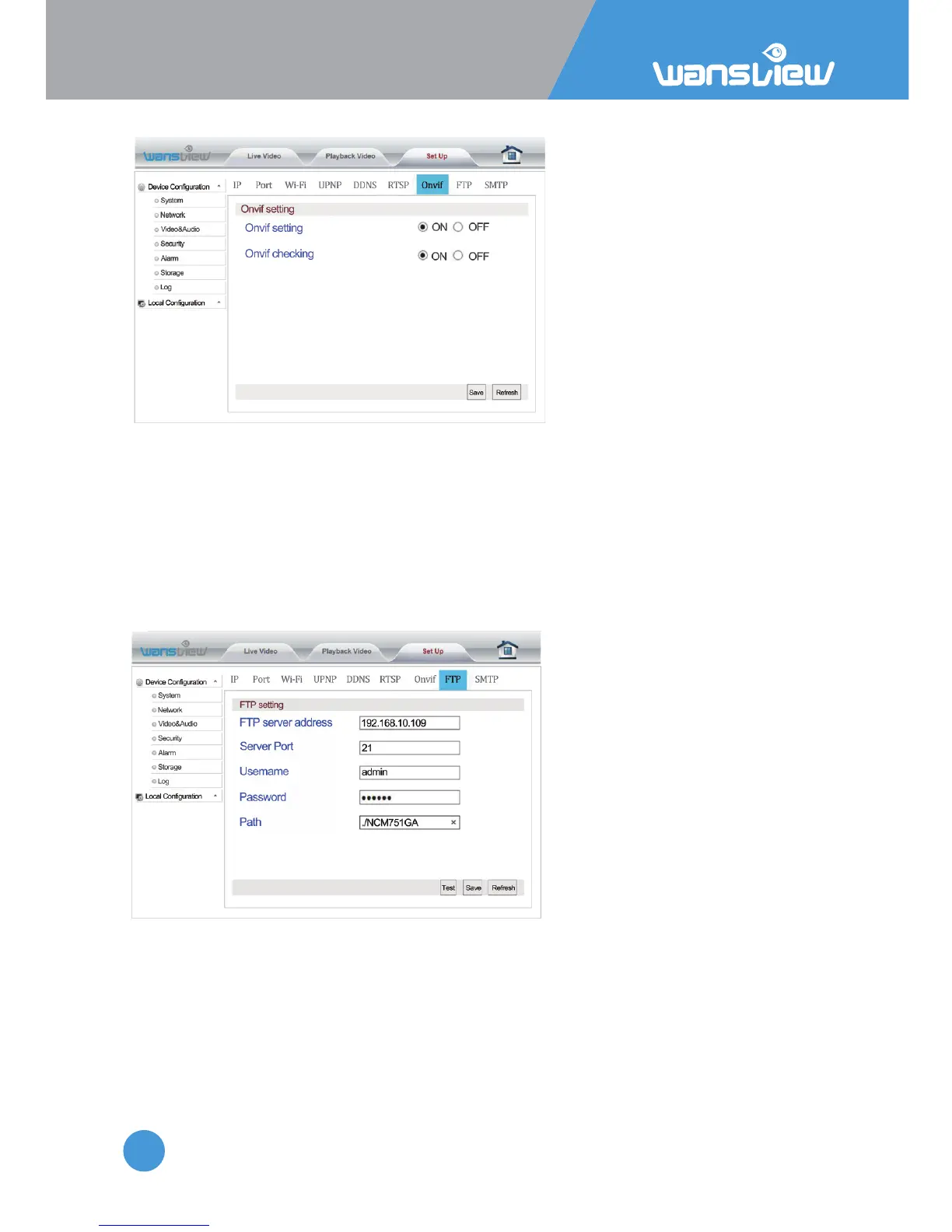
Network > Onvif seng
Onvif is a global standard for the interface of IP-based security products. The ONVIF
protocol ensures interoperability between products regardless of manufacturer, allowing
you to integrate your IP camera as a generic ONVIF camera into exisng security systems.
Enter Onvif Seng. The user can start up and calibrate Onvif funcons. The default
seng for Onvif calibraon is on.
Note:NVR devices of some manufacturers do not support camera access with Onvif
calibraon. Our device supports Onvif versions 2.5 and below.
Network >FTP Sengs
FTP Server Address: This field
allows the user to designate an IP
address or DDNS address for the
FTP server.
Server Port: This field allows the
user to designate the port number
for the FTP server.
User Name: Input FTP user name.
Password: Input FTP password.
Path: Specify a folder for storing
video and pictures, for example:
/NCM751GA
Note: If you want to save the alarm picture and video to FTP, you must build an FTP sever,
then create an FTP account with a password (not an anonymous account) on your FTP
server and FTP account must have create and delete file rights.



 To Next Page