2.9 Rebooting the mass spectrometer
Pressing the reset button shuts down the electronics momentarily and causes the mass
spectrometer to reboot.
Reboot the mass spectrometer when either of these conditions applies:
• The software fails to establish communication or loses communication with the mass
spectrometer.
• You perform a software upgrade.
To reboot the mass spectrometer:
1. Ensure that the mass spectrometer software is closed.
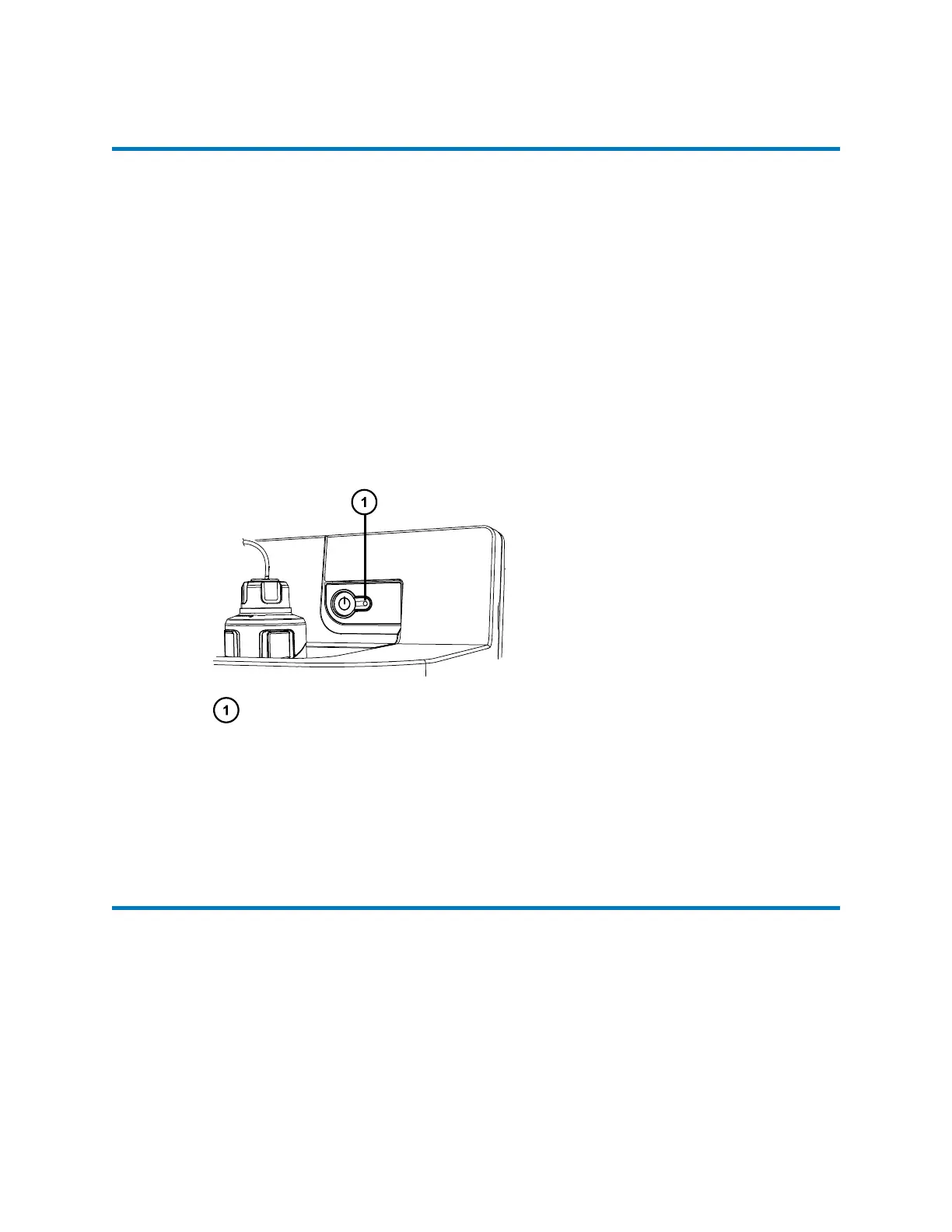
2. Insert a short length (7.5 cm) of PEEK tubing, or similar object, into the reset button
aperture to operate the reset button.
Figure 2–2: Rebooting the mass spectrometer
Reset button aperture
3. Remove the PEEK tubing from the reset button aperture.
4. Wait until the reboot sequence completes before starting the mass spectrometer software.
Tip: An audible alert sounds when the reboot sequence completes.
2.10 Leaving the mass spectrometer ready for operation
Leave the mass spectrometer in Operate mode, except in the following cases:
• When performing routine maintenance.
• When changing the source.
• When leaving the mass spectrometer unused for a long period.
January 10, 2022, 715006200 Ver. 01 (previously released as Rev. A)
Page 45


 To Next Page