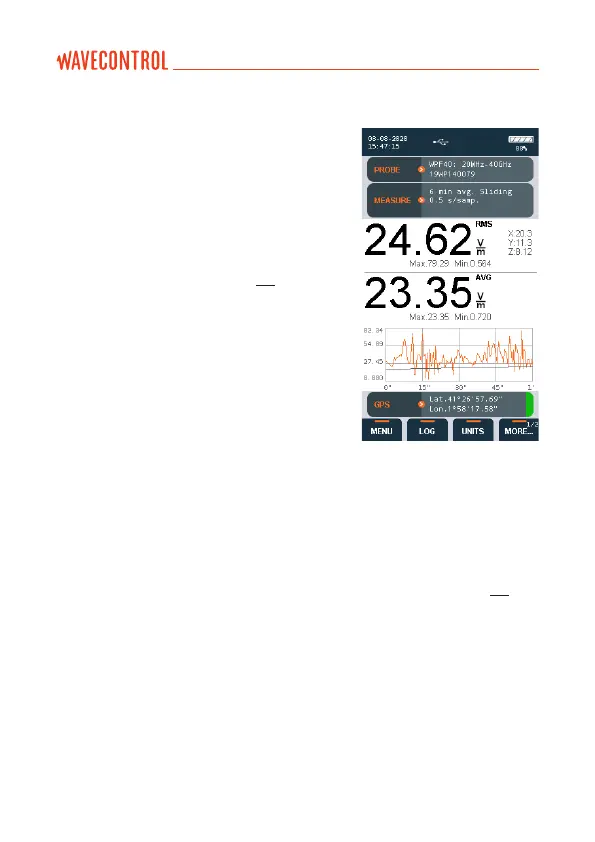
6.1.1. Time domain measurement
If you are using a broadband probe, this is
the default mode. If you are using a selective
probe, select this mode on the main screen
virtual menu (‘MORE…’ ‘MODE’ ‘Time’).
Measurements in the time domain contain
eld samples. One sample is saved each
log interval as dened in section 5.4. For
example, a 6-minute measurement with a 0.5
s log interval will record 720 samples. The
log interval does not affect the sampling rate
of the probe, since the device always uses 2
samples per second to calculate the average.
Measurements are stored in an SQL
database. The memory of the SMP2 allows
storage of up to 1,000 measurements and
1,000,000 samples.
Before starting the measurement, all the parameters must be congured. This
is done through the virtual menu.
First of all, select ‘MENU’, then ‘MEASUREMENT OPTIONS’. You will need to
establish the desired parameters for each option, basically ‘Measurement time’,
‘Log interval’, ‘Average type’, ‘Average interval’ and ‘Spatial average’ (see 5.4).
Return to the main screen by pressing the ‘Home’ button.
Select the rest of the measurement parameters using the virtual menu:
• ‘FIELD’: E or H (if the probe allows).
• ‘LIMIT’: Normative limit.
• ‘UNIT’: Measurement units.
User’s Manual Electromagnetic Field Meter SMP2 P. 34



 To Next Page