EasyManua.ls Logo

Wavetek 3000 - Page 58

Wavetek 3000
225 pages
Print Icon
To Next Page IconTo Next Page
To Previous Page IconTo Previous Page
Loading...
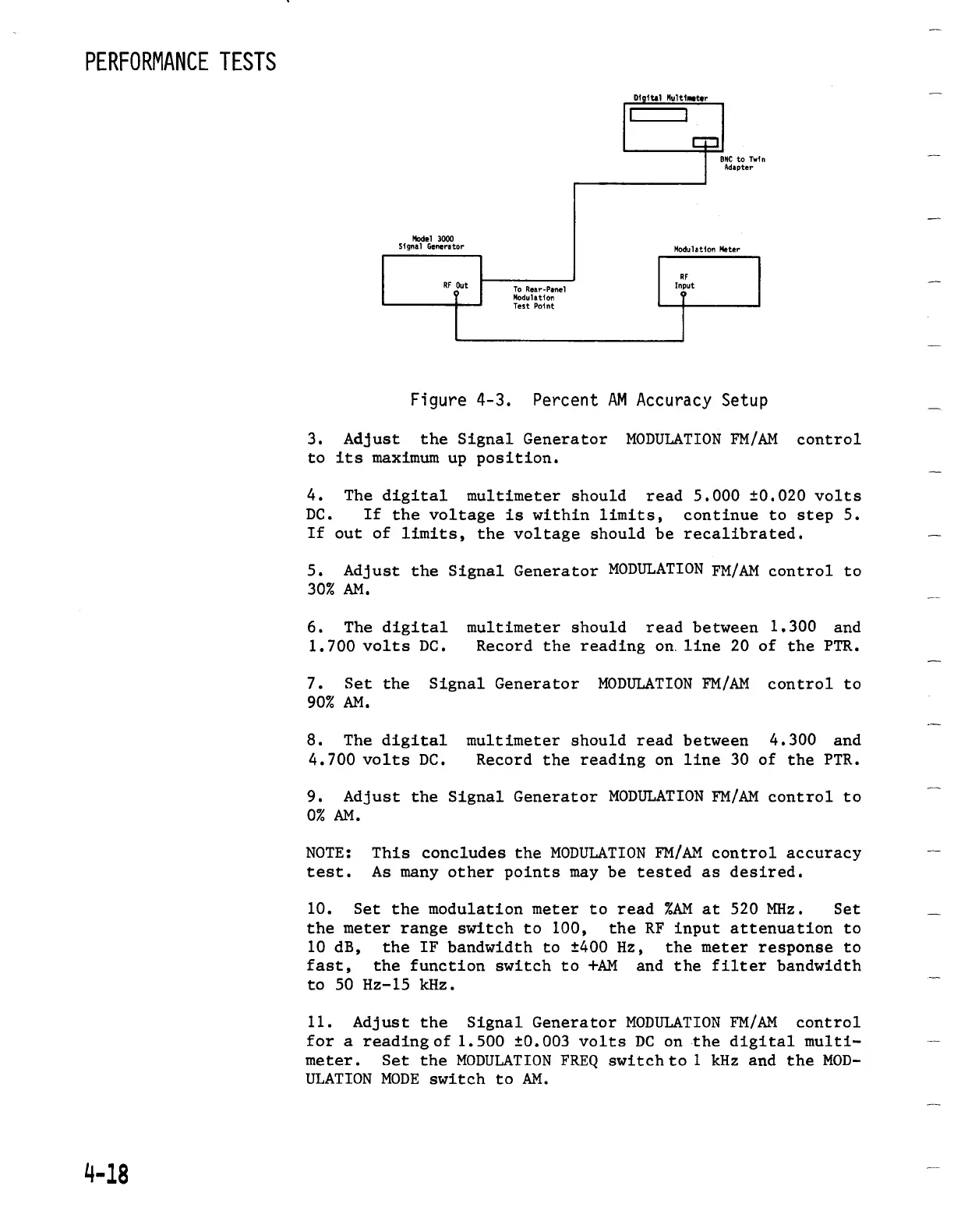
Figure
4-3
.
Percent
AM
Accuracy
Setup
3
.
Adjust
the
Signal
Generator
MODULATION
FM/AM
control
to
its
maximum
up
position
.
4
.
The
digital
multimeter
should
read
5
.000
±0.020
volts
DC
.
If
the
voltage
is
within
limits,
continue
to
step
5
.
If
out
of
limits,
the
voltage
should
be
recalibrated
.
5
.
Adjust
the
Signal
Generator
MODULATION
FM/AM
control
to
30%
AM
.
6
.
The
digital
multimeter
should
read
between
1
.300
and
1
.700
volts
DC
.
Record
the
reading
on
.line
20 of
the
PTR
.
7
.
Set the
Signal
GeneratorMODULATIONFM/AM
control
to
90%
AM
.
8
.
The
digital
multimeter
should
read
between
4
.300
and
4
.700
voltsDC
.
Record
the
reading
on
line
30 of
the
PTR
.
9
.
Adjust
the
Signal
Generator
MODULATIONFM/AM
control
to
OI
AM
.
NOTE
:
This
concludes
the
MODULATION
FM/AM
control
accuracy
test
.
As many
otherpoints
maybe
tested
as
desired
.
10
.
Set
the
modulation
meter
to
read
%AM
at
520
MHz
.
Set
the
meter
range
switch
to
100,
the
RF
input
attenuation
to
10
dB,
the
IF
bandwidth
to
±400
Hz,
the
meter
response
to
fast,
the
function
switch
to
+AM
and the
filter
bandwidth
to 50
Hz-15
kHz
.
11
.
Adjust
the
Signal
Generator
MODULATION
FM/AM
control
for
a
reading
of
1
.500 ±0.003
volts
DC on
the
digital
multi-
meter
.
Set the
MODULATION
FREQ
switch
to
1
kHz and the
MOD-
ULATIONMODE
switch
to
AM
.

Table of Contents

Related product manuals