EasyManua.ls Logo

Wavetek 3000 - AM;FM Vernier Voltage Adjustment C316

Wavetek 3000
225 pages
Print Icon
To Next Page IconTo Next Page
To Previous Page IconTo Previous Page
Loading...
1
,
6
2Z
.
rSJ~1
,v
S
),a()
,)
t
airn
G'+'v
\
~
1
Set
FREQUENCY
switches
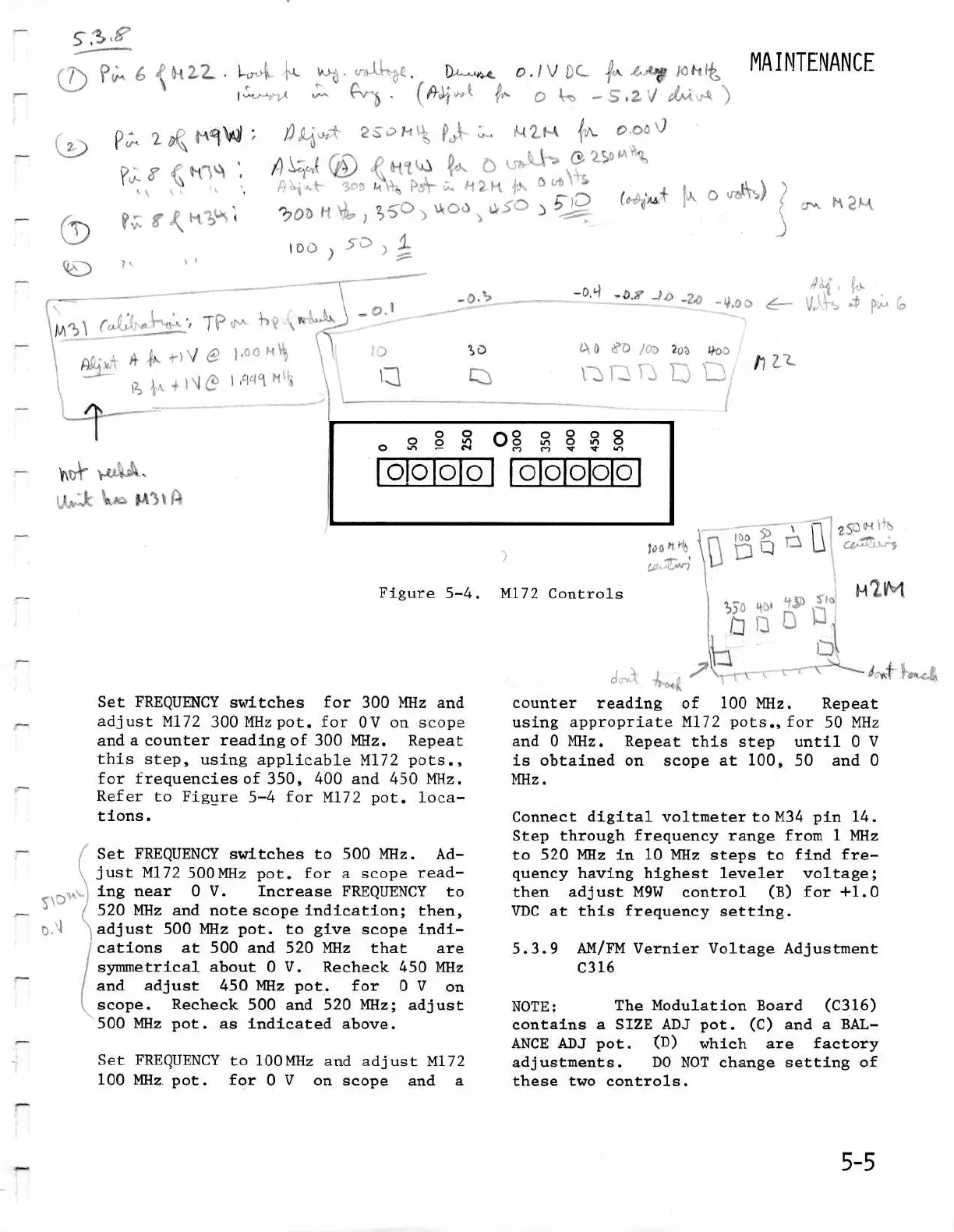
for 300 MHz and
adjust
M172
300MHzpot
.
for
OV
on
scope
and
a
counter
reading
of
300
MHz
.
Repeat
this
step,
using
applicableM172
pots
.,
for
frequencies
of
350,
400 and
450
MHz
.
Refer
to
Figure
5-4
for
M172
pot
.
loca-
tions
.
Set
FREQUENCY
switches
to
500
MHz
.
Ad-
just
M172
500
MHz
pot
.
for
a
scoperead-
ing
near
0
V
.
Increase
FREQUENCY
to
520
MHz
and
note
scope
indication
;
then,
adjust
500
MHz
pot
.
t o
give
scope
indi
cations
at
500
and 520
MHz
that
are
symmetrical
about
0
V
.
Recheck
450MHz
and
adjust
450
MHz
pot
.
for
0
V on
scope
.
Recheck
500 and 520
MHz
;
adjust
500
MHz
pot
.
a
s
indicated
above
.
Set
FREQUENCY
to
100
MHz
and
adjust
M172
100
MHz.pot
.
for
0
V
on
scope
and
a
v
,
1~,
.~
. .
o
.
d
V
J
C
.
,A
.
.
1st
h
i
'>
3a
~4
2
14
~J1
0,00
0
0
o
r
O
0
°
000
0000
8
00000
Figure
5-4
.
M172
Controls
-0,q
_2
.0
-4
.
U
ioa
5~
G
.~',m~r1
~
:1
MAINTENANCE
counter reading
of
100
MHz
.
Repeat
using
appropriate
M172 pots
.,for
50
MHz
and
0
MHz
.
Repeat
this step
until
0
V
is
obtained
on
scope
at
100,
50
and
0
MHz
.
Connect
digitalvoltmeter
to
M34
pin
14
.
Step
through
frequencyrangefrom
1
MHz
to
520
MHz
in 10
MHz
steps
to
find fre-
quencyhaving
highestleveler
voltage
;
then
adjust
M9W
control
(B)
for
+1
.0
VDC
at
this
frequency
setting
.
5
.3.9
AM/FM
Vernier
VoltageAdjustment
C316
NOTE
;
The
Modulation
Board
(C316)
contains
a
SIZE
ADJ
pot
.
(C)
and
a
BAL-
ANCEADJ
pot
.
(D)
which
are
factory
adjustments
.
DO
NOT
change
setting
of
these
two
controls
.

Table of Contents

Related product manuals