6
DVB-C, DVB-T/T2
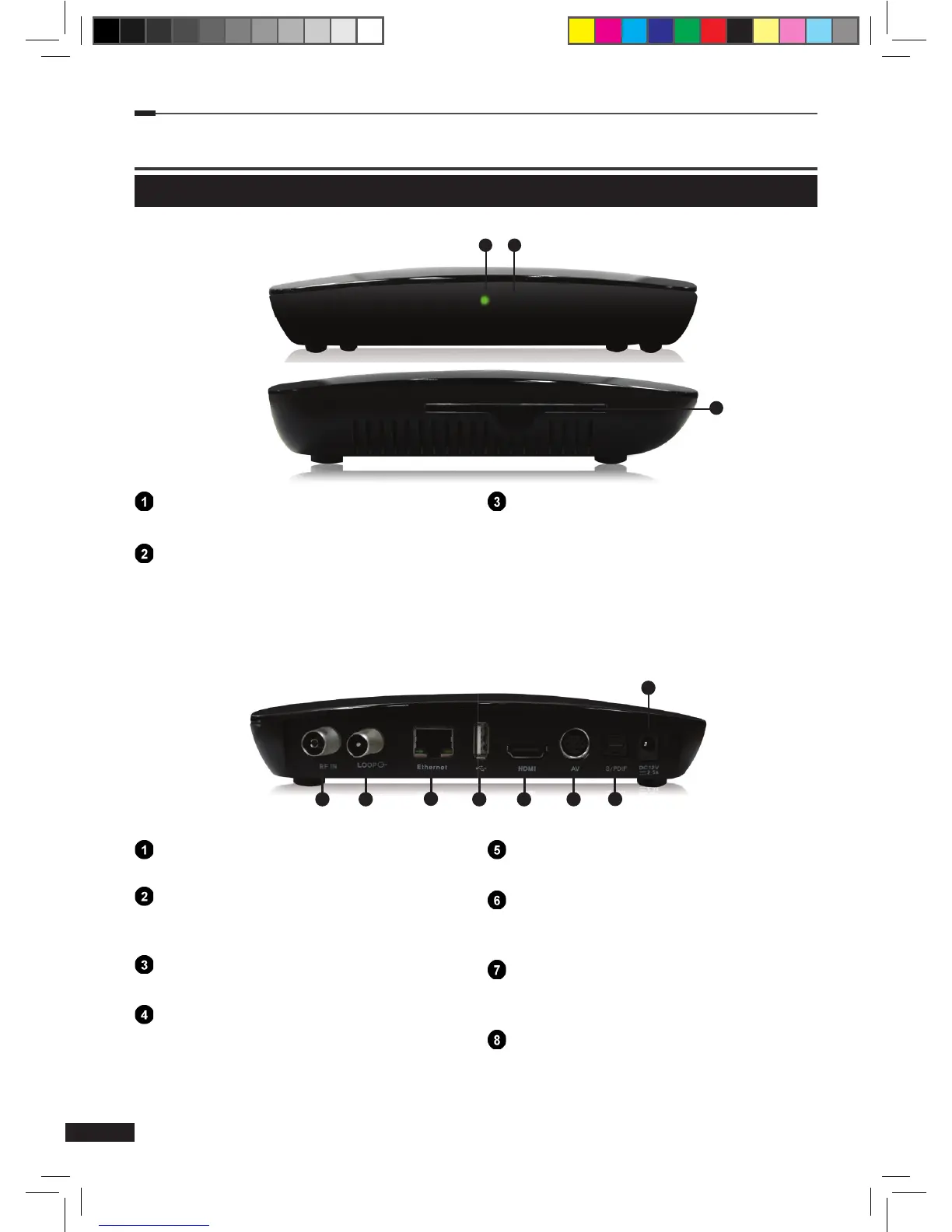
Connect to the cable antenna.
LOOP
Signal output. Connect to the antenna input
of another device, such as a TV.
Ethernet
Connect to the Ethernet with Ethernet cable.
USB
Connection for External HDD or USB
memorystick.
HDMI
Connects to the TV with HDMI cable.
AV
Connect to video/audio input jack on TV or
any external video/audio system.
S/PDIF OPTICAL
Connect to a digital audio component with
OPTICAL cable.
AC Adaptor
AC Adaptor INPUT.
Power LED
Display the power ON/OFF.
IR-receiver
IR Remote Control Receiver.
Smart Card Slot
Smart card shall be paired by informing
the CHIP-ID to your operator. You can nd
the CHIP-ID from CONAX and System
information menu. Insert the card with the
chip inwards and downwards.
C
ontrols and Functions
Front / Rear Panel
※The image shown may differ from the actual product.
1 2


 To Next Page