5.2. ReplicatorG Software Introduction
5.2.1. Basic Interface
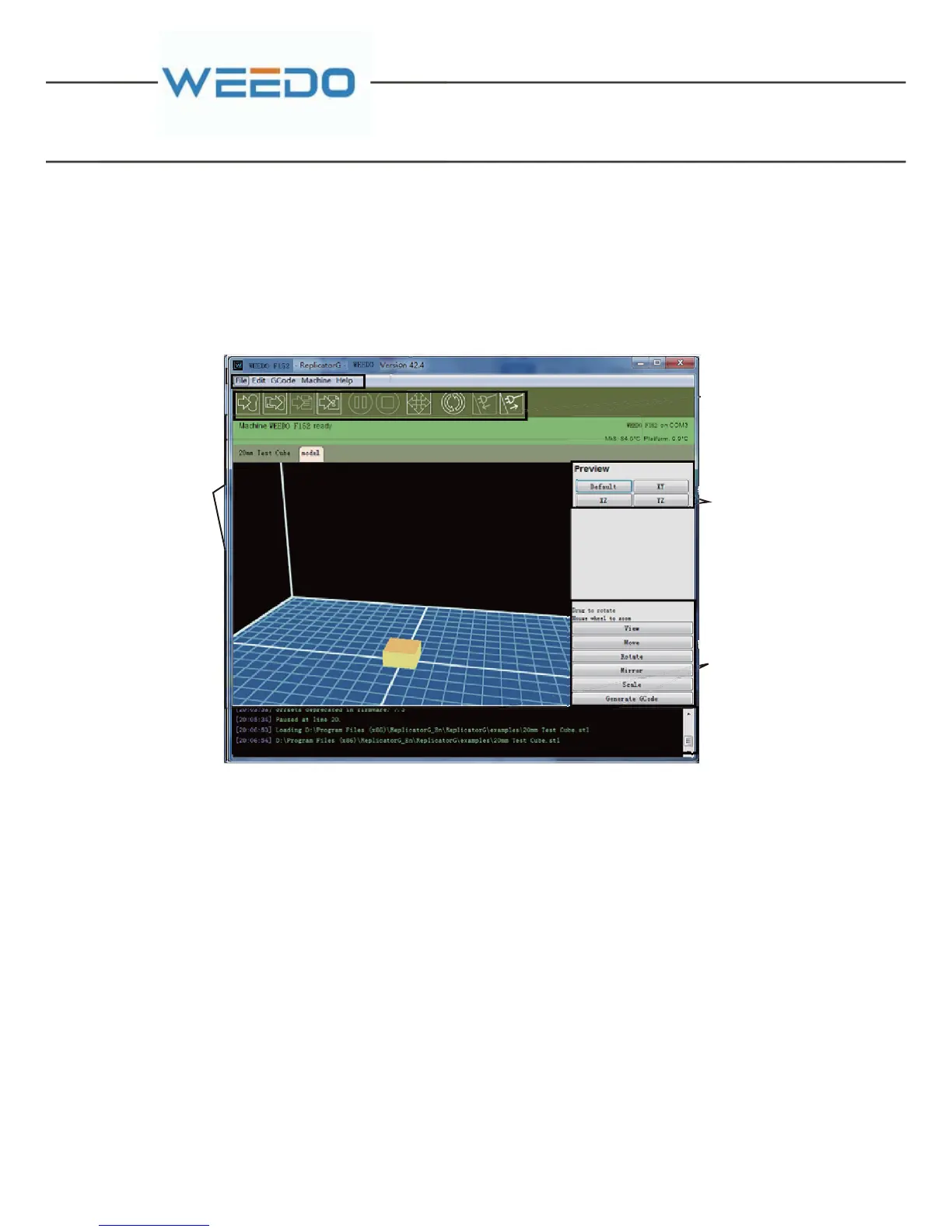
The software interface of ReplicatorG is as follows.
1.Menu bar. The main menu has five options: File, Edit, GCode, Machine and Help.
You can find the detailed information in 5.2.1.
2.Tool bar. It displays ten most common used function, please refer to 5.2.2 for
details.
3.Status bar. It shows the status of your connection to your printer, the current
temperature of the nozzle and your build progress.
4.Model/code preview. The 3D model you've selected will displayed in the ”model”
tab, and when the GCode generation is completed, you'll see a "Gcode" tab appear
beside your ”model” tab.
5.Model control panel. You can control different parts of your machine from the
control panel include such operations as move, rotate, scale and so on.
6.Message output window. It shows you the output messages the machine and the
skeinforge (slice Software) running in the background. (Note: We use a tool called
Meaubar
Tool bar
Status Bar
Model/Code
Preview
Model C ontrol
Panel
Message Output
Window



 To Next Page