User Manual Introduction 13
Controls
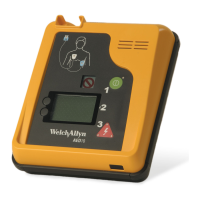
The Welch Allyn AED 10 is designed for ease of operation. After putting the defibrillator
pads on the patient and connecting them to the Welch Allyn AED 10 unit, the operator
performs this simple three-step process:
1. Turn the power ON.
2. Follow text and voice prompts.
3. If prompted, deliver shock by pressing the flashing red Shock button.
AED10
defibrillation pads connector
speaker
display
system status indicator
on/off button
shock button
menu selection soft keys
infrared data port
Power ON/OFF Green ON/OFF button to toggle system power on/off
Shock Red Shock button to discharge defibrillator; red LED flashes
when defibrillator is fully charged
Menu selection Two soft buttons located to the left of the display;
programmable functionality to make menu selections in
programming mode.
text and voice prompts
power on
shock
AED10
1
2
3


 To Next Page
 Loading...