2.14 2.13. Port Mapping / Port Forwarding
2.14.1 2.13.1. Access to Connected Devices via the Internet
To access devices connected to the Welotec router via the Internet, port mapping or port forwarding can be used.
This is configured in the TK800 router via NAT rules.
Port mapping requires a public IP address in the mobile network (Public IP). If necessary, ask your mobile network
provider or service provider about this!
The instructions refer to all TK800 routers with firmware 1.0.0.r10406 or higher.
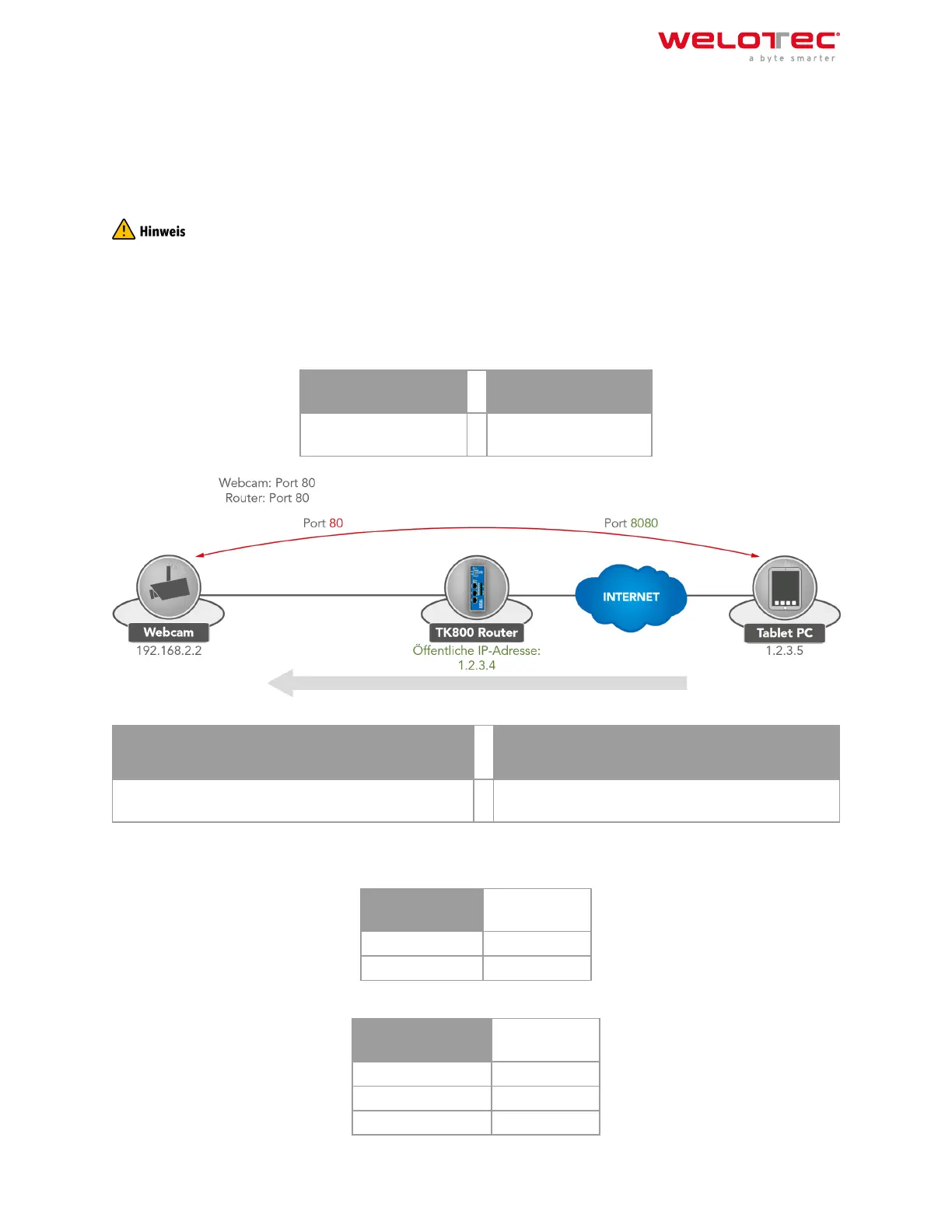
The following image illustrates the application example (http uses TCP port 80 by default):
Private network (LAN) Public network (WAN)
Package source: 1.2.3.4.8080 Destination:
192.168.2.2.80
Package source: 1.2.3.5.8080 Destination:
1.2.3.4.8080
Explanation:
Welotec Router
LAN IP address: 192.168.2.1
Subnet mask: 255.255.255.0
IP camera
LAN IP‑Adresse: 192.168.2.2
Subnet mask: 255.255.255.0
Standard Gateway 192.168.1.1
Welotec GmbH
Zum Hagenbach 7
48366 Laer
www.welotec.com
info@welotec.com
+49 2554 9130 00
Page 17



 To Next Page