2.7 2.7. Cable Connections
Connect the router to your PC via a network cable (RJ45). We recommend port FE 0/2 for all TK8x2 models and port
FE 1/4 for all TK8x5 models.
2.8 2.8. Connection of the Serial Interfaces and
I/O’s
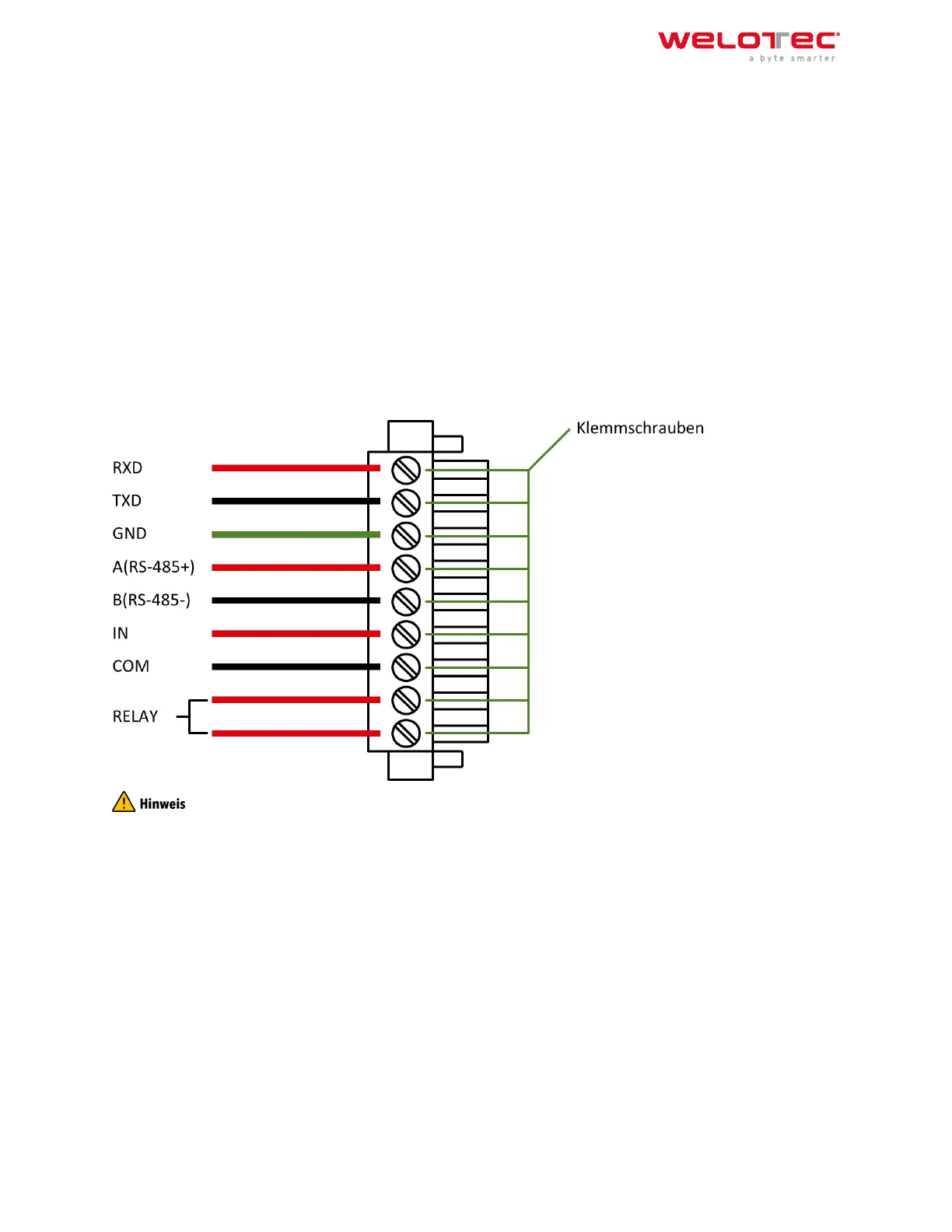
For the connection of the serial interfaces and the I/O’s you will find a terminal block on the front of the device. The
individual contacts for this are labeled on the front of the device. Connect the lines according to these labels. The
“IN” contact here represents the digital input, while the output is labeled “Relay”. “COM” represents the ground.
This is a potential‑free contact, i.e. what you put in at the IN contact comes out again at the relay contact, provided
the contact is closed. Switching can be done via SMS and via the web interface. At 230 VAC the contact can be
loaded with 2 Ampere. During installation, please remove the connection block from the device and connect the
individual wires to the corresponding terminals. Then plug the connection block back onto the device.
This chapter describes only routers in the versions with serial interfaces and I/Os TK8XXX‑EX.
2.9 2.9. Startup of the Router
2.9.1 2.9.1. Automatic Configuration (DHCP)
Configure the PC so that it works as a DHCP client (obtain IP address automatically). Connect the PC with a network
cable to the interface FE0/2 or FE1/1 ‑ FE1/4 (TK8X5 variants only). The PC is then assigned an IP address, standard
gateway and DNS server by the router. The following figure shows the configuration process via DHCP on a PC with
the Windows 10 operating system. The settings can be accessed via the Network and Sharing Center in Windows
10.
Welotec GmbH
Zum Hagenbach 7
48366 Laer
www.welotec.com
info@welotec.com
+49 2554 9130 00
Page 9



 To Next Page