Parameter
Description
Protocol TCP or UDP
Outside Interface The interface to be ac‑
cessed from
Service Port The port that is open to
the outside
Internal Address The internal IP address
to be reached
Internal Port The internal port to be
reached
Description Brief description
If Cellular 1 is selected as Outside Interface, the port mapping only works if the cel‑
lular interface is assigned a public IP address!
3.13 3.12. CLI Commands
In addition to the web interface, which can be accessed via the IP address of the router, it is also possible to config‑
ure and manage the router via the CLI (Command Line Interface). There are several ways to connect to the router
via the CLI. For example, putty has proven itself as a tool for this.
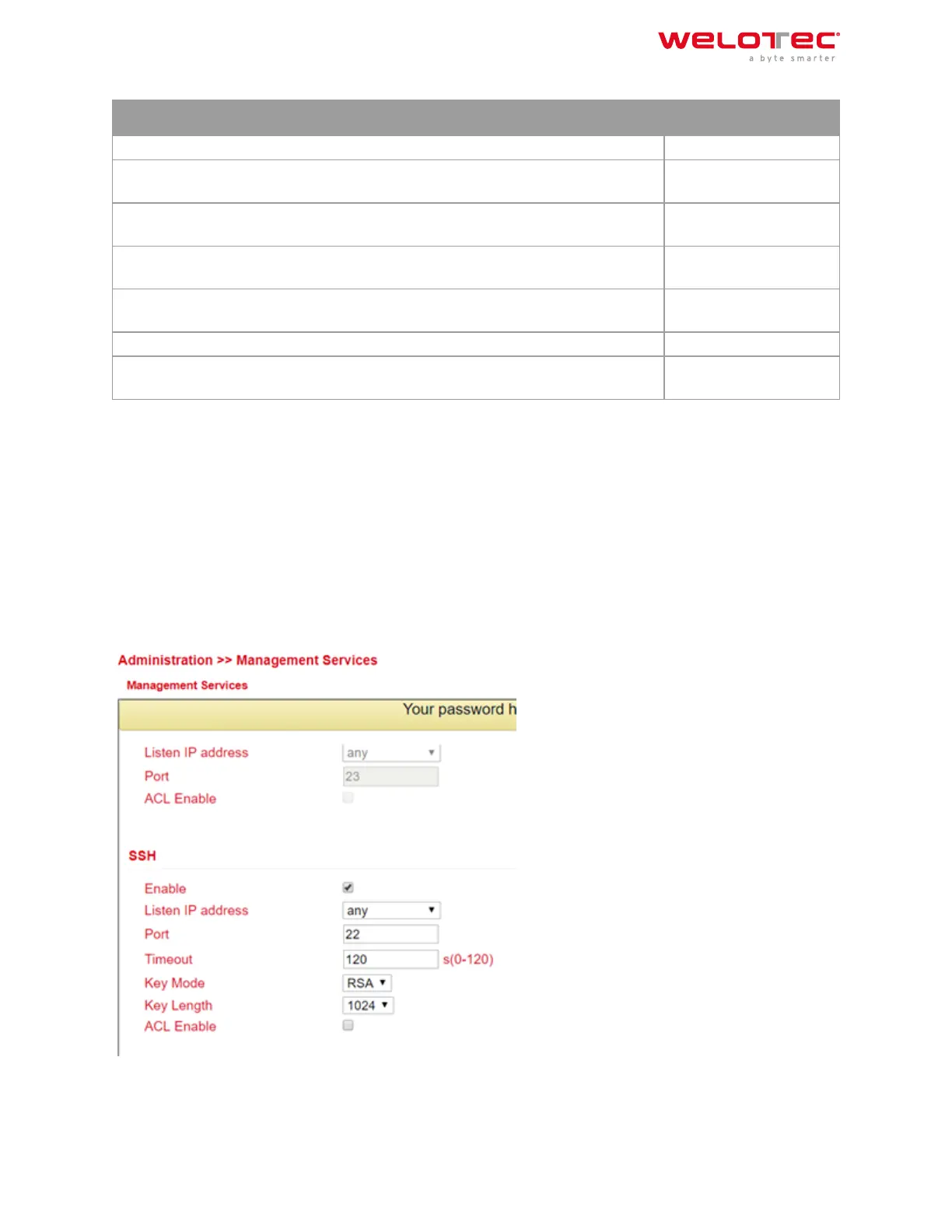
One way to connect via the CLI is via SSH. However, this function must first be activated in the router. This is done
via Administration > Management Services. Here the SSH function has to be enabled. The second way to connect
to the router is via Telnet in connection with a serial console cable. To do this, Telnet must be enabled under
Administration > Management Services, as with SSH, and the console cable must be connected to a computer at
the router port labeled Console. Please save the changes with Apply&Save.
Then start e.g. putty and enter the IP address of your router and select SSH or TELNET as port or connection type.
Then click on open to establish the connection to the router. If the connection is established successfully, you will
get the CLI window with the login for the router.
Welotec GmbH
Zum Hagenbach 7
48366 Laer
www.welotec.com
info@welotec.com
+49 2554 9130 00
Page 139



 To Next Page