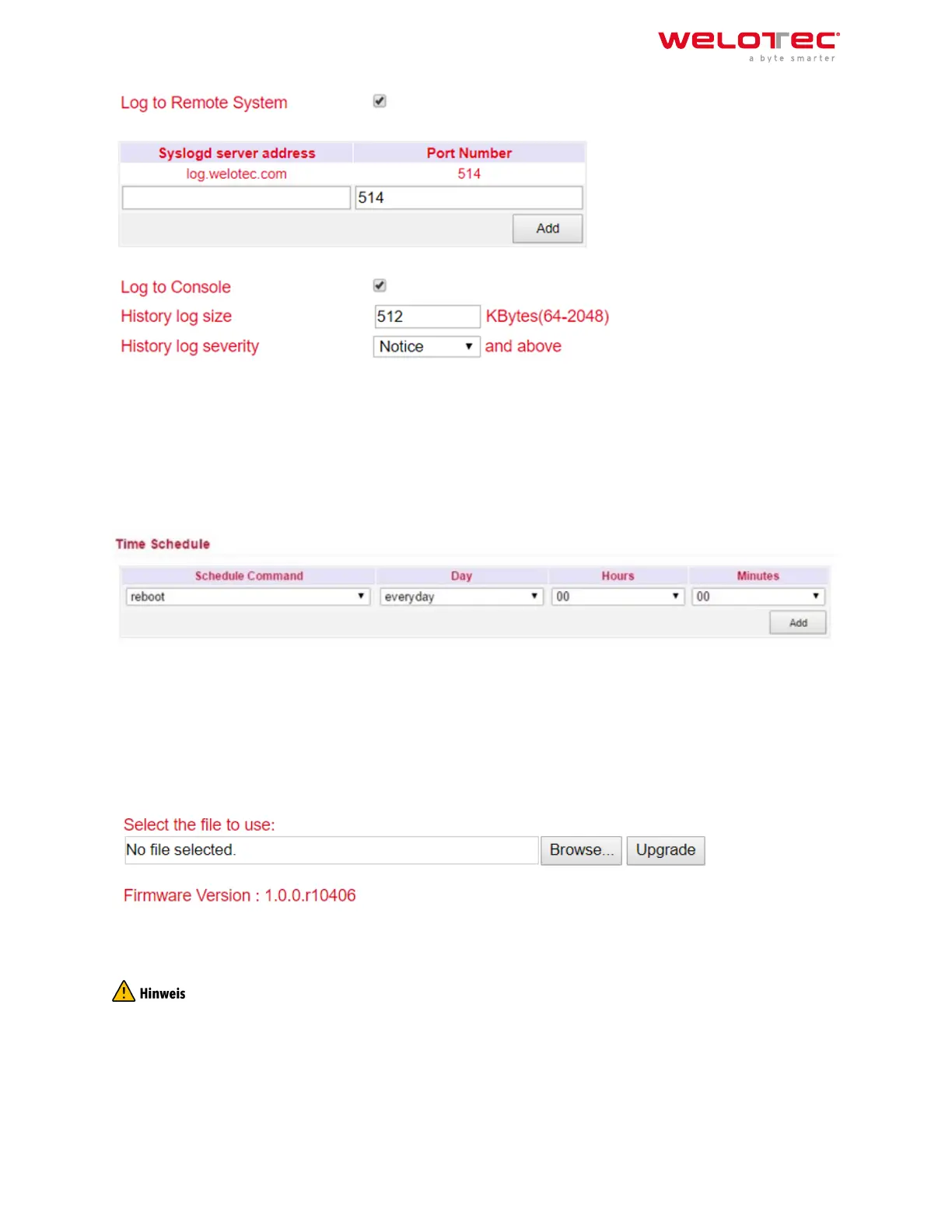
Under Syslog server address the host name of the syslog server (FQDN) or the IP address is specified. Port 514 is
the default port for syslog servers.
3.1.12 3.1.11. Cron Job
Under Time Schedule you can have actions executed on the router at specific times, such as a reboot of the router.
Here you could always reboot the router at a certain time.
Under Time Schedule you can select the schedule command (currently only reboot). With Day you select daily
(everyday) and with Hours and Minutes you control the start time. Click on the Add button to apply the settings.
3.1.13 3.1.12. Upgrade
Firmware updates of the router can be performed in the Upgrade menu. A firmware update can contain new func‑
tions or also eliminate errors. The installed firmware is displayed under the Select the file to use field.
Under Browse you select the firmware file which you have downloaded before (this must be unpacked either as
*.bin or *.pkg file). By clicking on Upgrade the firmware will be installed on the router.
Please note that the bootloader and the IO board may have to be updated separately if the firmware version is
significantly older. If you have any questions, please contact our support.
Welotec GmbH
Zum Hagenbach 7
48366 Laer
www.welotec.com
info@welotec.com
+49 2554 9130 00
Page 43



 To Next Page