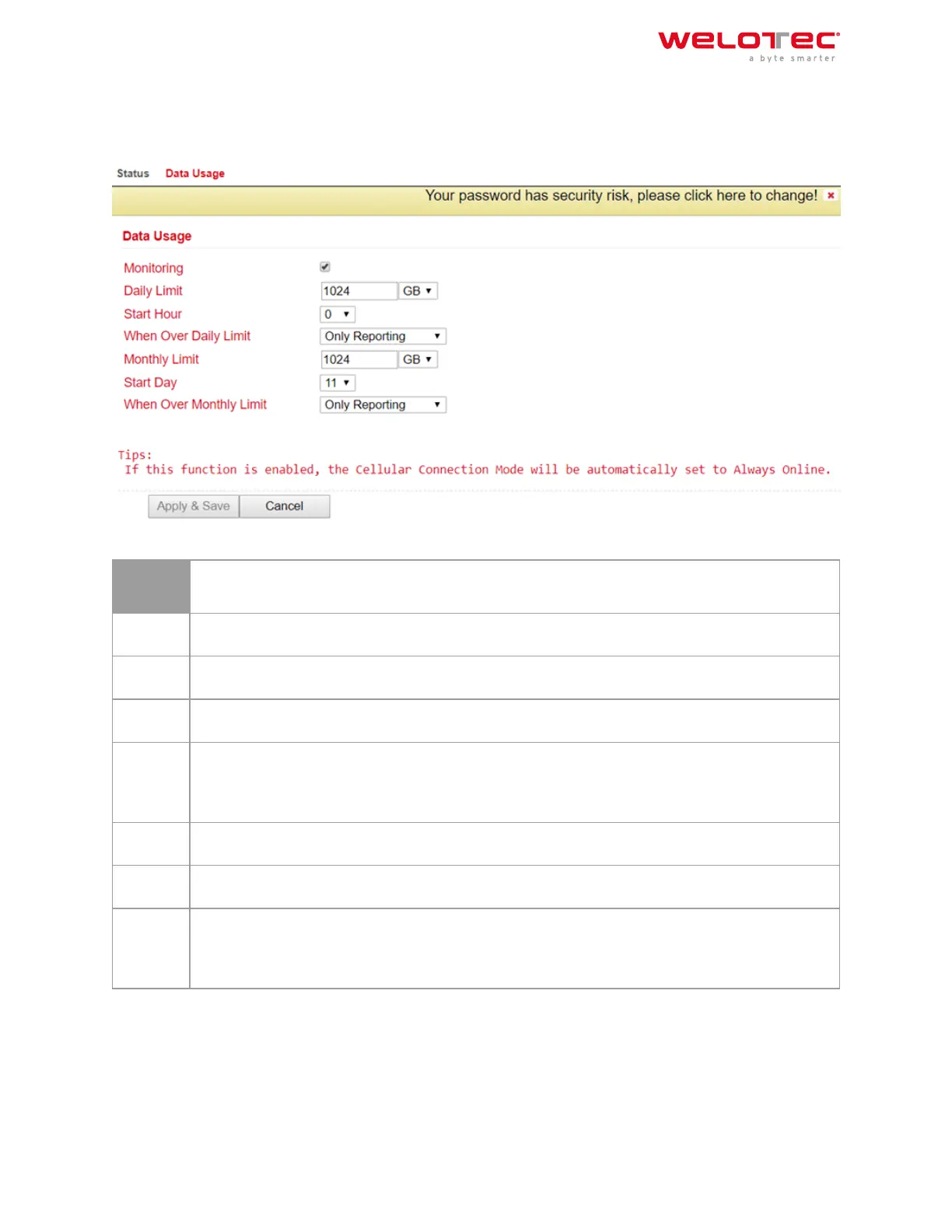
3.3.7.1 Data Usage
Open the menu under Service > Data Usage and Data Usage. Now check the Monitoring box to activate this section.
Now enter your data.
Data Us‑
age
Monitor‑
ing
Activate your data consumption display here
Daily
Limit
Enter a guideline value for the daily limit here. Data can be entered in KB, MB or GB.
Start
Hour
Time at which the measurement is to be started.
When
Over
Daily
Limit
Here you can enter what should happen when the entered limit is reached or exceeded. Options
are: Only Reporting Here, only the consumption value is displayed Stop Forward Here, the further
consumption of data is stopped Shutdown Interface Here, the interface is switched o.
Monthly
Limit
Enter an approximate value for the monthly limit here. Data can be entered in MB or GB.
Start
Day
Select here the day on which the measurement for the monthly limit should start
When
Over
Monthly
Limit
Here you can enter what should happen when the entered limit is reached or exceeded. Options
are: Only Reporting Here, only the consumption value is displayed Stop Forward Here, the further
consumption of data is stopped Shutdown Interface Here, the interface is switched o.
Welotec GmbH
Zum Hagenbach 7
48366 Laer
www.welotec.com
info@welotec.com
+49 2554 9130 00
Page 73



 To Next Page