8 ‒ Function Description | P1PY201 ‒ Laser Distance Sensor ToF 33
8.5.3 Speed Measurement
The sensor has integrated speed measurement. This detects the speeds of objects that are approaching
or distant axially from the sensor.
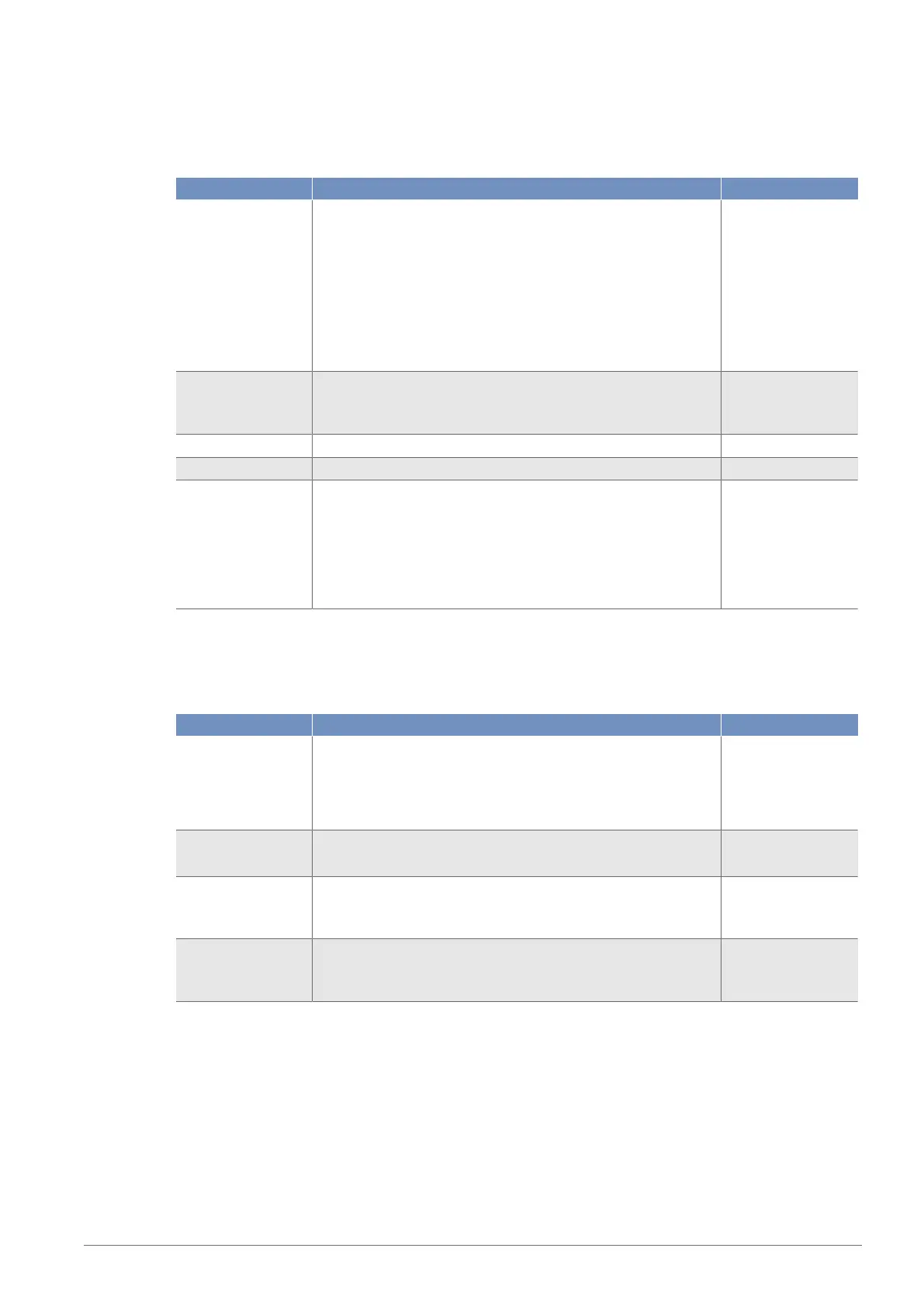
Function Possible settings Default
Speed measure-
ment
On
Speed measurement activated
Off
Speed measurement deactivated
If the set threshold is exceeded, a status message is triggered.
This can be linked to the warning or error output and thus trig-
ger a corresponding switching signal (see section Warning/Er-
ror Output Function [}32]).
On
Speed threshold The threshold defines how sensitive the speed measurement
reacts
0…30,000
50
Speed filter 0…300 0
Speed hysteresis 1…60,000
Approach direction The approach direction defines the direction of movement of
the object in relation to the sensor at which the set threshold
triggers the status message.
Add
Remove
Both
8.5.4 Signal Monitoring
The sensor can detect up to four objects in its working range. A distance and signal strength are deter-
mined for each of these objects.
Function Possible settings Default
Signal monitoring On
Signal observation activated
Off
Signal observation deactivated
Off
Object detection
status
Indicates the object used for signal evaluation.
Object 1–4
---
Object distance Indicates the respective distance from a maximum of four ob-
jects.
50…10,000 mm
---
Object signal Indicates the respective signal strength of a maximum of four
objects.
1…1,000
---
8.6 Simulation Functions
This function simulates the behavior of the sensor regardless of the current status and measured value.
This can be used to check whether a plant in which the sensor is integrated reacts correctly to the data
supplied by the sensor and processes them accordingly.
If a measured value is specified, the sensor behaves as if the specified measured value corresponds to
the actual measured value. This means that the behavior of the outputs and status messages is simulated
according to the specified measured value.


 To Next Page