BDA CS 300 – 06/15 – REV. B Page 61 / 84
6.1 Connecting to Power Supply
CAUTION
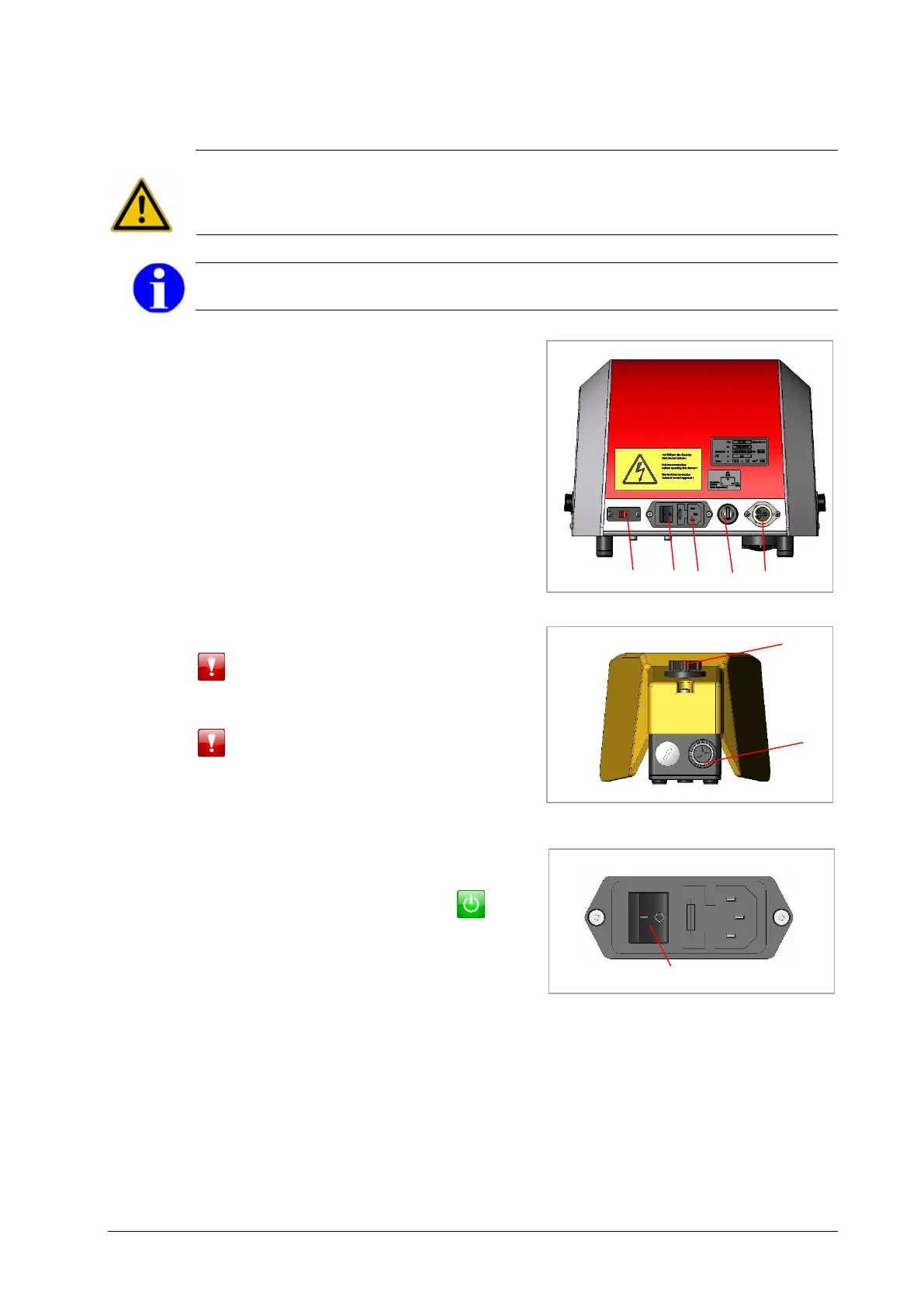
+ Select the right voltage with voltage selector 6 (Fig. 6.1).
+ The machine can only be made currentless by disconnecting the main plug connection 4
(Fig. 6.1) from the power supply.
INFORMATION
+ Use a power supply cable with a main plug of your norm (with protective contact).
Connect the foot pedal connecting cable 1
with foot pedal socket 2 on the machine and
secure it by slightly twisting it to the right (Fig.
6.1/6.2).
Connect the power supply cable with the 3
pole main plug connection 4 on the machine
(Fig. 6.1).
Move the voltage selector 6 to the right
voltage (115 V or 230 V).
If the supply voltage is too high, the following
error prompt appears:
048111000x01
If the supply voltage is too low, the following
error prompt appears:
048111000x02
Move ON/OFF switch 5 to position I
(Fig. 6.1/6.3).
Move key switch 3 to position II „EIN/ON“
(normal working condition) (Fig. 6.1).
The display shows the following icon:
The crimping machine is now ready for use.


 To Next Page