Chapter 2: Getting Started
EN-21
b. Operation:
(a)Two level warnings and temperature unit setting:
(1)Press the
SET
button once to access the level 1 (L1) warning threshold
setup.
(2)Press the
or
button to increase or decrease the setting value,
100ppm per time.
(3)Press the
SET
button again to access the level 2 (L2) warning threshold
setup.
(4)Press the
or
button to increase or decrease the setting value,
100ppm per time.
(5)Press the
SET
button again to access the temperature unit setup.
(6)Press the
or
button to switch “°C” or “°F”.
(7)Press the
SET
button again to save and exit.
(b)Buzzer setup:
(1)When the buzzer beeps, press the
ALARM
button to stop.
(2)Long press the
ALARM
button for 3 seconds to switch ON or OFF the
buzzer.
c. Factory default:
(1)L1: 1200ppm
(2)L2: 2000ppm
(3)Temperature unit: °C
(4)Buzzer beeps: ON
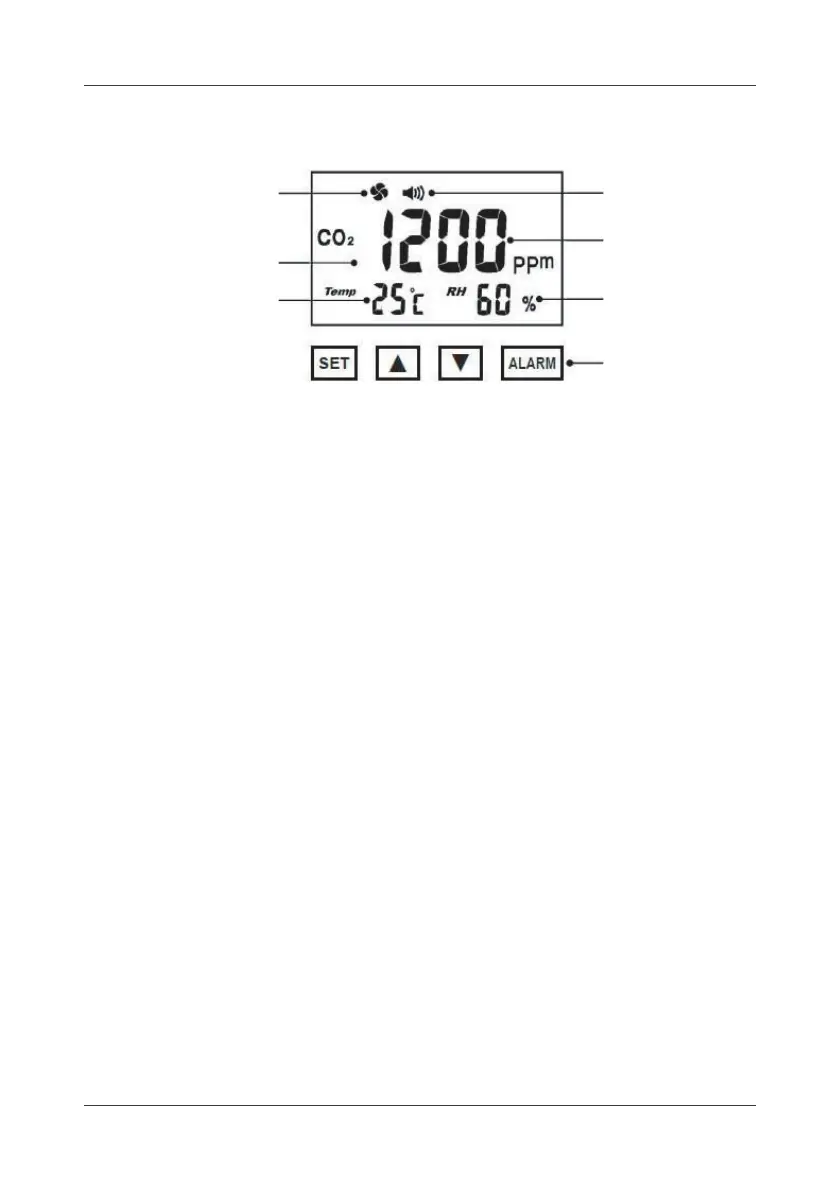
Fan state Buzzer state
CO
2
current value
Buzzer state
Humidity current value
Setting buttons
Backlight:
Temperature
current value
Green (normal) /
Orange (warning)



 To Next Page