MULTI- ZONE / FROZEN FOOD VENDOR • 3576 • 4222618A | 25
NOTE: The display will show “Lift Unknown” while the Delivery Lift is moving to
the up or down position. If the control board can’t determine a Lift motors cam
position the “Lift Unknown” message will also appear and stay present.
IMPORTANT: Do not attempt to run the Delivery Lift Test diagnostic if the
Delivery Lift Plate may be jammed. Manually correct this issue before
running test. Contact Vendnet Service at 1-800-833-4411 for assistance or
more information.
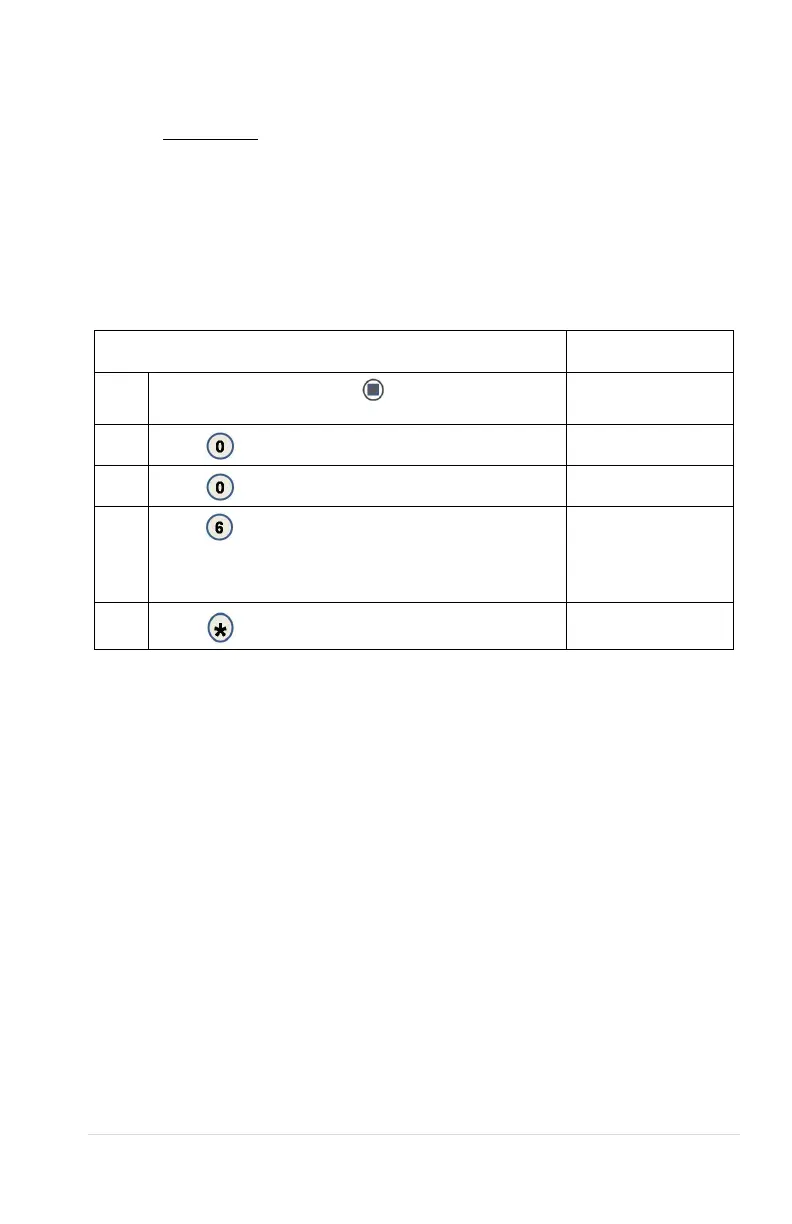
0.0.6 LIFT OPTICS ALIGN
This indicates if the Delivery Lift Sensors are functioning and aligned so that they
can detect when a product is lifted to the correct height. The Green LED on the
lift optics board (located behind the iVend Red LED sensor board) will also be
illuminated when sensors are aligned.
STEP DISPLAY
1
Press the ‘Service Mode’
button on the control
(Motor count)
2
Diagnostics
3
Peripherals
4
Press
Shows current state of sensors. OK is
unblocked and ready . NO is blocked or not operational.
The time counter allows for determining how long a
product or object is blocking the sensors.
Lift Optics Align
OK or NO
0000 ms
5
Back to sales mode



 To Next Page