34
User manual WMF bistro!
Software
Level: Accounting
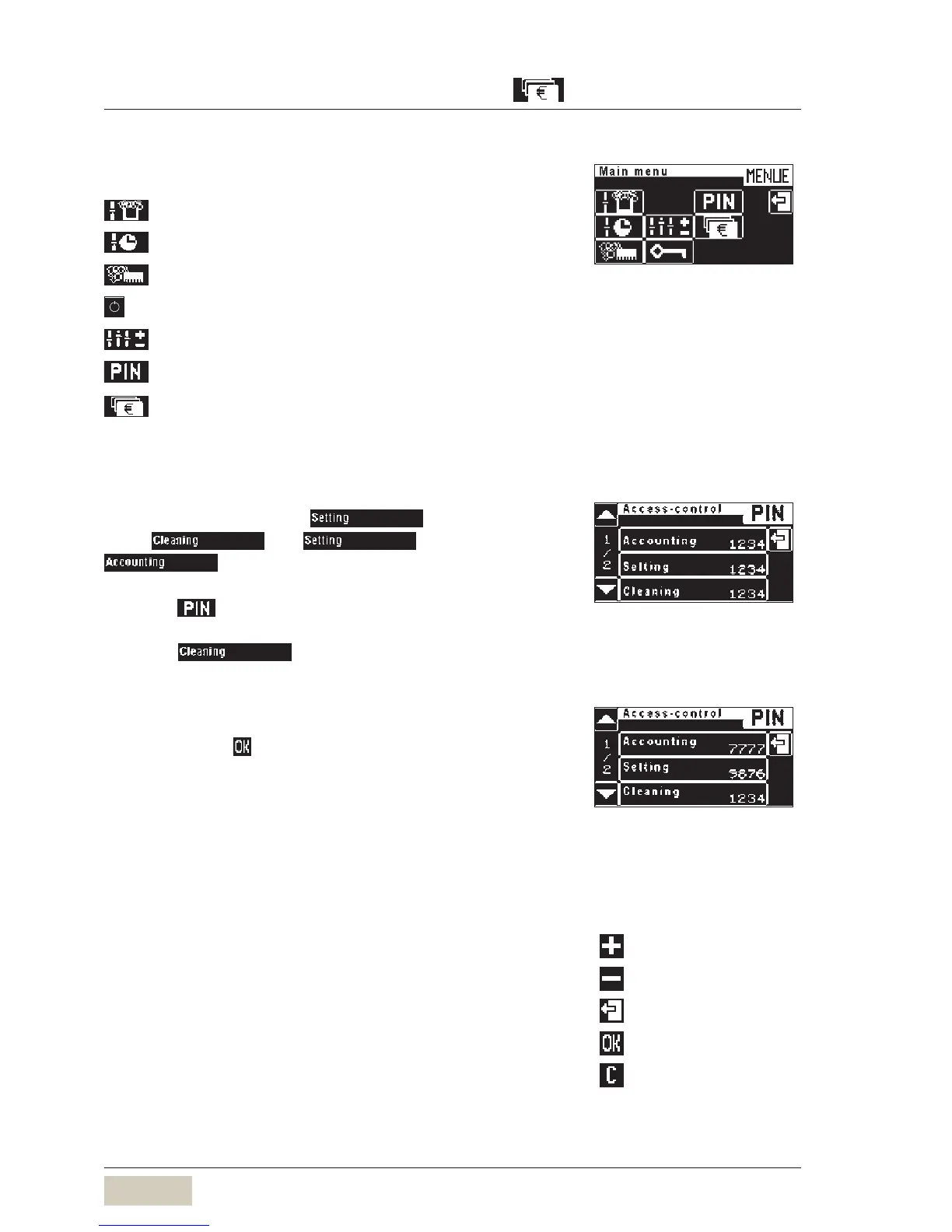
On entering the valid PIN access to::
= Set milk foam quality
= Timer program
= Customer care
= PIN-protected ON/OFF button
= Settings (beverage, general, others)
= Assign PIN rights, award access control
= Accounting of numbers of items
A PIN can be assigned to any level.
The levels are hierarchical.
Example: The PIN for level
is valid for
levels and , but not for level
.
Touch in the main menu.
Select desired level
Example:
Numerical keyboard display appears.
Enter desired 4-figure number
Number entered is displayed.
Confirm with
This level is now PIN-protected.
When a PIN is assigned to a subordinate level that PIN is
automatically assumed for superior levels if the latter are
not already PIN- protected.
Delete PIN
Entering 0000 will delete access control for the given level.
Deletion of one level automatically deletes the subordinate
levels.
Accounting level accessAccounting level access
An example:
PIN entry for the cleaning level:
1234.
This PIN is adopted in the superior
levels.
An example:
PIN entry for the cleaning level:
1234.
This PIN is adopted in the superior
levels.
Example:
PIN entry for the
cleaning level: 1234,
set level: 9876,
account level: 7777
Example:
PIN entry for the
cleaning level: 1234,
set level: 9876,
account level: 7777
= more
= less
= leave without change
= Save the values
= delete



 To Next Page