17 | Page
Configuring the Wolfcom Vision
The Wolfcom Vision has the ability to work in 3 different ways. We call them "Operating Modes"
Before you begin using the Wolfcom Vision, You will need to decide which of the 3 "Operating Modes" your
department would like to use. Once you have decided, you will have to configure the Wolfcom Vision by using
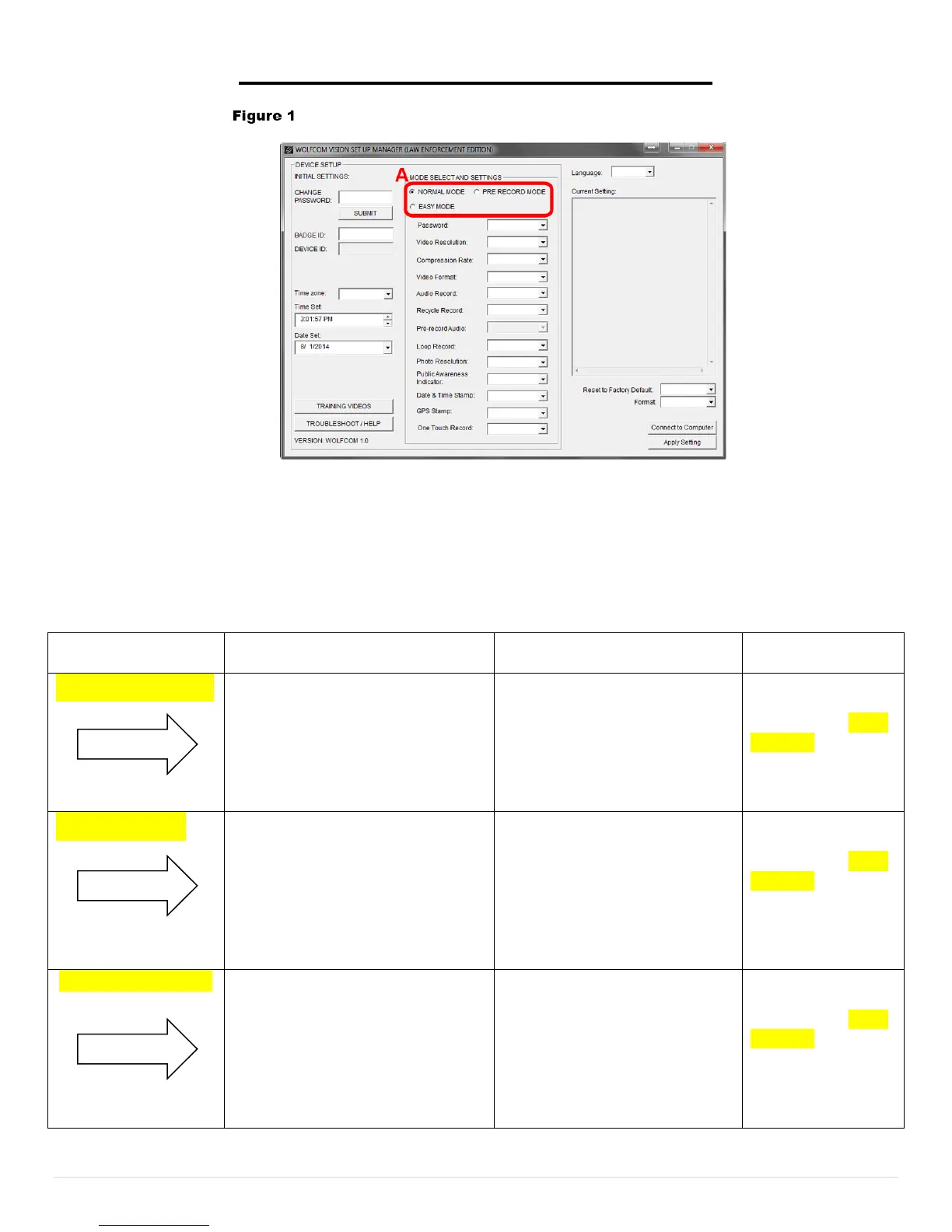
the Wolfcom Vision Setup Manager. (See above screenshot Figure 1A) Circled in red are the 3 available
modes. Normal Mode, Easy Mode, and Pre Record Mode. Please use the table below to decide which mode
suits your department's needs.
Please select a Mode below and go to that page number for further setup instructions and user guide for that Mode.
This mode allows the user to
utilize the 3 in 1 device options
using all the switches on the unit.
The user can select between
Video Camera, Digital Camera,
and Voice Recorder modes.
users or those who have been
properly trained. Battery life
will be longer in this mode
use this Mode,
please go to page
18 to 22 for the
setup instructions
& user guide for
Also known as Dummy Mode or
Simple Mode, This mode
disables all the switches on the
unit except the One Touch
Record (OTR) switch turning the
unit into a very simple and easy
to operate body camera.
Recommended for Beginners
or for those desiring an easy
to use and operate body worn
camera. Just press the OTR
switch down to start
recording, and press it up to
stop. Battery life will be
use this Mode,
please go to page
23 to 26 for the
setup instructions
& user guide for
this Mode.
Choosing this Mode will activate
the Pre-record feature. Once the
unit is powered on, it will always
be buffering. Once the record
button is activated, it will also
capture the last 60 seconds or
more of the event before the
buffering, that means that it is
always on and recording. The
battery life will last
approximately 2.5 hours. It is
recommended that you use
an extended battery pack in
use this Mode,
please go to page
27 to 30 for the
setup instructions
& user guide for
this Mode.
Note* By Default, the Wolfcom Vision is set to Normal Mode unless requested otherwise.


 To Next Page