4 | Page
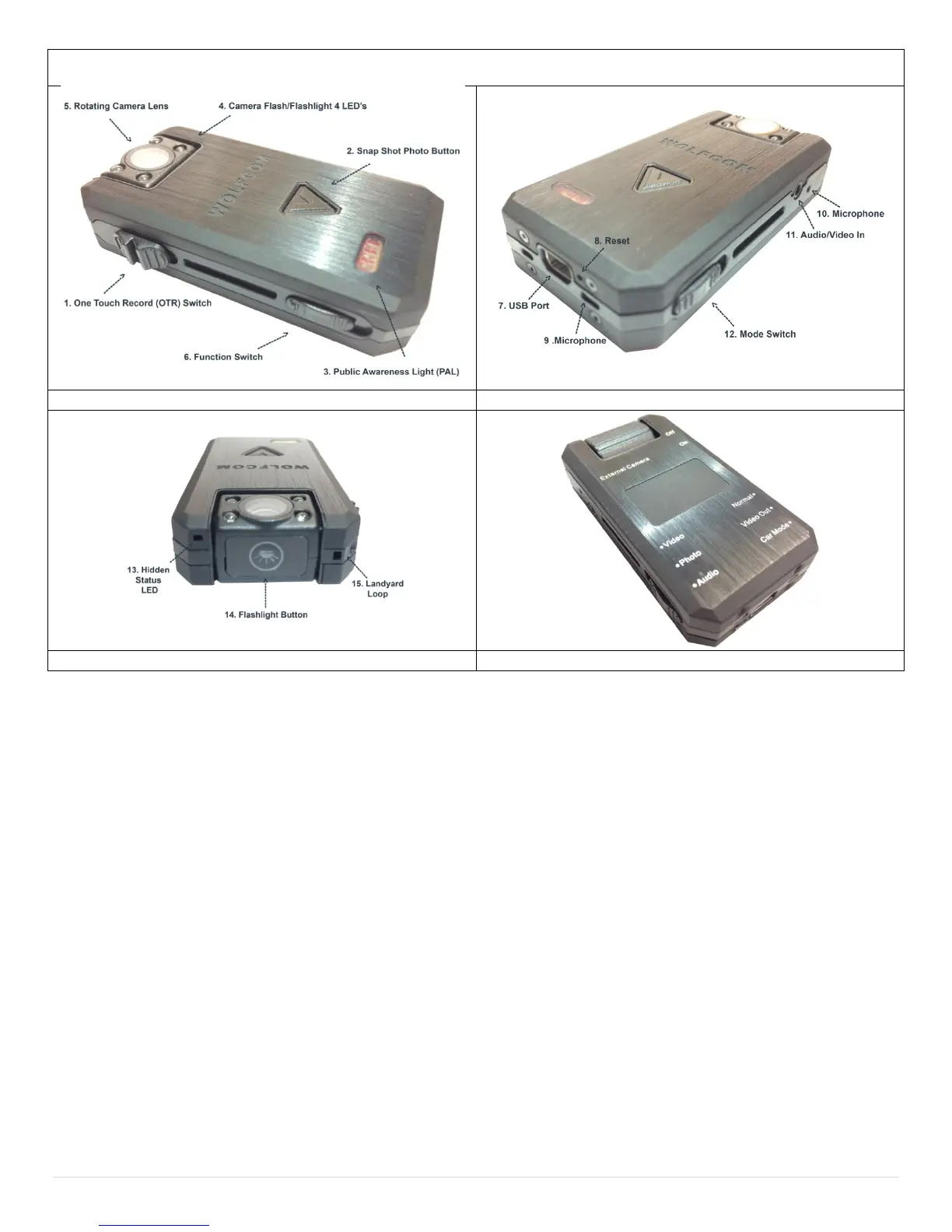
Wolfcom Vision Body Camera Layout
Getting to know the Wolfcom Vision Police Body Worn Camera System.
1. One Touch Record switch (OTR) is used to start and stop recording or to power on the unit.
2. Snap Shot Button is used to snap photos or to start recording if in Pre-Record Operating Mode.
3. Public Awareness Light is used to alert the public that recording is in progress.
4. Super Bright LED used for Digital camera flash or as a flashlight.
5. 120 degrees up and down rotating camera head. 120 Degrees wide angle view.
6. Function Switch switched between Normal Function, Video Out Function, and Car Mode Function.
7. 10 pin USB Port is used to attach optional accessories, charging, and transferring files.
8. Reset Button is used to reset or reboot the unit.
9. First of 2 microphones
10. Second of 2 microphones
11. A/V input for external camera. Features Critical Re-Connect Technology (CRC).
12. Mode Switch is used to switch between Video Mode, Digital Camera Mode and Voice Recorder Mode.
13. Recording Status indicator can be seen by the officer but not by the public.
14. Flashlight Activation switch. (Works only when the unit is powered on or recording)
15. Lanyard Loop is used as a secondary safety harness to prevent accidental loss.
Note* Function description for the switches are printed on the back of the unit.


 To Next Page