32 | Page
Wolfcom Vision LE Set Up Manager Settings Guide
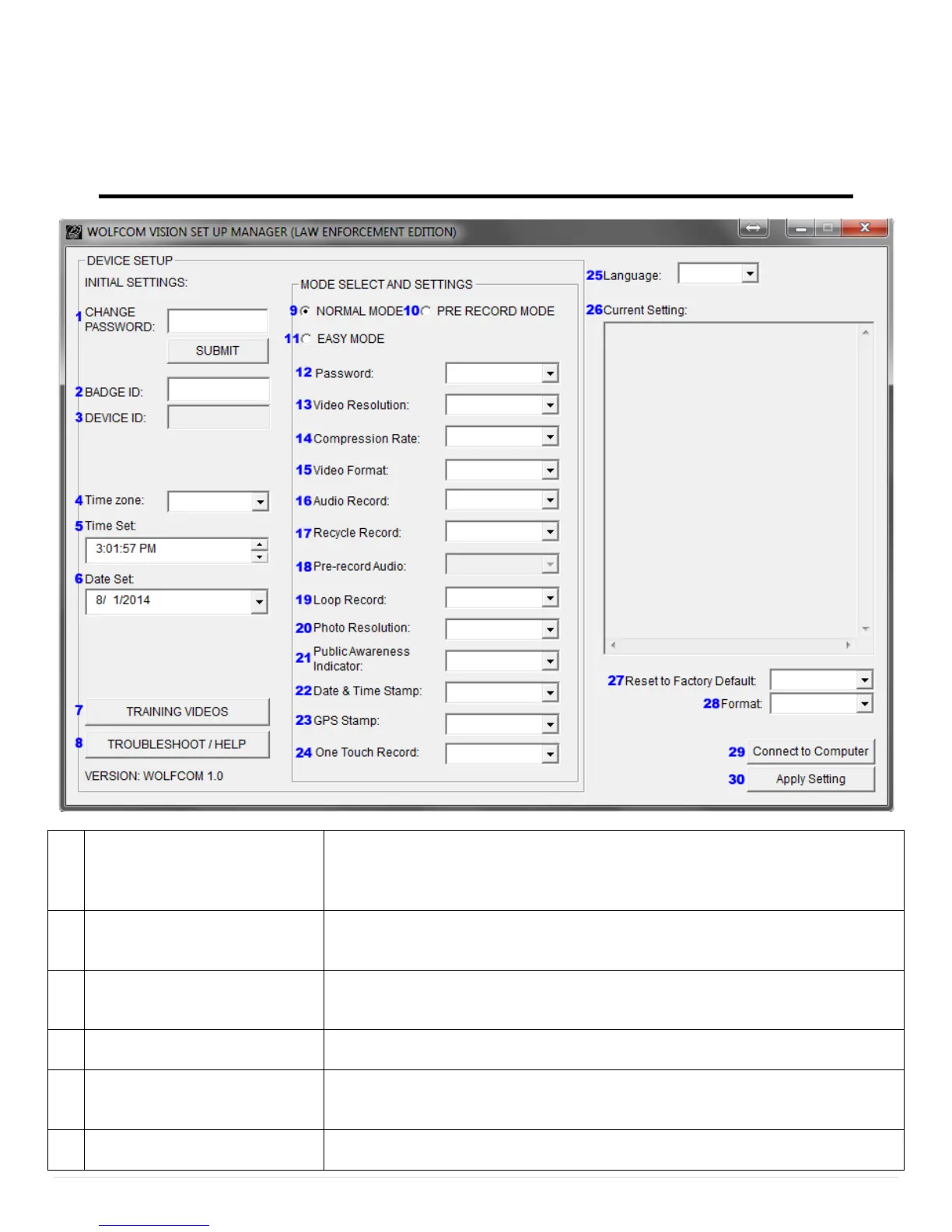
Setting or changing your password. After you set or change your
password, make sure you click on "Submit" button or "Apply Setting" to
save. This section will only be valid if you have Password section (#12)
Officers badge identification number. Customizable up to 10 alphanumeric
characters. The Badge ID will be stamped onto the top left of every video
Manufacturer’s device number. This is permanent and cannot be
changed. The Device ID will be stamped onto every video and picture file
to the right of the Badge ID (#2).
Set your Time zone for your location on earth. Go to Page 45 to see
Diagram.
Time that is shown is automatically synced with your Computers time.
This time will automatically update the time on your Wolfcom Vision.
*Make sure your computer time is accurate.
Date that is shown is automatically synced with your Computers date. This
date will automatically update the time on your Wolfcom Vision. *Make


 To Next Page