22 | Page
How to use in Car mode:
Car Mode: When using the Wolfcom Vision as a car
DVR, recording while driving in your car.
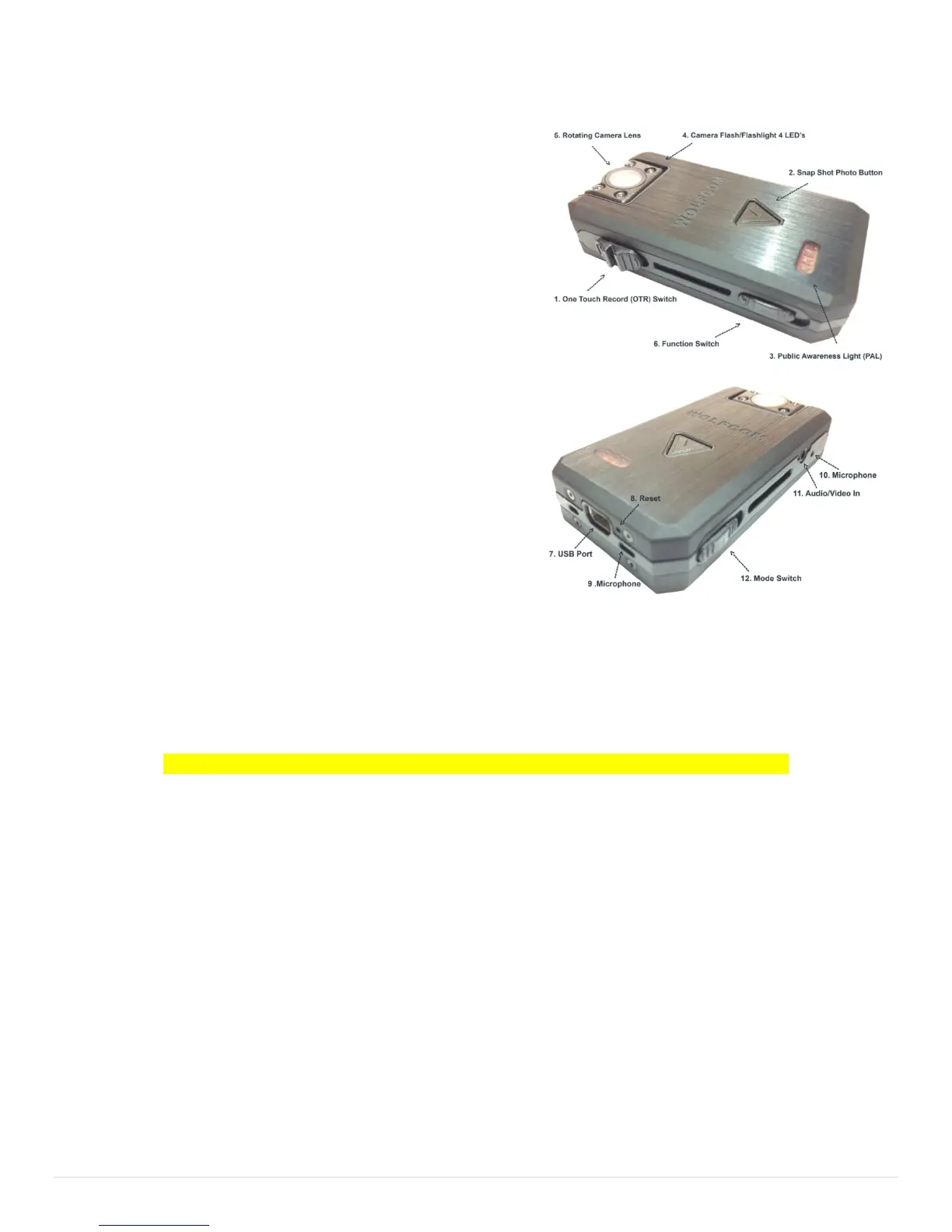
First make sure that the Function Switch (6) is set in the
down position. The Function Switch (6) should be set to
Car Mode.
When the unit is connected using the USB cable to the
bottom of the unit and the other end plugs into the car's
12v cigarette plug using the included USB cigarette car
charger, once the car ignition is started the unit will
automatically begin recording whenever the car is turned
on. When the car is turned off, the unit will automatically
turn off and save all recorded files into memory.
How to Reset the unit:
If you unit freeze or become none responsive. Make sure
the One touch record switch (1) is in the up position.
Take a paper clip or needle and stick into the Reset hole (8) gently and you will feel a click.
Need Help in Training or trouble shooting? Click on the Buttons on the PC software.
This concludes operating instruction for the Wolfcom Vision in Normal Mode


 To Next Page