14 World Precision Instruments
Blank Handling Page
1. Press
Blank Handling
on the
Setup
page to subtract the control well blank from the
current resistance measurement.
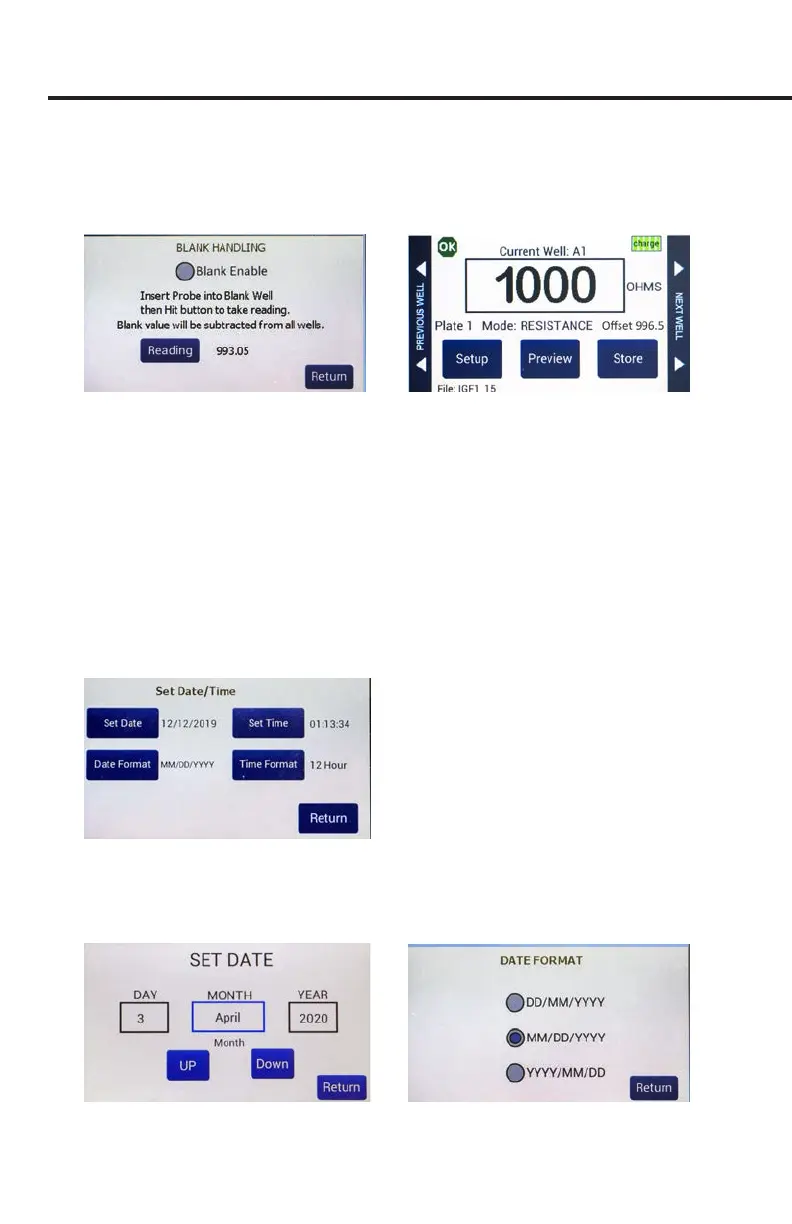
Fig. 14—(Left) Blank Handling window.
Fig. 15—(Right) The main screen shows the oset underneath the reading.
2. Insert the probe into an empty well lled with media. Press
Reading
to make a
measurement.
3. Select the
Blank Enable
radio button to enable the oset.
4. Press
Return
. The resistance oset shows under the reading on the main screen.
If the blank (oset) is greater than the resistance reading, the reading displays
negative numbers in red text. The saved data le reects the subtraction.
NOTE: This includes uid and electrode resistances.
Setting the Date and Time
1. Press
Time/Date
on the
Setup
page to set the date and time format.
Fig. 16—The Set Date/Time screen lets you set the date and time and choose the display format.
2. Press
Set Date
(Fig. 17). Set the appropriate date and press
Return
.
3. Press
Date Format
(Fig. 18). Choose your preferred format and press
Return
.
Fig. 17—(Left) Set the date and press Return
Fig. 18—(Right) Choose the date format and press Return



 To Next Page