44 World Precision Instruments
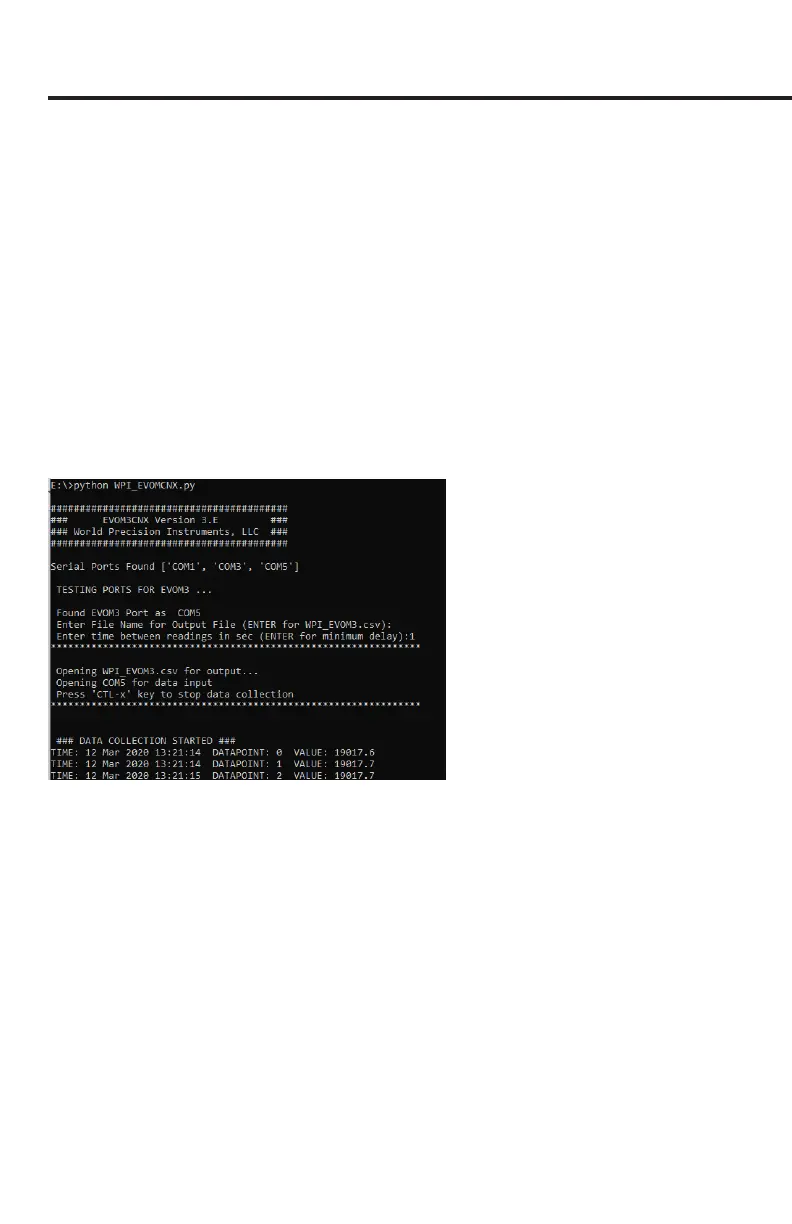
6. Open Python or a command window on your system.
7. At a command line or from python type this command : python WPI_
EVOMCNX_3.E.py and press enter. If you are not running Python from the
directory where WPI_EVOMCNX_3.E.py was extracted, you will have to change
directory to that location.
8. Enter the lename for the Output File (ENTER for WPI_EVOM_Manual.csv). Type in
a lename and add the .csv extension or enter to accept the default.
9. Enter the time between readings in seconds. (ENTER for minimum delay.) Enter a
time of 0, 1, 2 or 5 seconds. (0 is fastest at about 0.3 seconds.) The program will
run and update until ^X (control X) is typed. The readings are continuous at 12.5
Hz, always on. The time entered is the averaged 20s/s reading taken at that time
interval. Note: 2 seconds is recommended.
10. The default le name is WPI_EVOM_Manual.csv. This le may be opened in
Microsoft® Excel or any other spreadsheet program as a .CSV le
Sample CSV Recording
TIME , DATA , VALUE
12 Mar 2020 13:24:35,0,0000.0
12 Mar 2020 13:24:36,1,19017.9
12 Mar 2020 13:24:36,2,19018.1
12 Mar 2020 13:24:36,3,19018.0
12 Mar 2020 13:24:37,4,19018.1
12 Mar 2020 13:24:37,5,19017.8
12 Mar 2020 13:24:37,6,19017.7
12 Mar 2020 13:24:37,7,19017.7
12 Mar 2020 13:24:38,8,19017.8
NOTE: Python is an open source programming language. Licensing information can
be found on the Python website (https://docs.python.org/3/license.html#terms-and-
conditions-for-accessing-or-otherwise-using-python.)



 To Next Page