20 World Precision Instruments
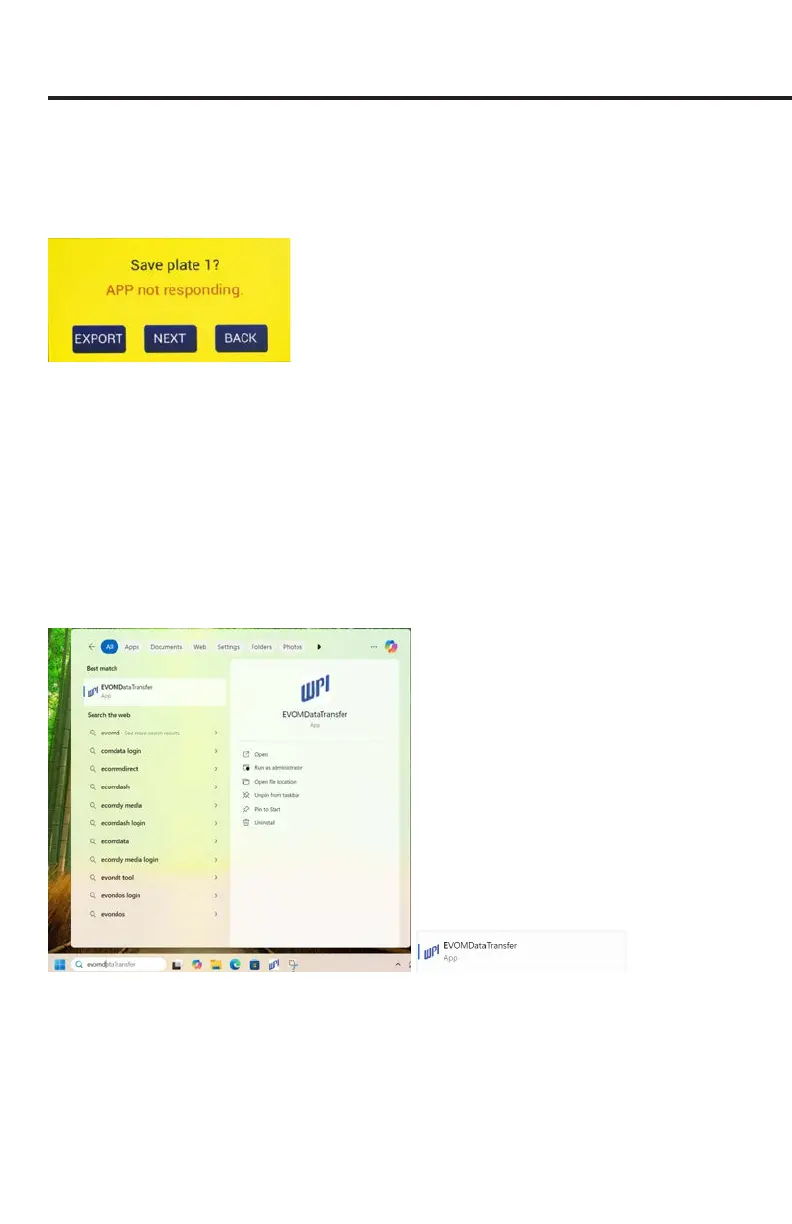
Companion Application is not running. If this error occurs, a message appears
describing of the communication error (Fig. 32). If this happens, make sure the USB
cable is connected to both the EVOM™ Manual and the computer, and verify that the
application is running. Then press the
Export
button again.
Fig. 32—This message indicates that the data save has timed out. Make sure the unit is
connected to the PC and the EVOM™ Companion Application is running on the PC.
Starting the EVOM™ Companion Application
To be able to save les to a PC, the EVOM™ Companion Application must be running
on the PC. To install the EVOM™ Companion Application, see "Appendix F: Installing
the EVOM™ Companion Application" on page 49.
1. Launch the EVOM™ Companion Application by typing "EVOMDataTransfer" into
the Windows start bar search eld (Fig. 33). Select the WPI Application (Fig. 34)
from the list that appears.
Fig. 33—(Left) Enter EVOMDataTransfer into the Windows search eld.
Fig. 34—(Right) Select the WPI application from the list that displays.
TIP: After the program has launched, right click on the WPI icon (Fig. 35) in the taskbar
and select
Pin to taskbar
. Then, you can double click the taskbar icon to load the
program in the future.



 To Next Page