Light gate tests
PRINCESS – Edition: 17.02.2005
69
FIELD SERVICE MANUAL
15.3.2 Light gate function test, level 4 button 9
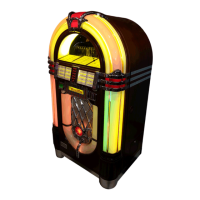
With this test you can check each single light gate by a continuous test loop during operation. A “0”
in the display represents an open gate, a “1” represents a closed one. The gate to be checked is
connected by software to the interrupt request line INT1 which is used in normal operation. INT1 is
always shown in the most RH digit of the display. So do not worry that the left movement VLL is dis-
played in the second digit from right.
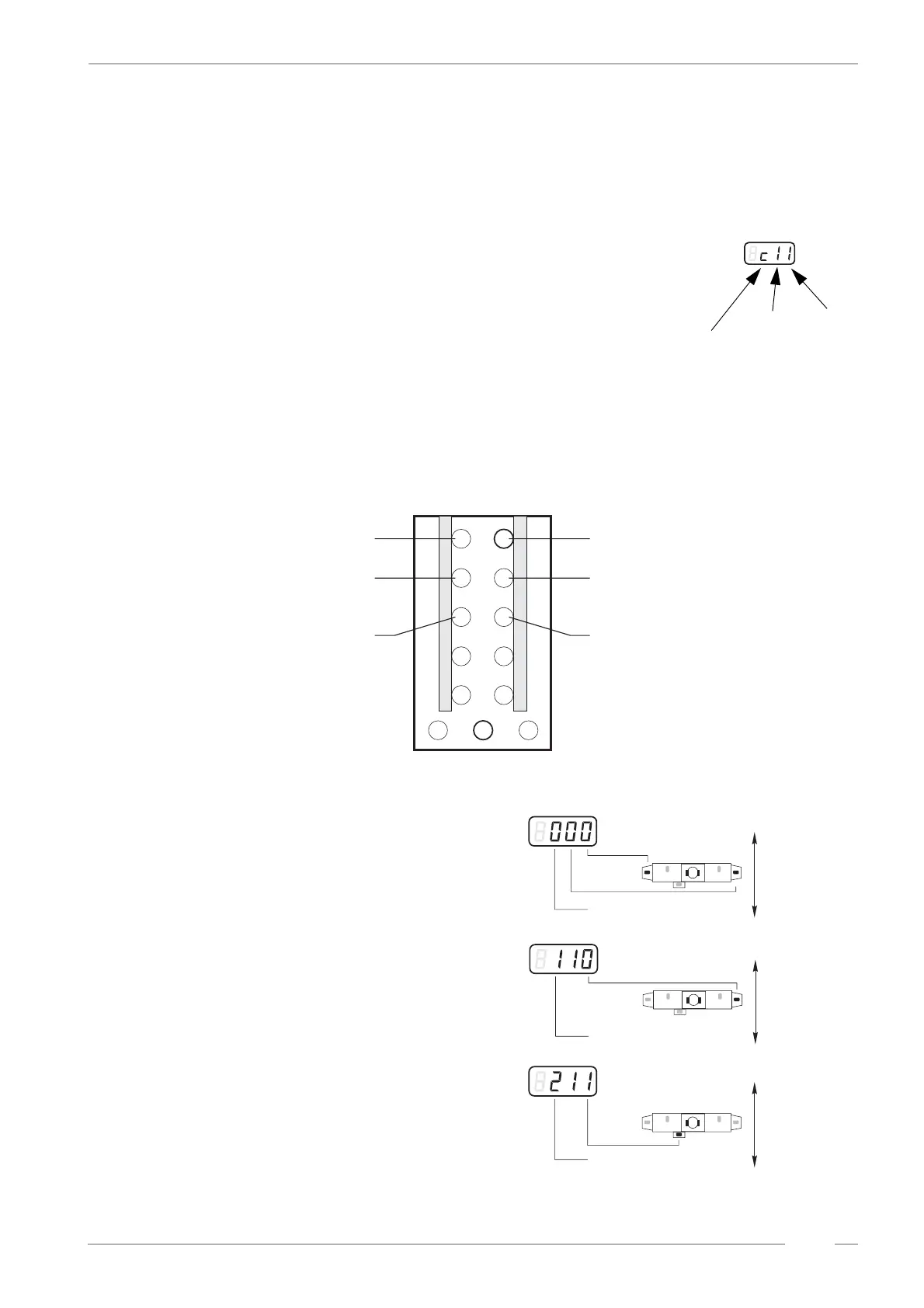
Test start: Go to service level 4 press selection button 9 - hold - and
press selection button R. Release both buttons and press selection button
9 again. The display shows:
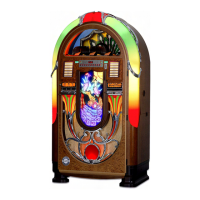
Now you can select different test procedures. Each procedure checks a
certain function and the corresponding light gate. The procedures are
numbered from 0 to 9 and can be selected with the selection buttons 1
(counts downwards) and 2 (counts upwards). The procedures 7, 8 and 9 have no function.
Depending on the selected test you can carry out special actions by means of the selection buttons 3
and 4. If you use the selection buttons 5 or 6 each action will be stopped at an occurring bright dark
or dark bright change (auto edge stop) of the gate.
Meaning of the tests:
0 Test: VLL & VLR together. VLL is dis-
played in the RH digit (INT1), VLR in the second
digit from RH (INT2). 1=gate is interrupted,
0=gate is open. Button 3 (5) makes the selec-
tion sledge move downwards, button 4 (6) up-
wards.
1 Test: VLR. State is displayed in the
RH digit (INT1). 1=gate is interrupted, 0=gate is
open. Button 3 (5) makes the selection sledge
move downwards, button 4 (6) upwards.
2 Test: VLC (Center). State is displayed
in the RH digit (INT1). 1=gate is interrupted,
0=gate is open. Button 3 (5) makes the selec-
tion sledge move downwards, button 4 (6) up-
wards.
c: means start address
INT 1
INT 2
1
3
5
7
9
2
4
6
8
0
R
< >
procedure select -
procedure select +
dependent on procedure: selection
sledge up, to RH side or gripper close
dependent on procedure: selection
sledge down, to LH side
or gripper open
like button 3,
but auto edge stop
like button 4,
but auto edge stop
Functions of the buttons
M
button 4 (6)
button 3 (5)
test 0
VLR
M
button 4 (6)
button 3 (5)
test 1
VLR
M
button 4 (6)
button 3 (5)
test 2
VLC


 To Next Page