GPSChartPlotter&EchoSounder
23
Tips: Inroutenavigationmode,ifyouwanttochangecoursetemporarilyandturntothenext
waypointfromthepreviouswaypoint,youcanpress〖 NEXTPOINT〗 otherwisepress
〖PREVIOUSPOINT〗tocallthepreviouswaypointoftheroute.
2-13Typewriting
Invoke: Selectthetextboxandpress〖OK〗toinvoketypewritingfunction.
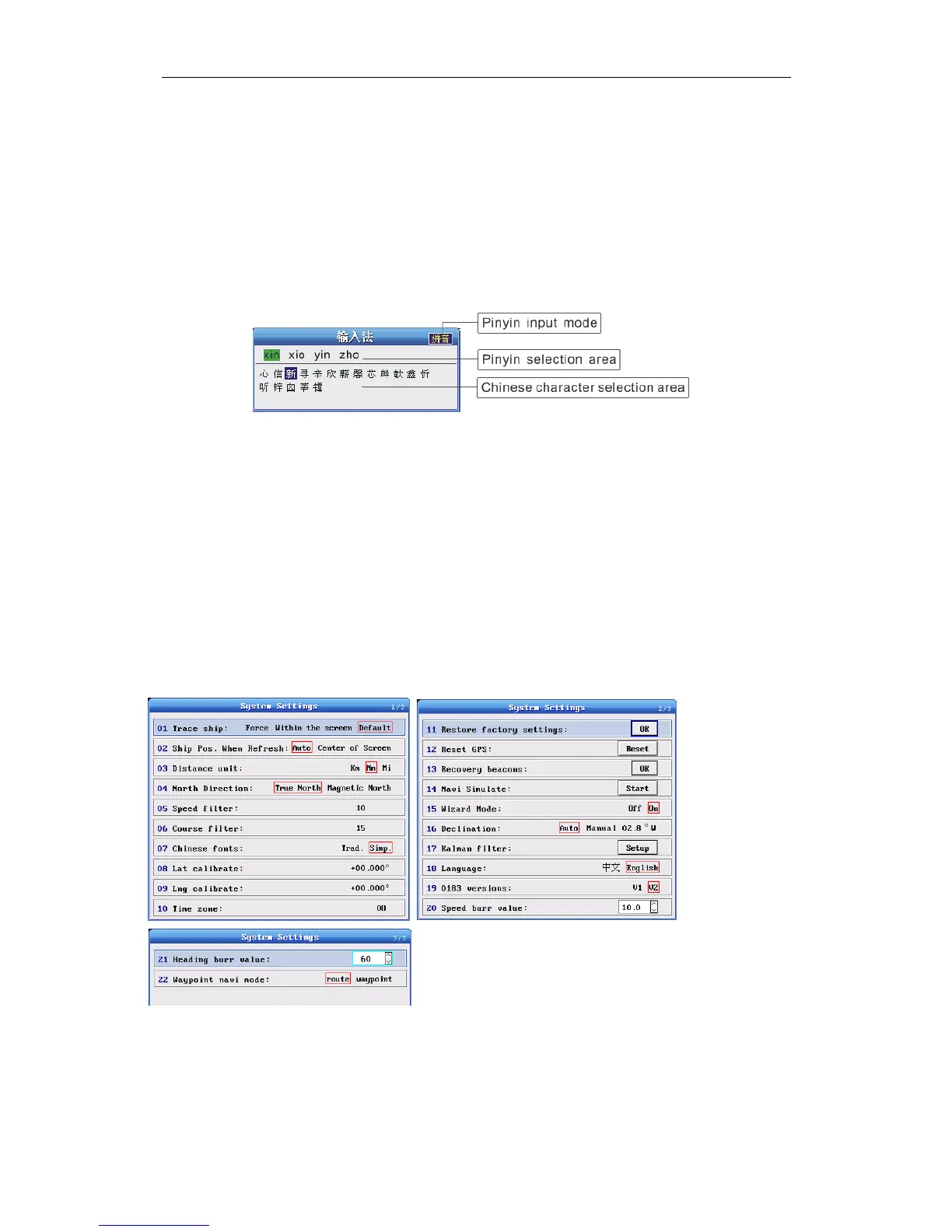
Mode:Thesystemprovidesfourmodes.Currentmodewillbedisplayedattheupperrightofthe
typewritingwindow.OnlyPinyinmodeprovidesChinesecharacterselectionarea.
PinyinTypewriting: Press〖Page〗toswitchinputmodetoPinyininputmode.Press〖DIGIT〗
keystoinputPinyin.Press 〖↓〗〖↑〗〖←〗〖→〗toselectChinesecharacters.Press〖OK〗
toselectthecurrentcharacter.〖MENU〗canbeusedtoquitthecurrentmenu,ortoggletothe
digitinputmode.
EnglishTypewriting: Press〖 Page〗 toswitchinputmodetoEnglishcharacterinputmode.
Press〖2〗oncetoinputcharacter ‘A’,press〖2〗twicetoinput ‘B’,press〖2〗threetimestoinput
‘C’.Otherlettersinputissimilaroperation.
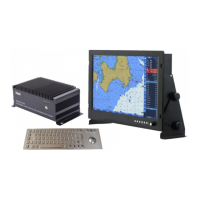
2-14Param.Settings
2-14-1SystemSettings
Function: Tosetthesystemparameters.
Howtocallout:【Param.settings】->【SystemSettings】->Press〖OK〗
Operation: Press〖↓〗〖↑〗toselectdesiredparameters,press〖←〗〖→〗toselectparameter
values.〖OK〗istoconfirmsetting,andpress〖QUIT〗toexitthecurrentmenu.


 To Next Page