GPSChartPlotter&EchoSounder
41
Userscanaccordingtotheiractualneedsoftheinterferencereductionsettings:Off,Week,
Strong.
Onmapscreen:
Press〖MENU〗toenter【MainMenu】,select【FishFinder】.Select【16InterferenceReduction】
in【FishFinder】 ,press 〖←〗、〖→〗tosetInterferenceReductionmode.
Onfishfinderscreen:
Press〖MENU〗toenter【FishFinder】,Select 【16InterferenceReduction】in【FishFinder】,
press 〖←〗、〖→〗tosetInterferenceReductionmode.
4-1-15WhiteLine
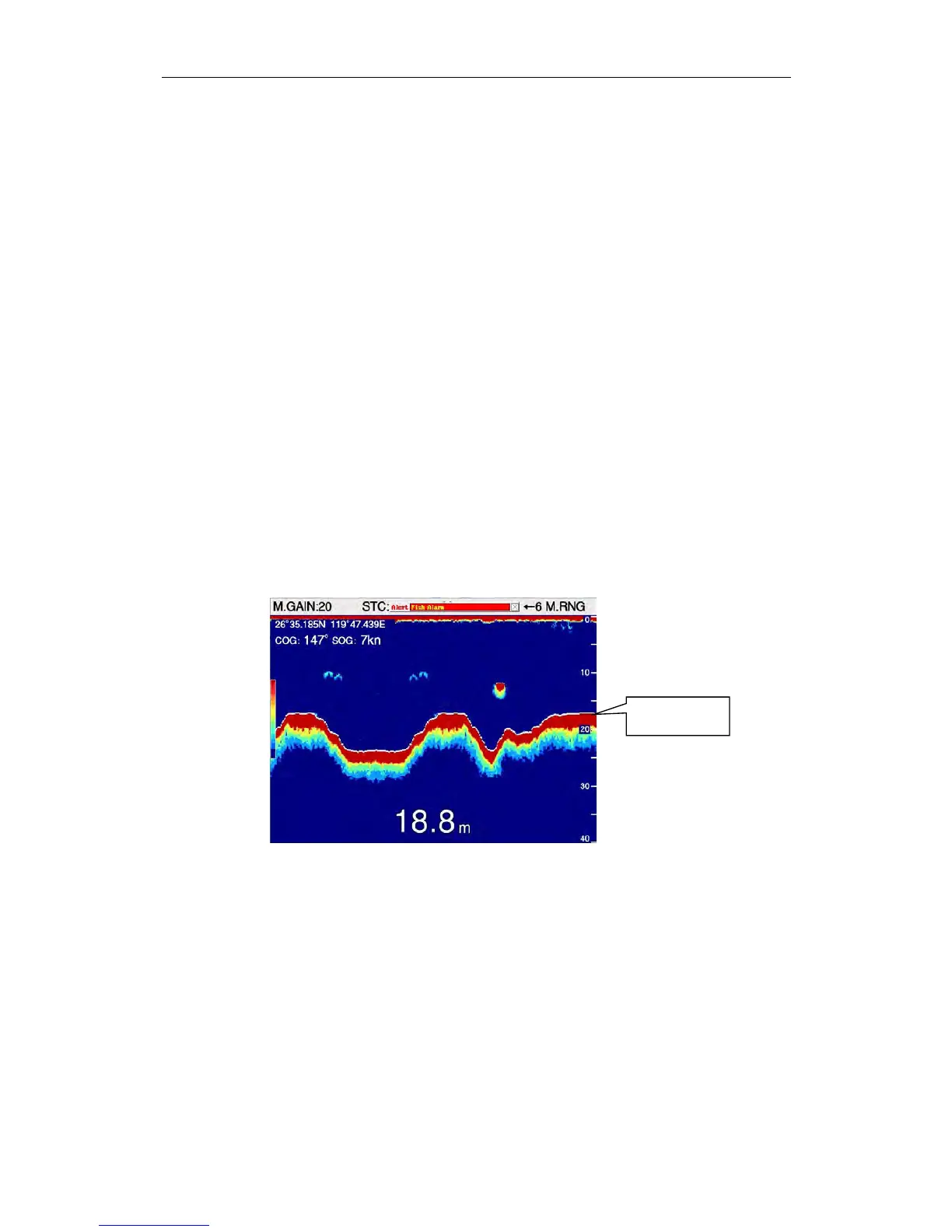
Theseabedcontourisawhitelinethatappearsonthesurfaceoftheseafloor,makingiteasily
toidentifythefishechoeswhichlooklikesubmarineechoes.
Userscanaccordingtotheiractualneedsoftheunderseacontourlinewidthsettings:
1px,2px,3px
Onmapscreen:
Press〖MENU〗toenter【MainMenu】,select 【FishFinder】.Select 【16whiteline】in【Fish
Finder】 ,press 〖←〗、〖→〗tosetwhitelinemode..
Onfishfinderscreen:
Press〖MENU〗toenter【FishFinder】,Select 【16whiteline】in【FishFinder】 ,press 〖←〗、
〖 → 〗 tosetwhitelinemode.
4-1-16Backgroundcolor
Threecolorscanbeselected:Blue.Black.White
Onmapscreen:
Press〖MENU〗toenter【MainMenu】,select 【FishFinder】.Select 【06BackgroundColor】
in【FishFinder】 ,press 〖←〗、〖→〗toselectbackgroundcolor..
Onfishfinderscreen:
Press〖MENU〗toenter【FishFinder】,Select 【06BackgroundColor】in【FishFinder】 ,press
〖←〗、〖→〗toselectbackgroundcolor.
4-1-17EchoSignalLevel
Echosignalclassificationismainlyusedtoadjusttheechodisplaycolor.Theusercan
accordingtotheactualsituationoftheechosignalclassificationsettings:1,2,3,4.
WhiteLine


 To Next Page