GPSChartPlotter&EchoSounder
8
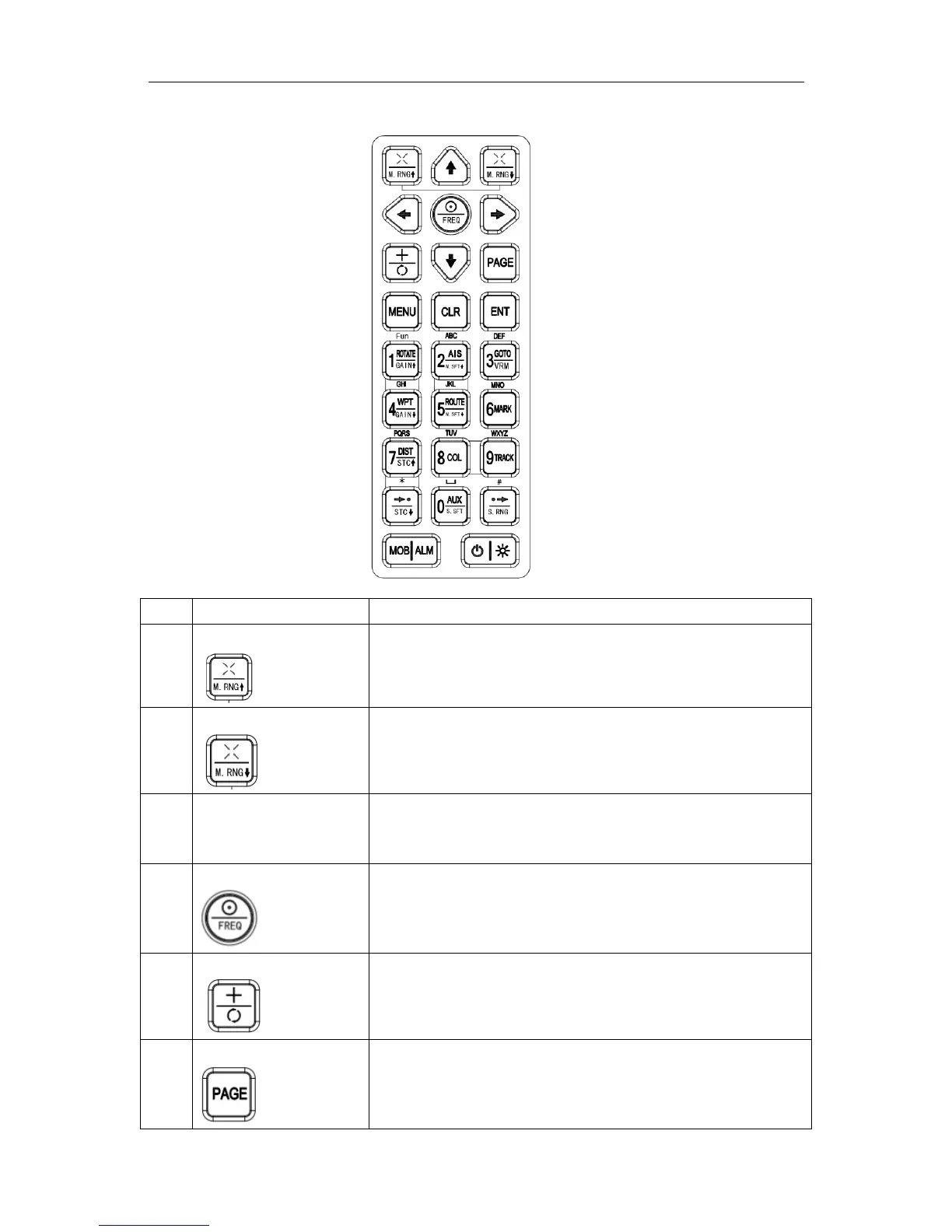
1-1-5KeyboardInstruction
No KeyName Description
1
〖Zoomin/Range↑〗 1】Map:mapshowofdetailedinformation
2】FishFinder:reducerangescope
2
〖Zoomout/Range↓〗 1】Map:showofglobalinformation
2】FishFinder:increaserangescope
3
〖ArrowKeys〗
←↑→↓
1】Map:buttonselect,cursormove
2】FishFinder:Adjustthevalueofdepth\sub-range\sub-shift
by↑↓.
4
〖Center/Frequency〗 1】 Map : Centershipposition.SwitchWPTandWayroute
duringaddroute.
2】FishFinder:Switchfrequency,hight,low
5
〖Cursor/Focus〗 1】Map:Cursordisplay/hide
2】FishFinder:Switchfocustodifferentscreen.
6
〖Page〗 SwitchScreenDisplay:Mapandfishfinder,map,fishfinder,
fishfinder,AISdata,compass,GPSdata,etc.


 To Next Page