XP0100 Enterprise IP Phone Using the Advanced Phone Functions
Xorcom Ltd. 39 www.xorcom.com
accounts, Advance settings of Network, Reset to Factory, and other advance phone
settings
Administrator/User Password
Administrator mode grants unlimited access to the phone configuration on both web
and phone user interface. The administrator/user password is used to access:
Web user interface.
The advanced settings of the phone such as Account, Reset to Factory, and
Advanced Settings via the phone interface.
The default administrator password is admin. Meanwhile the user name for Web user
interface access is admin.
To change the administrator password via phone user interface:
1) Press ->Settings->Advanced.
2) Enter the password required, scroll to Set Password and then press .
3) Enter the Current PWD, New PWD and Confirm PWD, press abc soft key to
change the input method.
4) Press to save the change or to cancel.
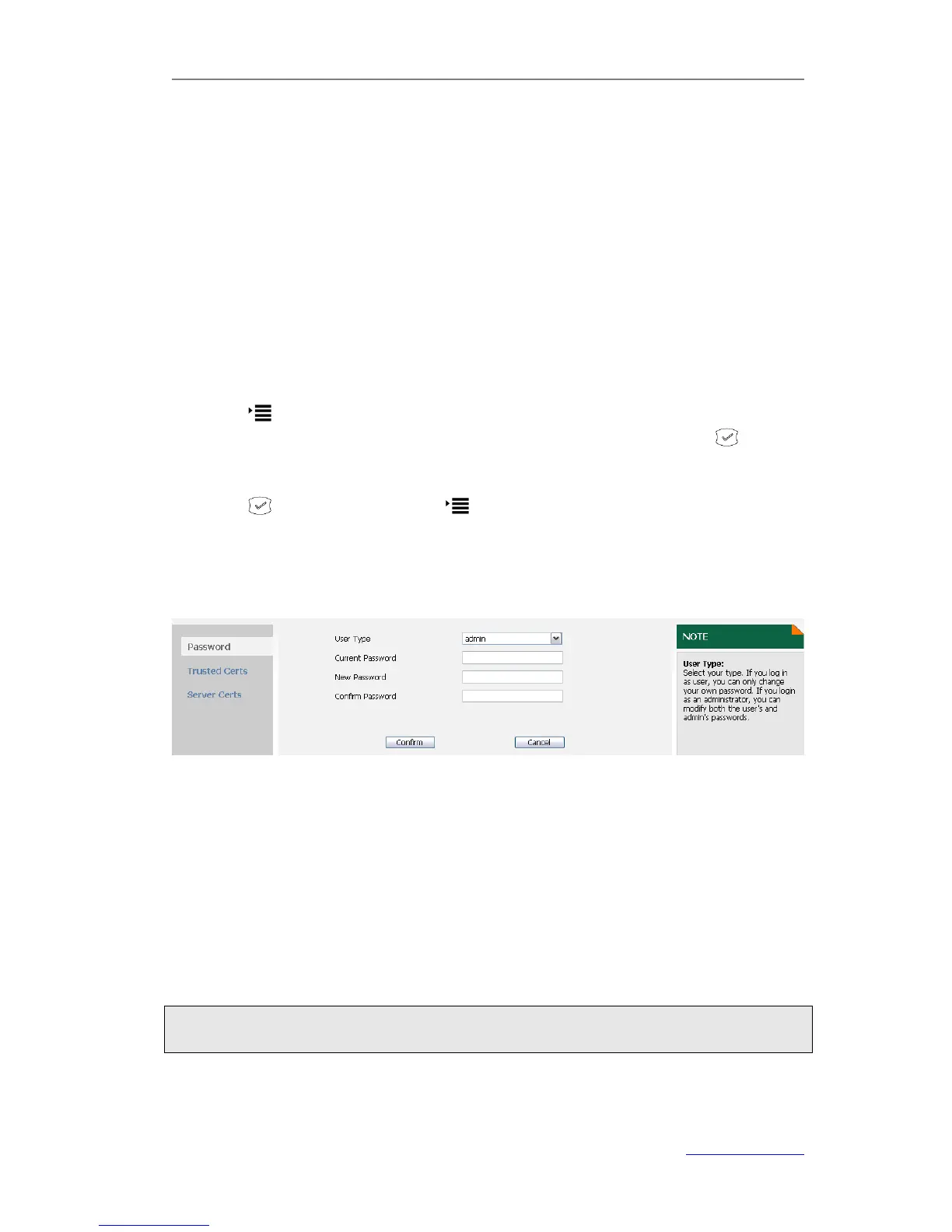
To change the administrator password via web user interface:
1. Click on Security.
2. Select admin from the pull-down list of User Type, enter the Current Password,
New Password and Confirm password.
3. Click Confirm to save the change.
To change the user password, refer to the steps introduced above.
Reboot
You should reboot the phone when you are challenged, e.g. after applying changes to
the phone configuration.
To reboot the phone via web user interface:
1) Click on Phone->Upgrade.
2) Click Reboot to reboot the phone.



 To Next Page