XC Camera Setup and OSD Guide
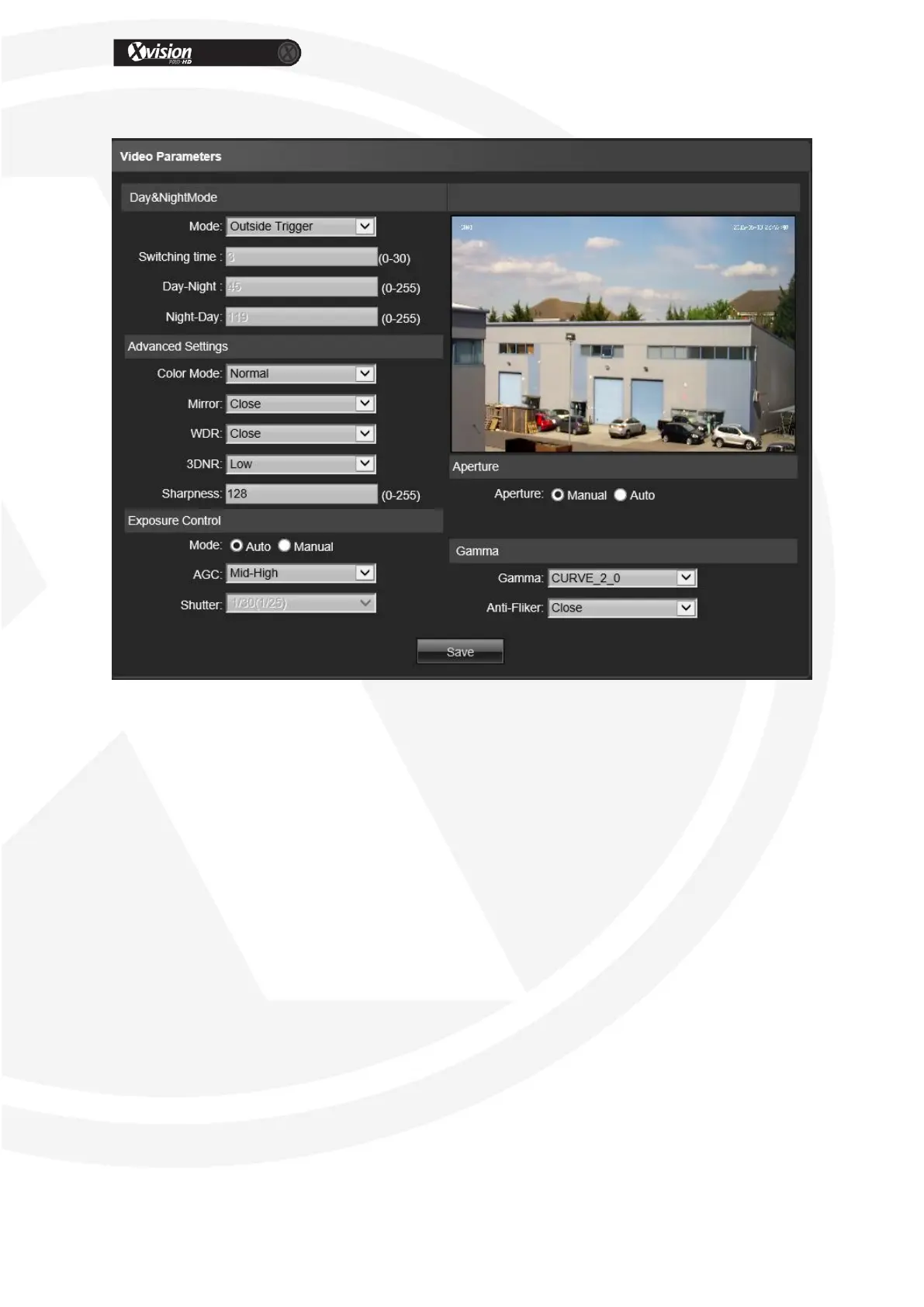
Video Parameters
Day & Night Mode: Outside Trigger/ Auto/ Color/ Black White four kinds of mode
selectable. Non infrared IP cameras default mode is Auto, and infrared IP cameras
default mode is Outside Trigger.
Switch time: Day & Night switch delay time, 0-30s selectable, and default is 3s.
Day-Ni-Threshold: 0-255 selectable, users adjust it according to the need, default is
45.
Ni-Day-Threshold: 0-255 selectable, users adjust it according to the need, default is
119.
Color: Normal/ Bright/ Nature three options, default is Normal.
Mirror: Close/ Horizontal Mirror/ Vertical Mirror/ 180° Rotation four options, default
is Close.
WDR: Close/ Low/ Medium/ High four options, default is Close.
3DNR: Close/ Low/ Medium/ Higher/ High five levels, default is Close.
Sharpness: 0-255 selectable, default is 128.
Gain: Low/ Mid-Low/ Mid/ Mid-High/ High selectable, default is Mid-High.
Shutter: Auto, 1/30(25)-1/10000, the default is Auto
Exposure Control Mode: Auto/ Manual selectable, default is Auto.
Aperture: Manual and Auto selectable.


 To Next Page