XC Camera Setup and OSD Guide
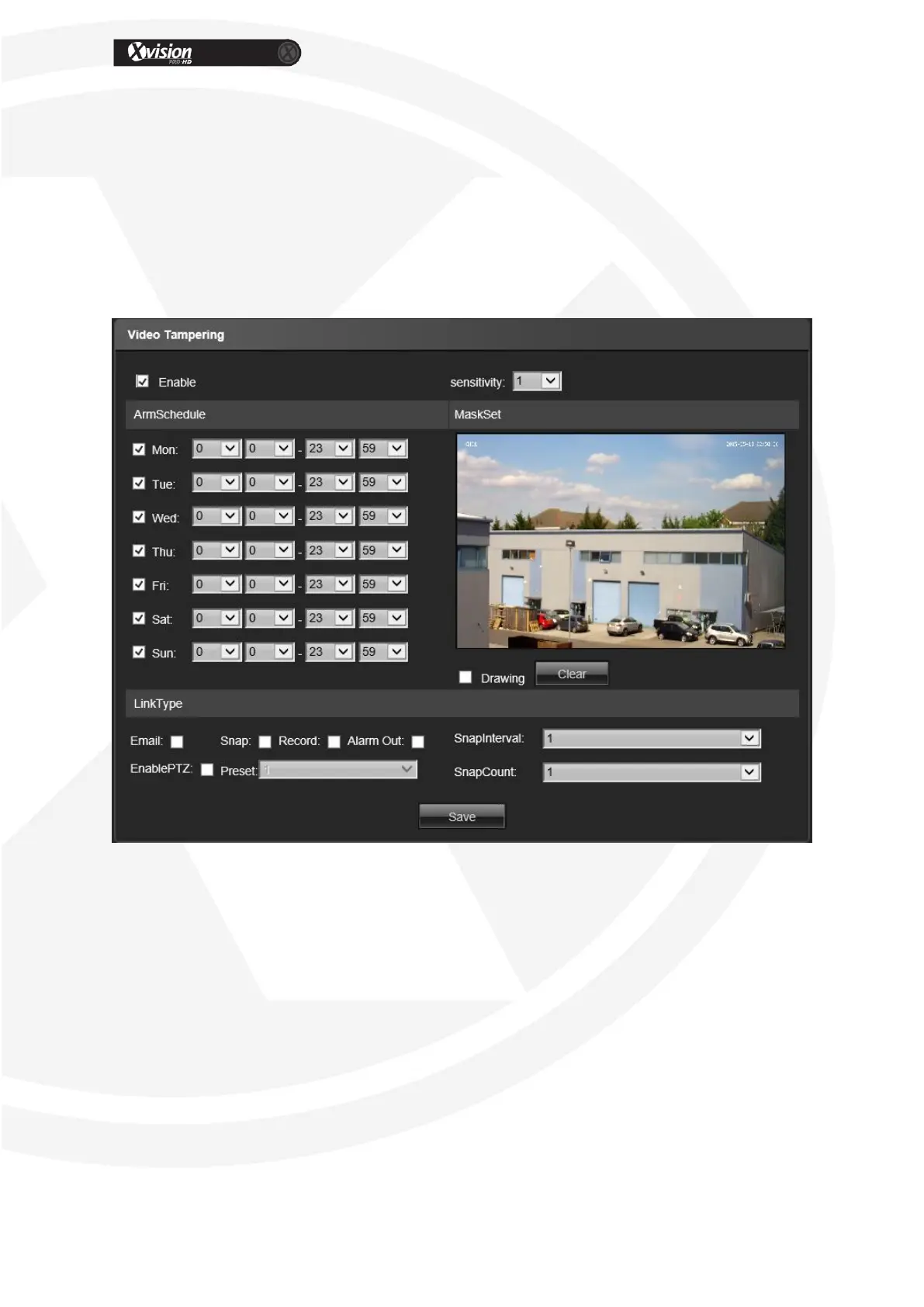
Preset: Alarm input to link the preset.
Snap Interval: Set the snapshot interval time
Snap Count: Set the snapshot count in every second
After all parameter settings are completed, click “Save” these settings will take
immediate effect.
Video Tampering
Enable: Set to enable video tempering
Alarm Schedule: Set the alarm schedule from Monday to Sunday.
Drawing: Click Drawing, then set the video tampering area.
Clear: Click Clear to clear the current video tampering areas.
Sensitivity: The higher of the sensitivity, the more video tampering will be detected.
Email: Send Email to appointed mailbox when alarm triggered.
Snap: Snapshot and install the picture in the HDD when alarm triggered.
Record: Video record and installed in the HDD or send as FTP to keep when alarm
triggered.
Alarm Output: Connect the alarm output port, alarm triggered the embedded relay
switch to call alarm output.
Enable PTZ: Alarm input to link the PTZ motion.


 To Next Page